Learn · Web Development · Free
How to Learn Web Development for Free in 2027: The Exact Path I Recommend
By Nasir · WebNasir.com · Updated 26 Nov 2026
People ask me how to learn web development for free in two situations: they want a job, or they want to stop paying people like me. Either way, my answer surprises them — you do not need to buy a course. Everything I use daily in paid work exists free on the internet, legally, from the people who invented the technology. What money usually buys is not knowledge. It buys an order to learn things in, and someone nagging you to finish. This guide gives you the order for free. The nagging you will have to supply yourself.
The honest timeline before anything else

At 1–2 focused hours a day, most beginners reach “can build a real website alone” in about 3–4 months , and “ready to apply for junior work or take small freelance projects” in 6–12 months . Anyone promising 30 days is selling something. The good news: the skill compounds. Month one feels painfully slow; month six you will read code you wrote in month one and laugh.
Step 1 — HTML and CSS (weeks 1–4)
HTML is the skeleton of a page, CSS is how it looks. Learn them together, in this order, from these free sources:
- MDN Web Docs (developer.mozilla.org) — the official reference, written by Mozilla. When any tutorial anywhere confuses you, MDN is the truth.
- freeCodeCamp — the Responsive Web Design certification: hundreds of small exercises in your browser, no setup, completely free.
- The Odin Project — a full free curriculum that makes you build real projects on your own computer from week one. Slower than freeCodeCamp, deeper for it.
Pick one main path (I suggest Odin if you have a laptop, freeCodeCamp if you are learning on a phone or a weak computer) and use MDN as your dictionary. Finish these three things before moving on: a page that looks right on a phone, a form, and a layout built with Flexbox and Grid.
Step 2 — JavaScript (weeks 5–12)
JavaScript is what makes pages do things — menus, calculators, live updates, this site's article reader. It is also where most beginners quit, because it is the first real programming. Two free resources carry almost everyone:
- JavaScript.info — the best free JS textbook on the internet, plain language, exercises included.
- freeCodeCamp's JavaScript certification — if you learn better by doing than reading.
Do not rush to a framework. If you cannot build a to-do list, a simple calculator and a small quiz in plain JavaScript, React will just hide your confusion for a few weeks and then charge interest.
Step 3 — Git, GitHub and putting sites live (week 13)
One week, huge payoff. Learn Git basics (commit, push, pull), put your projects on GitHub, and deploy them free on GitHub Pages, Vercel or Cloudflare Pages — the same ₹0 route from Guide #4. From this week on, every practice project gets a live link. A live link is proof; a screenshot is a claim.
Step 4 — One framework: React (months 4–6)
React is the most hired frontend skill in India, the USA, the UK and Canada alike, and its own documentation (react.dev) is free and genuinely excellent now. Learn components, props, state, and fetching data. Build two real things with it — not another to-do list; a small shop front or a jobs board teaches ten times more.
The five projects that prove you learned it
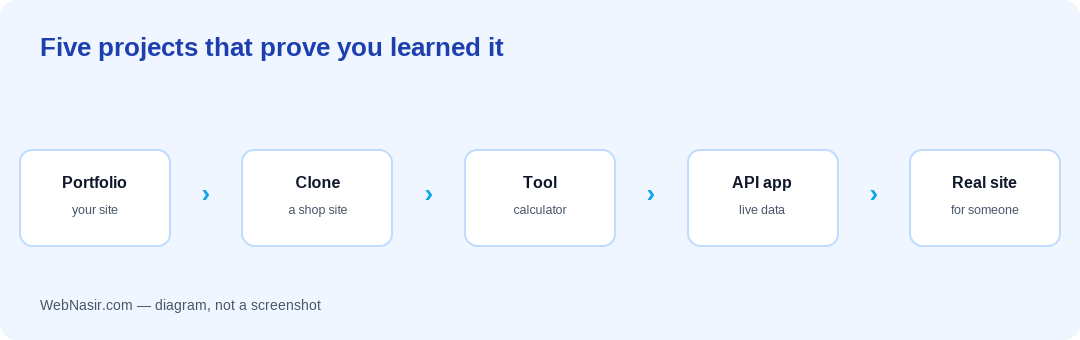
- A personal portfolio site — designed by you, live, on your own domain if you can (Guide #14 helps you name it).
- A business website clone — rebuild a local shop's site better than the original. This becomes your freelance pitch.
- A tool — a price calculator, a unit converter, an invoice maker. Tools teach real JavaScript.
- An API project — weather, jobs or news pulled from a free public API and displayed cleanly.
- One full small site for a real person — a relative's shop, a friend's tuition classes. Real users ask questions tutorials never do.
The three ways beginners waste a year
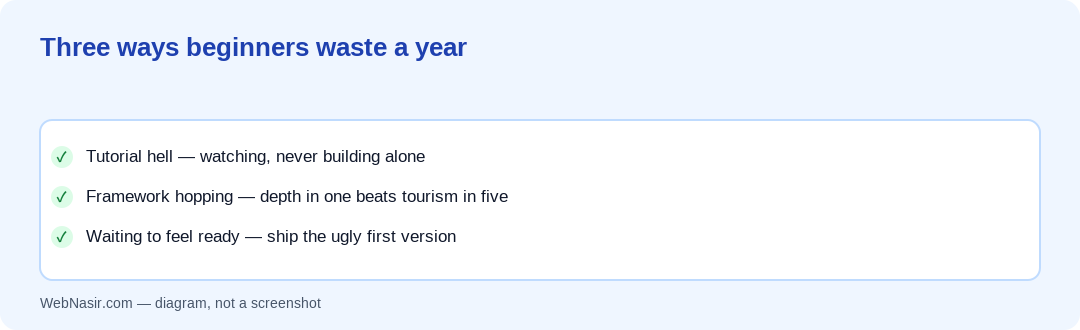
- Tutorial hell — watching course after course, building nothing alone. Rule: after every tutorial, rebuild the same thing from memory, closed tab.
- Framework hopping — React this month, Vue next, Svelte after. Employers pay for depth in one, not tourism in five.
- Waiting to feel ready — you will not feel ready. Ship the ugly first version; ugly and live beats perfect and private.
Where CS50 fits
Harvard's CS50 (free to audit on edX) is the one “extra” I recommend — not for web skills, but for understanding what a computer is actually doing. Do it alongside Step 2 if you enjoy it; skip it without guilt if your goal is paid work fast. It is a foundation, not a gate.
Pair this with: the 2027 Roadmap, month by month →
Then: Start Freelancing in India →
What to learn after React (and what to ignore for now)
Most people finish React and immediately panic. They think they need to learn ten more things before anyone will hire them. You do not. You need one database, one way to talk to it, and one place to put the site. That is it. Everything else is a bonus you pick up on the job.
The short list that actually matters
- A database — start with PostgreSQL. It is free, boring, and used everywhere. Boring is good.
- A backend language — Node.js keeps you in JavaScript, so you are not learning two things at once.
- An ORM or query builder — something like Prisma or Drizzle so you are not writing raw SQL for every tiny thing.
- Authentication — learn how sessions and cookies work before you touch any auth library.
- Deployment — one host you understand end to end, not five you half-understand.
Notice what is not on that list. No Docker. No Kubernetes. No microservices. No message queues. No GraphQL. Those are real tools for real problems, but you do not have those problems yet. Learning them now is like buying a commercial roti-making machine for a home kitchen.
The order I would actually follow
- Build a form that saves data to a database. Just that. Name, phone, message.
- Add login. Real login, with hashed passwords, not a fake check.
- Add one page that only logged-in users can see.
- Deploy it. Break it. Fix it. Deploy again.
- Only then read about Docker, and only if a job description asks for it.
This order matters because it mirrors how work actually arrives. A coaching centre does not ask for a microservices architecture. They ask for a form that saves enquiries and a page where the owner can see them. That is the whole job.
How to practise when you have no clients and no ideas
This is the wall most self-taught people hit around month three. Tutorials are done. You sit down to build something and your mind goes blank. So you start another tutorial. That loop can eat a year.
The fix is to stop inventing projects and start copying real ones. Not copying code — copying problems. Look around your own street, your own family, your own WhatsApp groups. There is a business with a bad website or no website within walking distance of you right now.
A kirana store
The owner takes orders on WhatsApp all day. Messages get lost. Build a simple order form: item, quantity, name, phone, delivery slot. Save it to a database. Add a page where the owner sees today's orders. You have just built something a real shop would use. No payment gateway needed. No fancy design needed.
A coaching centre
They run batches, take enquiries, and forget to follow up. Build an enquiry form with a batch dropdown and a status field — new, called, joined, dropped. Add a filter so the owner can see who has not been called yet. That single filter is worth more to them than a beautiful homepage.
A home baker
Orders come in on Instagram DMs. She needs a page listing cake types with photos, a form for date and flavour, and a simple calendar view of what is booked. You will learn file uploads, date handling, and image resizing. All three are things you will use again.
A repair shop
Customers call asking if their item is ready. Build a job tracker: job number, customer name, phone, status, notes. The customer gets a link with their job number and sees the status. The owner updates it from a phone. This teaches you URL parameters, simple auth, and mobile-first layout.
None of these need to be perfect. None need to be launched publicly. Build them, break them, rebuild them. The point is that the problem is real, so you cannot cheat your way through it.
If you truly have no one to build for
Clone things you use. Not the code — the behaviour. Build a to-do app where the list survives a refresh. Build a notes app with search. Build a simple expense tracker with a monthly total. These are boring on purpose. Boring projects teach fundamentals because there is nothing shiny to hide behind.
The free resources I actually point people to
There are hundreds of free courses. Most are fine. A few are excellent. The problem is not finding resources — it is knowing which ones to finish and which to abandon after twenty minutes. Here is how I sort them.
Documentation first, always
MDN Web Docs for HTML, CSS and JavaScript. Read it like a manual, not a novel. When you get stuck, search MDN before YouTube. The answers are shorter and more accurate. This habit alone will put you ahead of most beginners.
Video courses worth finishing
- freeCodeCamp — long, thorough, project-based. Good if you like structure.
- The Odin Project — text-heavy, assumes you will Google things. Good if you hate hand-holding.
- CS50 — already covered above, but worth repeating for the computer science base.
- Scrimba — interactive, good for people who fall asleep watching videos.
- Full Stack Open — free, university-grade, heavy on React and Node. Do this after you can build a basic site.
Pick one. Finish it. Do not start a second one until the first is done. Course-hopping is the most common way people waste six months and learn nothing.
YouTube — use it like a dictionary
YouTube is great for one specific thing: seeing someone solve the exact problem you are stuck on. It is terrible as a curriculum. Watch a video, solve your problem, close the tab. Do not fall into the rabbit hole of watching a forty-part series you will never finish.
What to do when a resource is outdated
Web development moves. A tutorial from three years ago may use tools that no longer exist or syntax that has changed. When that happens, do not abandon the tutorial. Read the official docs for the current version and adapt. Learning to adapt outdated instructions is a skill you will use for your entire career.
How to actually get good — deliberate practice, not more tutorials
Watching someone code is not practice. It feels like practice because your brain is busy. But you are not building the muscle. The muscle only grows when you type code that does not work and then figure out why.
The three-pass method
- Pass one: follow the tutorial exactly. Do not improvise. Just get it working.
- Pass two: close the tutorial and rebuild it from memory. You will get stuck. That is the point.
- Pass three: change one thing. Add a feature, change the layout, swap the data source. Make it yours.
Most people only do pass one. That is why they can follow along but cannot build alone. Pass two is where the learning happens. Pass three is where confidence happens.
Read code you did not write
Find a small open-source project on GitHub. Not a huge one — something with a few hundred lines. Read it. Try to understand what each file does. Change something small and see if it still works. This is how you learn to work in a codebase that is not yours, which is what every job actually is.
Debugging is the real skill
Anyone can write code that works. The people who get hired are the ones who can fix code that does not. So practise debugging on purpose. Break your own code. Delete a line. Rename a variable. See what error you get and learn to read it. The browser console and the terminal are your two best teachers.
Keep a learning log
Every day, write three lines: what you tried, what broke, what you learned. This takes two minutes. After a month, you will have a record of your own progress that no certificate can match. It also stops you from repeating the same mistake five times.
The mistakes that cost people months
I have watched a lot of beginners. The ones who quit almost always quit for the same handful of reasons. None of them are about talent. All of them are fixable.
Tutorial hell
You finish a course, feel lost, start another course, feel lost again. The exit is to build something small and ugly with no tutorial open. It will be bad. Build it anyway. The second one will be less bad.
Chasing the perfect setup
Spending a week choosing a code editor, a theme, a font, and a terminal. None of it matters. Install VS Code, pick a theme, move on. You can change it later. You will change it later. Everyone does.
Learning five languages at once
JavaScript, Python, Rust, Go, and TypeScript in the same month. You will be mediocre at all five. Pick one. Get good. The second language is much easier once you actually know one.
Waiting to feel ready
You will never feel ready. Not after six months, not after two years. The feeling of readiness comes from doing the thing, not from preparing to do it. Apply for the small freelance job before you think you are qualified. Build the site before you think you know enough. Readiness is a side effect, not a prerequisite.
Ignoring the boring parts
Accessibility. Semantic HTML. Basic security. Error handling. These are not exciting, so beginners skip them. Then they wonder why their site breaks on a phone or why a form lets through garbage. The boring parts are what separate a hobbyist from someone who gets paid.
Comparing yourself to people on the internet
The person on Twitter who built a full app in a weekend has been coding for years, or is lying, or both. You are seeing the highlight reel. Compare yourself to where you were last month. That is the only comparison that means anything.
Turning the skill into money — the honest version
Learning to code is step one. Getting paid for it is a different skill, and nobody teaches it in a free course. Here is what actually works for beginners in India, and honestly, most places.
Start with people you already know
Your uncle's shop. Your friend's tuition centre. Your neighbour who bakes. Do the first one cheap or free in exchange for a testimonial and permission to show the work. You are not building a portfolio — you are building proof that you can finish something.
What to charge when you have no track record
I am not going to give you a number, because it depends on your city, your client, and the scope. What I will say is this: charge something. Free work attracts clients who will never pay. A small paid job, even a tiny one, changes how both of you treat the work.
Where small jobs actually come from
- Local business groups on WhatsApp and Facebook
- Your college alumni network
- Freelance platforms — crowded, but real
- Referrals from the first two clients you do well for
- Local shops and clinics that have no website or a broken one
The first job is the hardest. The second is easier. By the fifth, you will have a queue, or at least a steady trickle. That is how it works for almost everyone.
What a small business actually needs
| What they ask for | What they usually need |
|---|---|
| A fancy website | A page that loads fast and shows phone, address, hours |
| An app | A form that saves enquiries somewhere they can see |
| SEO magic | Correct titles, fast pages, and a Google Business profile |
| Online payments | A clear way for customers to contact them first |
| Social media management | A simple site that links to their existing socials |
Read that table again. The gap between what clients ask for and what they need is where beginners overbuild and underdeliver. Build the simple thing. Charge for the simple thing. Add complexity only when they ask and pay for it.
The junior job route
If you want a salaried job instead of freelancing, the path is different. You need a portfolio of three to five real projects, a GitHub with consistent commits, and the ability to talk through your code in an interview. Nobody cares which course you did. They care whether you can build and explain.
Apply before you feel ready. Expect rejections. The first interview will be rough. The fifth will be better. The tenth will feel normal. That is the whole process, and there is no shortcut around it.
Keeping going when motivation dies
Motivation is unreliable. It shows up on day one and disappears around week six, right when things get hard. You need a system that works when you do not feel like it.
Small daily sessions beat weekend marathons
One focused hour a day beats eight hours every Sunday. Your brain needs repetition, not intensity. The person who codes for an hour daily for six months will run circles around the person who binges every weekend and forgets everything in between.
Have a project you actually care about
If your project is a generic to-do app, you will quit. If it is a site for your mother's business, or a tool your friend actually needs, you will keep going because someone is waiting for it. Accountability beats willpower.
Find one person to learn with
A friend, a cousin, someone in a Discord server. Not a big group — one person. Someone to ask dumb questions without judgment and to check in with weekly. This single thing keeps more beginners going than any course.
Accept the plateau
Progress is not linear. You will go weeks feeling like you are learning nothing, then suddenly something clicks and three concepts fall into place at once. The plateau is not failure. It is how learning actually looks from the inside.
Take breaks without guilt
FAQ — how to learn web development for free
Do I need a powerful laptop?
No. A basic laptop that runs a browser and VS Code is enough for everything in this guide. I have seen students learn on machines older than their ambitions.
Is a certificate from a free course worth anything?
Less than your projects. Recruiters click live links, not certificate PDFs. Certificates prove attendance; projects prove ability.
Can I learn only on my phone?
You can start — freeCodeCamp works in a mobile browser — but get access to any computer by Step 2. Libraries, a friend's laptop on weekends, anything. Real development needs a keyboard and a big-enough screen.
Choosing your route: self-taught, a structured free programme, or a degree
There is no single correct way into web development, and anyone who tells you there is one is usually selling it. In practice there are four routes, and the right one depends on your money, your time, and how much structure you need to keep going. All four can end in the same place — a working developer with a portfolio — but they get there at very different speeds and costs. Pick the route that fits your actual life, not the one that sounds most impressive when you describe it to someone else.
| Route | What it costs | How long | Best for |
|---|---|---|---|
| Self-paced free curriculum | Free | 6–12 months at 1–2 hours a day | Self-disciplined learners who like choosing their own order |
| Structured free programme | Free | 6–12 months at 1–2 hours a day | People who want a fixed path and a community without paying |
| Computer science degree | Tuition fees — check current fees before deciding | 3–4 years full-time | People who want the credential, the theory, and the campus network |
| Paid bootcamp | Fees vary widely — check current prices before deciding | A few months full-time | People who can study full-time and want a cohort pushing them |
The honest difference between the first two rows is smaller than it looks. A self-paced curriculum like freeCodeCamp and a structured programme like The Odin Project both cost nothing and both cover the same ground. The real difference is who sets the order. freeCodeCamp gives you small exercises and lets you move at your own pace. The Odin Project gives you a fixed path and expects you to read documentation and figure things out, which is slower at first and more useful later. If you know you will quit the moment nobody tells you what to do next, pick the structured one. If you get annoyed being told what to do, pick the self-paced one. Either way, finish what you start.
A degree is a different decision entirely, and it should not be judged only on whether it teaches you React. A computer science degree teaches you how computers work — data structures, algorithms, operating systems, networks — and that knowledge stays useful for decades, long after any framework is forgotten. It also costs years and real money, and it will not make you job-ready faster than the free route. If you already have a degree in something else, or you need income within a year, the free route is the sensible choice. If you are eighteen, you can afford the time, and you want the deepest possible foundation, a degree is still a good investment. A paid bootcamp sits in the middle: faster than a degree, more structured than self-study, but expensive, and the quality varies enormously. If you ever consider one, talk to three graduates first and ask them what they actually do at work now, not what the brochure promised.
One warning that applies to every route: the route does not do the learning. I have seen degree holders who cannot build a form, and self-taught developers running teams. The certificate, the curriculum, the cohort — none of them write code for you. What matters is the number of hours you spend stuck on a real problem and refusing to quit. Choose the route that maximises those hours, and ignore the rest.
The tools you actually need on day one — and the ones you can ignore
Beginners lose their first week to tooling. They install twelve things, configure five of them, break two, and write no code. You need four tools to start, and you already have one of them. Everything else can wait until a real problem forces you to install it.
Install these four things
First, a modern browser — Chrome or Firefox, either is fine — because the browser's developer tools are where you will spend half your learning time. Press F12 and you can inspect any page on the internet, change its CSS live, and watch JavaScript run. Second, Visual Studio Code, the free editor almost every beginner tutorial assumes you are using. Third, Git, so you can save versions of your work and push it to GitHub. Fourth, Node.js, which you need for JavaScript tooling and for running a local server. Install the current stable version from the official site and check the version it reports afterwards; if a tutorial tells you to install a specific older version, check the current docs first, because version advice goes stale faster than anything else in this field.
Inside VS Code, install two extensions and stop: Prettier, which formats your code automatically so you stop arguing with yourself about spacing, and ESLint, which points out mistakes while you type. There is also a Live Server extension that opens your page in the browser and refreshes it every time you save, which saves you hundreds of manual refreshes in your first month. That is the whole setup. You can build everything in this guide with those four tools and two extensions.
Do not install these yet
Docker, TypeScript, Tailwind CSS, a database, a cloud account, a fancy terminal, a second editor, a note-taking system for developers — none of these belong in week one. Each one is a real tool with a real purpose, and each one will happily eat a weekend of your time before you have written a single page. The rule is simple: install a tool the day a project you are building actually needs it, and not one day earlier. When that day comes, the official documentation will tell you how. Until then, every tool you install is a distraction wearing a productivity costume.
HTML and CSS, done properly: the details most free courses skip
Most free courses teach you enough HTML and CSS to make a page that looks right on your own screen. That is about sixty percent of the job. The other forty percent is the part employers and real users notice: pages that work for everyone, on every screen, in every browser. These are the details that separate a page that looks finished from a page that is finished.
Semantic HTML is not optional
Semantic HTML means using the tag that describes what something is, not just what it should look like. A navigation menu goes in a nav element, the main content in main, a heading is a heading, a button is a button. This is not pedantry. Screen readers use these tags to help blind users navigate your page. Search engines use them to understand what your page is about. And future-you uses them to understand code you wrote six months ago. A page built entirely from div elements works, but it is like writing a letter with no paragraphs — technically readable, practically a mess. Learn the twenty or so semantic tags properly and use them every time, even in practice projects.
Accessibility is a skill, not a checkbox
Accessibility means people with disabilities can use what you build. The basics cost almost nothing and you should learn them in your first month: every image gets meaningful alternative text, every form field gets a label, colour is never the only way you communicate information, and the page must be fully usable with a keyboard alone. Try it yourself — unplug your mouse and tab through your own site. If you cannot reach the submit button, neither can a keyboard user. This is not charity work. In many countries it is a legal requirement for business websites, and clients who know that will pay for a developer who already understands it.
Responsive design is a habit, not a chapter
More than half of all web traffic comes from phones, and on a small business website the share is usually higher. So build mobile-first: write the CSS for a phone screen first, then add rules for wider screens. If you build desktop-first and squeeze it down afterwards, you will spend twice as long fixing things. Test on a real phone, not just by dragging your browser window narrower. Borrow a phone, use the browser's device preview, or deploy the page and open it on your own device. The layout bugs you find on a real phone are the ones your users would have found first.
Flexbox or Grid? Both, for different jobs
Beginners treat Flexbox and CSS Grid as rivals and waste time picking a side. They are different tools. Flexbox lays things out in one direction — a row of buttons, a navigation bar, items spaced along a line. Grid lays things out in two directions — a whole page layout, a gallery, a card grid with rows and columns. Learn Flexbox first because you will use it every day, then learn Grid for page layouts. The MDN guides for both are excellent and free, and each one takes an afternoon. Once you know both, you will stop fighting CSS, which is the moment layouts start feeling easy.
The JavaScript ideas that separate beginners from employable developers
You can finish a JavaScript course and still not be able to build anything alone, because courses teach syntax and employers need understanding. The gap is a handful of ideas that look small on paper and change everything in practice. If you understand these five, you can read real code, debug real problems, and learn any framework quickly. If you skip them, every framework will feel like magic, and magic breaks the moment something goes wrong.
Asynchronous JavaScript: promises and async/await
Almost everything useful on the web is asynchronous — fetching data from a server, waiting for a user to click, loading a file. The data is not there yet when your code runs, and beginners write code that assumes it is. Learn promises first, then async and await, which is the same idea written in a way that reads like normal code. The single most important rule: any function that waits for something must tell the code that called it to wait too. Once that clicks, API projects stop being mysterious and start being the easiest part of the job.
Array methods instead of loops everywhere
Beginners write a for loop for everything. Working developers reach for map, filter, find, and reduce, because those methods say what you are doing instead of how. Map transforms every item in a list. Filter keeps the ones that match. Find returns the first match. Reduce combines a list into one value. Learn these four properly — with real data, not toy examples — and your code gets shorter, clearer, and much easier to debug. JavaScript.info has a free chapter on array methods with exercises, and it is one of the best hours you will spend in Step 2.
Modules and the DOM, without a framework
Before React, learn how plain JavaScript organises code into modules and talks to the page through the DOM. Modules let you split a project into files that each do one thing. The DOM is the browser's live representation of the page, and querySelector, addEventListener, and a few methods for creating and changing elements are enough to build anything interactive. This matters because React is, at its core, a smarter way of doing DOM work. If you understand the DOM, React's ideas — components, state, re-rendering — feel like common sense. If you skip it, React feels like a black box, and black boxes are where beginners get stuck for weeks.
Reading error messages properly
Half of professional programming is reading error messages, and beginners treat them like a wall instead of a map. An error message tells you three things: what went wrong, which file it happened in, and which line. Read it slowly, out loud if it helps, and look at the exact line it names. Then search the exact error text on the web — someone has had the same error before, and the answer is usually the first result. The developers who progress fastest are not the ones who make fewest errors. They are the ones who stop being afraid of the red text.
How to use AI tools while learning — without letting them do the learning
Every beginner in 2027 has an AI assistant in their pocket — ChatGPT, Gemini, Claude, and others, most with a free tier. Used well, they are the best tutor you will ever have: patient, available at 2 a.m., and able to explain the same concept ten different ways until one of them lands. Used badly, they are the fastest way to finish a course knowing nothing. The difference is not the tool. It is what you ask it to do.
The right way to use an AI assistant is as a tutor, not a typist. Paste an error message and ask it to explain what the error means, not just to fix it. Ask it to explain a piece of code line by line, then close the chat and explain it back in your own words. Ask it to give you a practice exercise on a topic you are weak at, then solve the exercise without its help. Ask it to review code you wrote and point out what is unclear, then fix the problems yourself. In every case, the AI does the explaining and you do the learning. That order matters more than anything else in this section.
The wrong way is to paste the assignment in and paste the answer out. That feels like progress because the code works, but nothing has moved into your head, and the first time you sit in an interview or in front of a client with no AI to ask, the gap shows immediately. There is a simple test: after the AI helps you, close the tab and rebuild the same thing from memory. If you cannot, you used the tool as a crutch instead of a tutor. Go back, ask it to explain instead of solve, and try again. This discipline is worth more than any single course, because AI assistance is now part of the job — professional developers use these tools every day — but they use them to move faster at things they already understand, not to skip understanding entirely.
One practical note: free tiers change. What is free today may have a limit tomorrow, and the limits are usually per day or per month, so check the current free tier on the official site before building your study routine around any one assistant. Keep two in your pocket so that when one hits its daily limit, you can keep going with the other. And never paste passwords, API keys, or a client's private data into any AI chat. That rule has no exceptions.
Building a portfolio recruiters actually click
A portfolio is not a gallery of screenshots. It is three to five live links that a stranger can open, use, and understand in under a minute. Recruiters spend seconds on each candidate, and they do not read — they click. A live link that works beats a beautiful screenshot every time, and a project with a clear purpose beats ten half-finished demos. Quality here means finished, deployed, and explained, not impressive-sounding.
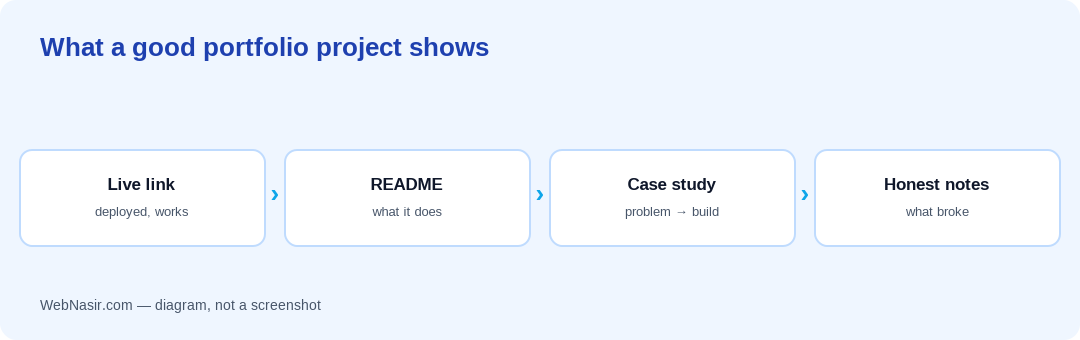
Every project in your portfolio needs three things. First, a live link — deployed free on GitHub Pages, Vercel, Netlify, or Cloudflare Pages, the same route from Step 3. Second, a README on GitHub that says what the project does, what you built it with, and how to run it. Third, a short honest note about what you learned and what broke along the way. That third part is the one beginners skip, and it is the one interviewers care about most, because it proves you actually built the thing instead of following a tutorial to the letter.
Write each project up like a tiny case study: what problem it solves, who it is for, what you built, and what you would improve next. Two or three short paragraphs are enough. A portfolio site for a baker that explains the ordering problem, the form you built, and the date-handling bug that took you a day to fix tells a hiring manager more about you than a certificate ever will. And keep the portfolio itself simple — one page, your name, your projects, your contact details. If your portfolio site takes a month to build, you are building the wrong thing. The projects are the portfolio; the site is just the shelf they sit on.
GitHub the right way: what hiring managers actually look for
When a hiring manager opens your GitHub profile, they are not reading your code line by line. They are looking for signals, and they form an impression in about thirty seconds. The first signal is activity: commits spread over weeks and months, not fifty commits in one weekend before an application. Consistent small commits say you work steadily. A burst of activity the week you apply says you are performing. So commit little and often, from your first week of learning, and let the history grow honestly.
The second signal is presentation. Pin your best three or four repositories to your profile. Give each one a clear name, a one-line description, and a README that explains what it does. Add a short profile README too — a few lines about what you are learning and what you are building. These are small touches, but they are the difference between a profile that looks like a storage cupboard and one that looks like a workshop. Nobody expects a beginner's profile to look senior. They expect it to look cared for.
The third signal is the quality of the commits themselves. Write messages that say what changed and why, not 'fix' or 'update' or 'asdf'. 'Add form validation for the enquiry page' tells a story; 'stuff' does not. And when you are ready, make your first contribution to someone else's project. It does not need to be code — fixing a typo in documentation, improving a README, or reporting a bug clearly are all real contributions, and they teach you how professional projects work: issues, pull requests, reviews, and the discipline of changing code you did not write. That experience is worth more than another tutorial, and it gives you something genuine to talk about in interviews.
Interview preparation for self-taught developers
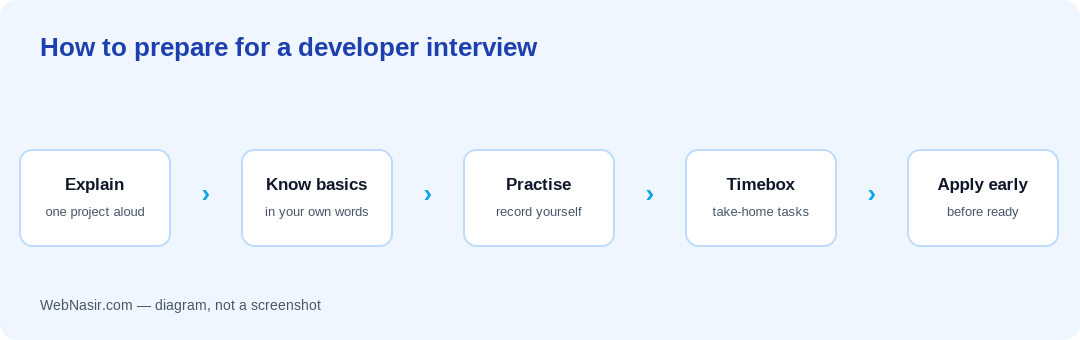
Self-taught developers fail interviews for a different reason than they expect. It is rarely a lack of knowledge. It is the inability to explain what they know out loud, under pressure, to a stranger. You have spent months talking to a screen. An interview is the first time you have to talk to a person about your code, and that is a skill you have to practise separately, like any other.
The questions you will actually be asked
Junior interviews are more predictable than beginners fear. You will be asked to talk through a project you built — why you built it, how it works, what you would change. You will be asked to explain basic concepts in your own words: what a closure is, how the event loop works at a simple level, the difference between let and const. And you will be given a small practical task, like building a component or fixing a bug in a short piece of code. None of this requires genius. It requires being able to explain your own work clearly. So practise explaining: record yourself walking through your best project for five minutes, watch it back, and notice every place you mumble or say 'basically'. Then do it again until it sounds like someone who built the thing on purpose.
Take-home tasks deserve their own warning. Some companies ask you to build a small feature at home and send it in. Timebox it — decide in advance how many hours you will spend, and stop when the time is up. A finished, simple submission beats an ambitious, half-broken one, and nobody will reward you for spending a whole weekend on an unpaid task. Include a short note with your submission explaining your decisions and what you would do with more time. That note often matters more than the code, because it shows judgment, and judgment is what junior developers are actually hired for.
For the computer science side, keep it proportionate. You need to know arrays, objects, and how to think about whether your code is fast enough — the basics that CS50 and freeCodeCamp already cover. You do not need to spend three months grinding algorithm puzzles before your first application. If a particular company is famous for hard algorithm interviews, you will know about it before you apply, and you can prepare for that company specifically. For most junior web roles, a candidate who can build, explain, and debug beats a candidate who can recite sorting algorithms but has never shipped anything.
What still matters in 2027: the skills AI has not replaced

The question every beginner asks now is whether AI makes learning web development pointless. It does not, but it does change what is valuable. Writing basic code from scratch is no longer the scarce skill — an AI assistant can do that in seconds. What is scarce, and what employers pay for, is everything around the code: deciding what to build, knowing whether the code is correct, fixing it when it breaks in a way the AI did not predict, and understanding the user's actual problem well enough to solve it instead of just coding something.
That is why the fundamentals matter more now, not less. HTML, CSS, and JavaScript are the ground truth. When the AI writes something wrong — and it will, regularly — only someone who understands the fundamentals can spot it. Debugging is more valuable than ever, because AI-generated code fails in subtle ways that look correct at first glance. Reading documentation is more valuable than ever, because the AI's knowledge stops at some point in the past and the current version is the only one that counts. And taste is more valuable than ever: knowing what a good page looks like, what a fast page feels like, and what a user actually needs are human judgments no tool makes for you.
The practical consequence is simple. Do not skip the boring foundations to get to the exciting tools faster, because the foundations are now the whole advantage. A developer who understands the DOM, the browser, HTTP, and basic security can use AI tools ten times more effectively than someone who cannot tell good output from bad. Learn the fundamentals deeply, use AI as a multiplier on top of them, and keep building real things for real people. That combination is very hard to replace, and it is the entire bet this guide is built on.
A week-by-week checklist you can actually follow
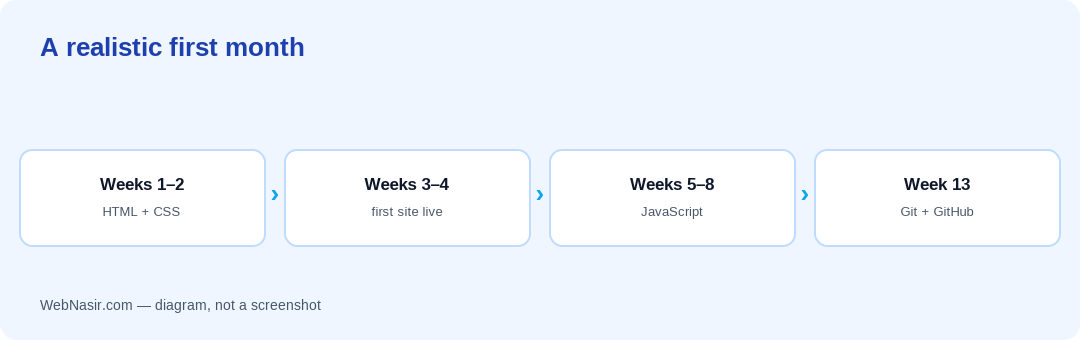
Plans fail when they are vague, so here is the whole guide compressed into a checklist. Print it, stick it on a wall, and tick things off. If you fall behind by a week, do not start over — just pick up where you left off. The schedule is a guide, not a contract, and a late finish still counts.
- Weeks 1–2: HTML and CSS basics. Finish the freeCodeCamp Responsive Web Design exercises or the first sections of The Odin Project. Build one page that looks right on a phone.
- Week 3: forms, Flexbox, and Grid. Build a landing page for a made-up business, with a working form layout.
- Week 4: your first deployed site. Put it on GitHub Pages and send the link to one person.
- Weeks 5–8: JavaScript fundamentals on JavaScript.info. Build a calculator, a to-do list, and a quiz — all in plain JavaScript.
- Weeks 9–12: DOM projects and your first API project. Fetch real data from a free public API and display it cleanly.
- Week 13: Git and GitHub properly. Every project from now on gets commits and a live link.
- Months 4–6: React on react.dev. Rebuild one of your JavaScript projects in React, then build a small shop front or jobs board.
- Month 6: portfolio and applications. Three to five live projects, a GitHub profile you are not embarrassed by, and your first ten applications.
Notice what this checklist does not contain: no second framework, no database in month two, no paid course, no week spent choosing tools. Six months of steady work, one thing at a time, and you arrive at the same place the expensive routes promise — except you own the skill, because you built it yourself.
More questions, answered
Do I need maths to learn web development?
No, not beyond basic arithmetic. Web development is mostly logic and language, not algebra. You need to be comfortable with thinking step by step, breaking a problem into smaller parts, and spotting patterns. If you can work out a monthly budget or follow a recipe with substitutions, you have the kind of thinking this work needs. The maths-heavy parts of computer science — the parts a degree covers — matter later if you move into graphics, data, or algorithms, but they are not a gate to building websites. Do not let a bad experience with school maths talk you out of this.
Is web development still worth learning now that AI writes code?
Yes, and the reason is in the section above: AI writes code, but it does not decide what to build, check whether the result is correct, or take responsibility when it breaks. Someone has to do those jobs, and that someone is a developer who understands the fundamentals. The work is changing — more reviewing, more debugging, more talking to clients about what they actually need — but it is not disappearing. The developers at risk are the ones who only ever copied code without understanding it. If you learn properly, AI makes you faster, not redundant.
How do I know I am ready to apply for jobs?
You are ready when you have three live projects you can explain, a GitHub profile with steady commits, and the ability to build a small feature without a tutorial open. That is the bar, and it is lower than most beginners think. You do not need to know everything in the job description — nobody does, including the people already in the role. Apply when you meet roughly half of what a junior listing asks for and you can show real work. The rejections will teach you what to learn next, which is information you cannot get any other way.
What if I can only study 30 minutes a day?
Then study 30 minutes a day, every day, and accept that the timeline doubles. Six months becomes twelve. That is still a complete career change in a year, built from half an hour you were probably spending scrolling. The danger is not the short session — it is the skipped day that becomes a skipped week. Short sessions work because they are easy to repeat, and repetition is what learning actually is. Protect the streak, not the session length.
Should I learn TypeScript?
Not yet. TypeScript is JavaScript with types added, and it is genuinely useful on large professional projects — but it adds a layer of complexity that slows beginners down exactly when they need speed. Learn plain JavaScript first, build real things with it, and add TypeScript when a job description asks for it or when a project grows big enough that types would actually help. That usually happens around month nine or twelve, not month two. When the time comes, the official TypeScript documentation has a free handbook, and it will take you a weekend because you already know the language underneath.
Frontend or backend first?
Frontend, always, for a beginner. It is visual, so you can see your mistakes immediately, and it teaches you HTML, CSS, and JavaScript — the three things everything else is built on. Backend work — databases, servers, authentication — is easier to learn once you have built things users can see and click, because you understand what the backend is serving and why. The order in this guide is frontend first, backend second, and that order is deliberate. Learn to make something people can use, then learn to store what they give you.
The last thing I will say
Nobody is coming to check whether you studied today. No teacher, no manager, no deadline. That is the hardest part of learning for free, and it is also the whole point. The people who make it are not the smartest or the fastest. They are the ones who sat down on a tired Tuesday evening and wrote twenty lines of bad code instead of watching another video about writing code. Be that person often enough, and the rest takes care of itself.
Start today, not Monday. Open MDN, open freeCodeCamp, open The Odin Project — pick one, do the first lesson, and deploy something small before the week is over. A year from now you will either have a skill that pays you, or a year of reasons why you never started. The work is free. The order is in this guide. The only part nobody can give you is the hour a day, and that part was always yours to give.