
UK · Small Business · Costs
How Much Does a Small Business Website Cost in the UK in 2027? (Real £ Prices, No Sales Talk)
By Nasir · WebNasir.com · Updated 26 Nov 2026
British small businesses asking about the small business website cost in the UK get quoted everything from “£99 all-in” to five figures for what looks like the same website. The difference is never the pages — it's what happens in year two, and whether the legal basics UK sites carry were included or quietly left for you. Here is the full picture in pounds, the same way I break it down for clients. Ranges are the typical 2026 quotes; check any specific quote against them.
Route 1 — DIY with a website builder: roughly £150–£450 in year one

- Builder plan: the mainstream builders typically run about £10–£30/month billed annually for a business tier in the UK.
- Domain: a .co.uk is usually a few pounds a year — commonly around £6–£12/year at renewal — and for a UK-facing business it quietly signals “we are actually here” better than any badge. Many businesses hold .co.uk and .com both.
- Business email: around £5–£6/user/month for Google Workspace or Microsoft 365 at UK pricing.
- Your time: still the real cost — 15–30 hours of evenings, most likely.
Route 2 — A freelancer: roughly £400–£2,500 one-time
Where most UK small businesses should land. Expect a proper 5–10 page site, help with your Google Business Profile, and handover you can actually use. The £99 end of the market is a template and a prayer; the top end usually includes copywriting or a small online shop. Care plans, if offered, commonly run £25–£80/month — optional, and you should be free to decline without your site being held hostage.
Route 3 — An agency: roughly £2,500–£8,000+
Justified when the website carries the business: e-commerce, bookings across locations, or a rebrand with real design work. For a straightforward local services site, an agency quote is mostly paying for account management you will never use.
UK-specific costs and duties people forget
- GDPR and cookies. A UK site that tracks visitors needs a proper privacy policy and, where non-essential cookies are used, genuine consent — not a decorative banner. It's light work at build time; make sure your quote includes it. (This site's own privacy policy is linked in the footer as a model of the plain-English style.)
- Who you are, legally. UK businesses must display company details (registered name, company number and registered office if a limited company) — usually on the contact page or footer. Sole traders have lighter duties, but an address customers can write to is a trust signal either way.
- Renewals and VAT. Ask whether quotes include VAT — a £600 quote that becomes £720 at invoice time is a classic. Builder plans and domains renew yearly; get year-two numbers in writing.
- Payments. Card processing in the UK commonly runs around 1.5%–2.9% + a small fixed fee depending on provider and card type — budget it as a cost of selling online.
What UK customers check before they ring you
Reviews and proximity first, website second — and on the website: a landline or mobile that taps to call, your town in the page titles (not just “Home”), clear prices or “from” prices where your trade allows, and pages that load quickly on a train-platform connection. British customers are polite about many things; a slow website is not one of them.
USA edition: website costs in $ →
Canada edition: website costs in C$ →
What You're Actually Paying For (And What You're Not)

Most quotes look similar on paper. Five pages, a contact form, maybe a gallery. The gap between a £400 quote and a £4,000 quote rarely lives in the page count. It lives in who writes the words, who takes the photos, who handles the domain, and what happens when something breaks at 9pm on a Friday.
When you get a quote, ask one blunt question: what exactly is included, line by line? A good freelancer or agency will send you a written breakdown without flinching. If they get defensive, that tells you plenty.
The bits that quietly cost extra
- Copywriting — most quotes assume you'll supply all the text. If you can't write it, expect to pay separately or spend three weekends doing it badly.
- Photography — stock images are cheap. Real photos of your shop, your team, your work cost more but convert better. Budget for a local photographer or learn to shoot on your phone properly.
- Domain and hosting — sometimes bundled, sometimes not. Always ask who owns the domain. If the answer isn't 'you', walk away.
- Email setup — a professional address on your domain is not the same as a website. It's often a separate line item.
- SSL certificate — should be standard and free these days. If someone is charging you separately for it, ask why.
- Ongoing edits — some quotes include a set number of changes per month. Others charge by the hour. Know which one you're getting.
Here's the thing nobody says out loud: the cheapest quote often becomes the most expensive project. Not because the person is dishonest, but because everything you assumed was included turns out to be an add-on. You end up paying twice — once for the build, once for the things you thought were part of it.
The Year-Two Trap: Why Your Second Year Often Costs More Than Your First
Year one feels manageable. You pay for the build, you're live, you're happy. Then year two arrives and the bills look different. Renewals, care plans, plugin updates, security patches, content changes you didn't budget for. This is where most small business owners get caught out.
I've watched shop owners pay £300 to build a site and then £600 in year two just keeping it alive. Not because anyone tricked them, but because nobody explained the ongoing reality.
What typically renews in year two
- Domain renewal — usually small, but it's a real cost and it's annual.
- Hosting — monthly or annual, depending on the provider. Check whether the first-year price is a promotional rate.
- Website builder subscription — if you built on a platform, you're renting it. Stop paying, lose the site.
- Care plan or maintenance retainer — optional with some providers, mandatory with others. Read the contract.
- Plugin or theme licences — common on WordPress sites. These renew annually and can add up.
- Content updates — new photos, new prices, seasonal offers. Either you do it or you pay someone.
The honest advice: before you sign anything, ask for a two-year cost estimate. Not just the build. The whole thing. If a provider can't or won't give you that, that's your answer.
A simple way to think about it
Treat your website like a shop lease, not a piece of furniture. You don't buy a shop once and never pay rent again. The same logic applies. Budget for the build and budget for the upkeep. If the upkeep number scares you, choose a simpler setup you can maintain yourself.
| Cost type | When it hits | Who usually forgets it |
|---|---|---|
| Build or setup | Year one, one-time | Nobody — it's the headline number |
| Domain renewal | Every year | Almost everyone |
| Hosting | Monthly or annual | DIY builders who assume it's free forever |
| Care plan | Monthly, optional or not | People who didn't read the contract |
| Content edits | As needed | Owners who assumed they'd do it themselves |
DIY vs Freelancer vs Agency: How to Actually Choose
The three routes are already priced out above. What nobody tells you is how to pick between them. It's not about budget alone. It's about your time, your skills, and how much you care about the result.
Choose DIY if:
- You're comfortable on a computer and can follow tutorials without wanting to throw the laptop out the window.
- Your site is simple — a few pages, a contact form, maybe a menu or a gallery.
- You're willing to spend a weekend or two getting it right.
- You don't need anyone to write your content for you.
- You accept that it won't look like a designer made it, and that's fine for now.
DIY is not a cop-out. For a kirana store, a home baker, or a repair shop just starting out, a clean DIY site beats no site at all. The mistake is pretending it's free. Your time has value, and you'll spend more of it than you think.
Choose a freelancer if:
- You want something that looks professional but don't need a full brand overhaul.
- You can write your own content, or you're happy to pay extra for it.
- You want a real person to call when something breaks.
- Your budget sits somewhere in the middle and you want value for it.
- You're okay managing one person rather than a team.
A good freelancer is often the sweet spot for UK small businesses. You get more attention than an agency gives you, and more skill than you'd get doing it yourself. The risk is inconsistency — some freelancers vanish mid-project. Ask for references, and don't pay everything upfront.
Choose an agency if:
- You need a proper brand, not just a website.
- You want copywriting, photography, SEO, and design handled together.
- You have a real budget and you're building something that needs to last.
- You want a contract, a timeline, and someone accountable if things slip.
- You're planning to grow and want a partner, not just a builder.
Agencies cost more because you're paying for a team, project management, and overhead. That's not automatically better. For a coaching centre with ten students, an agency is overkill. For a business with multiple locations and a real marketing plan, it might be exactly right.
Five Real Mistakes UK Small Businesses Make With Website Budgets
I've seen these play out dozens of times. None of them are stupid mistakes. They're the kind you make when you're busy running a business and websites aren't your thing.
1. Paying everything upfront
Never pay the full amount before the site is live and you've checked it. A sensible split is a deposit to start, a payment at a milestone, and the rest on handover. If a provider insists on full payment upfront, that's a red flag. You lose all leverage if they disappear.
2. Not owning your domain
This one hurts. If your web person registers the domain in their name, you don't control it. If you fall out, they can hold your site hostage. Register the domain yourself, in your own name, with your own email. It takes ten minutes and saves years of grief.
3. Skipping the content plan
A beautiful site with empty pages is useless. Before you hire anyone, write down what each page needs to say. What do you sell? Who's it for? What should someone do when they land on it? If you can't answer those questions, no designer can save you.
4. Choosing a platform you can't leave
Some builders lock you in. Your content lives on their system, and moving it elsewhere is painful or impossible. Ask before you build: if I want to move this site later, can I? If the answer is vague, think hard. You don't want to rebuild from scratch in three years because you picked the wrong tool.
5. Ignoring mobile until it's too late
Most of your visitors are on phones. If your site looks fine on a laptop but breaks on a phone, you've lost them. Check every page on your own phone before you sign off. Not the preview. The real thing, on real mobile data.
How to Brief a Web Designer Without Wasting Money
A good brief saves you money. It stops the back-and-forth, the 'actually, can we change that', and the endless revisions that eat into everyone's patience. Here's how to write one that works.
Start with the goal, not the design
What do you want the site to do? Get phone calls? Take bookings? Show a menu? Sell products? Write that down in one sentence. Everything else follows from it. A site built to get calls looks different from one built to sell online.
List your pages and what goes on each
- Home — what you do, who you serve, one clear action.
- About — who you are, why you started, why someone should trust you.
- Services or products — what you offer, with prices if you're comfortable.
- Contact — phone, email, address, map, opening hours.
- Anything else — gallery, testimonials, blog, booking page.
For each page, write two or three sentences about what it needs to say. You don't need polished copy. You need clarity. A designer can work with rough notes. They can't work with 'I'll figure it out later'.
Show examples you like
Find three websites you like — not necessarily in your industry. Tell the designer what you like about each. 'I like how simple this is.' 'I like how easy it is to find the phone number.' 'I like the colours.' This gives them a direction without you needing design vocabulary.
Be clear about what you'll handle
Will you supply photos? Write the text? Set up the domain? Handle the email? Say so upfront. Every task you hand over is a cost. Every task you keep is time you'll spend. There's no wrong answer, but there is a wrong assumption.
After Launch: What to Do in the First 90 Days

Launch day feels like the finish line. It isn't. The first three months decide whether your site actually earns its keep or just sits there looking pretty.
Week one: check everything
- Click every link. Every single one. Broken links look careless.
- Fill in your contact form and make sure the email arrives. Check spam too.
- Test on your phone, your laptop, and a friend's device.
- Check your Google Business Profile — is the website link correct?
- Make sure your phone number is clickable on mobile. People call from their phones.
Weeks two to four: tell people
A website nobody visits is a business card in a drawer. Put the link in your email signature. Add it to your social profiles. Mention it to customers. Print it on receipts. If you have a shop, put it on the window. The launch isn't the announcement — you are.
Months two and three: watch and adjust
Look at what people actually do. Which pages do they visit? Where do they leave? If everyone bounces off your home page, something's wrong. If nobody clicks your services page, maybe it's not obvious enough. You don't need fancy analytics to spot the obvious problems — most platforms show you basic visitor numbers for free.
Make small changes. Rewrite a headline. Move the phone number higher. Add a photo. You don't need to rebuild anything. You need to notice what's not working and fix it, one thing at a time.
What not to do in the first 90 days
- Don't redesign everything because you're bored of how it looks. Your customers haven't seen it yet.
- Don't pay for ads until you know your site converts visitors into enquiries.
- Don't ignore the site for three months and then wonder why nothing happened.
- Don't compare yourself to bigger competitors. They have budgets you don't. Run your own race.
The Honest Bottom Line on UK Website Costs
There's no single right number. A home baker in Manchester needs something different from a coaching centre in Birmingham or a repair shop in Leeds. What matters is that you know what you're paying for, what you're getting, and what it'll cost you next year.
The cheapest option isn't always the worst, and the most expensive isn't always the best. The right choice is the one that fits your business, your budget, and your willingness to maintain it. If you can't maintain it, don't build it. If you can, build something you're proud of and keep it alive.
Get three quotes. Ask for written breakdowns. Own your domain. Budget for year two. And don't let anyone rush you into signing something you don't understand. It's your business. The website works for you, not the other way around.
How to compare website quotes fairly
Ask every supplier to quote the same scope on one page. Otherwise you are comparing a bare build with a project that includes copy, photos, plugin setup and training. A low quote can look cheap because it leaves work for you.
- Check whether VAT is included, and when payments are due.
- List what is fixed: page count, forms, booking, ecommerce, integrations.
- Ask who owns the domain, hosting account, design files and content after launch.
- Confirm revision rounds and what happens if you need more changes.
- Ask how updates, backups and security are handled, and whether that is optional.
A good quote explains assumptions. If a supplier will not put key details in writing, treat that as a risk, not a bargain.
Where to spend instead of cutting corners
If your budget is tight, spend on clear words and honest photos before fancy animation. Customers need to understand what you sell, where you work, and how to contact you. A simple site with strong copy often beats a stylish one that hides the basics.
Trade-offs matter. A freelancer may be cheaper than an agency but less available for urgent fixes. DIY saves cash but costs your evenings. Choose the option that matches how quickly you need to launch and how much control you want later.
FAQ — how much does a small business website cost in the UK
.co.uk or .com for a UK business?
.co.uk if your customers are British and local — it builds instant “based here” trust and can help local search. .com if you sell internationally. Holding both, with one redirecting to the other, is cheap insurance (Guide #14).
Is a £99 website ever worth it?
As a placeholder while you validate an idea, maybe. As your business's public face, no — the missing pieces (privacy/GDPR basics, proper email, support when it breaks) cost more later than the £400 you saved.
What's the minimum sensible UK budget?
Roughly £250–£400 for year one DIY done properly, or £600–£1,200 for a clean freelancer build with the legal basics included.
What actually drives the cost: six levers
Two websites can both be five pages and still cost ten times apart. The page count is the least useful number in a quote. What moves the price is what each page has to do, who supplies the words and pictures, how the site is built, and who looks after it afterwards. If you understand the six levers below, you can read any quote and see exactly where the money goes — and which parts you can sensibly do yourself to bring the figure down without cutting something you will miss later.
1. How many pages, and what each page must do
A home page that only says who you are is a different job from a home page that has to take bookings, show live availability and answer the ten questions every caller asks. Count pages by jobs, not by files. A trades business usually needs a home page, a services page for each main job, an about page, a reviews page and a contact page — that is already six or seven pages before anyone mentions a blog. A café needs a menu page that changes with the seasons, which means somebody has to update it, and that updating is part of the cost whether it shows on the quote or not. Before you accept a page count in a quote, write one sentence per page saying what a visitor should do on it. If a page has no job, it does not need to exist, and you should not be paying for it. If a page has two jobs — say, selling and taking bookings — say so, because the supplier needs to design for both, and that design work is real time.
Extra pages also mean extra maintenance. Every page you add is a page that can go out of date: a price that changed, a service you no longer offer, a team member who left. Small businesses often ask for twelve pages because twelve sounds thorough, then update none of them for three years. Five honest, current pages beat twelve stale ones, and they cost less to build and less to keep. When a supplier quotes per page, ask what a page includes: layout, words, photos and mobile checking, or just an empty template with a heading. The answer changes the comparison completely.
2. Features that change the build
A contact form is a small job. A booking system that takes deposits, sends reminders and syncs with your diary is a much bigger one. An online shop that takes card payments, calculates delivery and emails order confirmations is bigger again, and it carries duties a brochure site never has: payment security, refund handling, stock that must be right, and customer data that must be protected. Each feature adds three kinds of cost — building it, testing it, and looking after it when it breaks or when the payment provider changes its rules. That is why the routes section above puts a straightforward local services site and an online shop in different price bands: they are different products that happen to share the word website.
Be specific about features before you ask for a price. “I want a shop” can mean ten products with a simple checkout or five hundred products with size options, discount codes and delivery zones. “I want bookings” can mean a form that emails you or a calendar that takes payment and blocks the slot. Write down the exact behaviour you need, in plain words: what the customer clicks, what happens next, and what email or message they should get. A supplier who has that list can quote accurately. A supplier who does not will either pad the price to cover the unknown or quote low and charge for every clarification later. Neither is dishonest — both are what happens when the scope is vague.
3. Content: the words and the photos
Most quotes assume you will supply all the text and all the photos. That assumption is where more projects stall than anywhere else. Writing about your own business is hard: you know too much, you cannot tell what a stranger needs to hear first, and every page sits half-written for weeks while the launch date slides. If you cannot write it, say so early and get copywriting quoted as a separate line. A copywriter who has written for trades or hospitality will ask you questions for an hour and hand back pages that sound like you on your best day. That is a real service with a real cost, and it is usually cheaper than the months of lost enquiries from a site that never launches.
Photos work the same way. Stock photos are cheap and instantly forgettable; customers in the UK notice when the “local bakery” on the home page is clearly a stock image from another continent. Real photos of your shop, your team, your food or your finished work do more for trust than any design trick. You do not need a professional shoot for every page — a modern phone, good daylight and a tidy workspace will carry most small business sites — but somebody has to take the photos, choose the best ones, resize them and put them in the right places. If your quote does not mention photography, assume you are supplying it, and block out the time to do it properly. A site with honest photos of a real business beats a polished site with borrowed ones, every time.
4. Design: template, customised template, or fully custom
Almost no small business needs a website designed from a blank screen, and almost no small business should pay for one. The sensible middle ground is a good template or theme, customised with your colours, your logo, your photos and your words. That is what most freelancers in the middle price band are actually selling, and there is nothing wrong with it — the template handles the hard parts like mobile layouts and accessibility basics, and the customisation makes it yours. What you are paying for is judgement: which template fits your business, how the pages are arranged, and the dozen small decisions that make a site feel professional instead of assembled.
Fully custom design earns its keep when the brand is the business — a restaurant with a distinct identity, a studio, a premium service where the look is part of what customers buy. For a plumber, a cleaner or a driving instructor, custom design is usually money spent where customers will never notice it. Ask any supplier who proposes custom design to show you what a customer would actually experience differently, in words a customer would use. If the answer is about fonts and spacing, you are being sold craft you do not need. If the answer is about how a customer finds the booking button in three seconds on a phone, that is design worth paying for.
5. Being found: local search basics
A website nobody finds is a business card in a drawer, and the earlier sections already touched on this. The part that belongs in the budget is the unglamorous foundation: every page with a clear title that says what you do and where you do it, your town named on the pages rather than only on the contact page, your opening hours and service area written out, and your Google Business Profile set up and matching the website exactly — same name, same address, same phone number. None of that needs expensive software. It needs somebody to do it carefully, once, and then to check it every few months. A freelancer who includes Google Business Profile help in the build, as the middle route above describes, is giving you something worth more than a fancy animation.
Beyond the foundation, be wary of paying for search optimisation before the foundation exists. If your pages have no clear titles, no local details and no reviews, no amount of technical work will fix that. And if a supplier promises a page-one ranking for a fixed monthly fee, ask them to put in writing what happens if it does not happen, and what exactly they will do each month. Real local visibility comes from accurate listings, genuine customer reviews, pages that answer real questions, and time. Anyone selling it as a switch to flip is selling you a story, not a service.
6. Maintenance and support after launch
Websites are not furniture. The software underneath them changes, security fixes appear, links break, and the phone number in the footer goes out of date. Somebody has to do the updates, keep a backup, and answer when the contact form stops working. That somebody can be you, a freelancer on a care plan, or an agency on a retainer — but it has to be somebody named, not a vague hope. The care-plan figures quoted earlier, in the freelancer section, are the going shape of this: a monthly amount for updates, backups and small fixes. Whether you need it depends on how comfortable you are doing updates yourself and how much it costs you when the site is down for a day. A shop that takes orders online cannot wait a week for a fix. A brochure site for a builder can usually wait until Monday. Price the support to the risk, not to the fear.
How to compare quotes like-for-like

The most common way small businesses overpay is not choosing the expensive supplier. It is comparing three quotes that describe three different jobs and picking the cheapest number. One quote includes the words, the photos, the domain, the email setup and a year of updates. Another includes five empty pages and a contact form. The second looks half the price. It is not half the price — it is half a website. The fix is boring and it works: write one page describing the job, send the same page to every supplier, and ask each one to quote against it, line by line.
Your one-page scope does not need to be technical. It needs the goal in one sentence, the list of pages with one sentence each about what each page must do, the features written as plain behaviour, who supplies the words and photos, and what happens after launch. Send it to three suppliers — a builder route you price yourself, a freelancer and, if the job justifies it, an agency — and give them the same deadline to reply. When the quotes come back, the differences will be visible immediately: one supplier asks sharp questions about your booking flow, another quotes without asking anything. The questions are information. A supplier who asks nothing has either done this a hundred times or has not thought about your job at all, and the quote alone will not tell you which.
| Quote line | What to check | Red flag if missing |
|---|---|---|
| Build and pages | Page count and what each page includes | Pages listed with no description of content |
| VAT | Whether the figure includes VAT, in writing | A price with no mention of VAT at all |
| Domain and hosting | Who registers and owns them, renewal cost | Domain registered in the supplier's name |
| Email setup | Mailboxes included and their ongoing cost | Email assumed but never mentioned |
| Content and photos | Who writes, who photographs, revision rounds | You supply everything, with no time budgeted |
| After launch | Updates, backups, support and who to call | No support named and no response time |
| Payment terms | Deposit, milestones and final payment on handover | Full payment demanded before work starts |
| Ownership and exit | How you leave, and what you take with you | No exit described, or an exit fee hidden in terms |
Two lines on that table deserve extra attention because they cause the most arguments. The first is VAT. A quote that does not say whether VAT is included is not a quote you can compare with one that does — ask the question in writing and keep the answer with the quote. The second is ownership. Your domain, your hosting account, your content and your customer data should be yours. If a supplier registers the domain in their own name or holds the hosting account so you cannot move, you do not own your website — you rent it from someone who can change the terms. The earlier section on domain ownership says this plainly, and it is worth repeating here because it is the single most expensive lesson in this whole article.
Finally, give yourself a cooling-off rule. When a quote arrives, wait a day before paying a deposit. Read it again slowly, check the lines above, and ring the supplier with the two or three questions that are still unclear. A good supplier welcomes that call — it is how they find out what you actually need. A supplier who pressures you to pay today to hold a price is telling you how the rest of the relationship will feel. The price of a website is a one-off decision; the supplier is a relationship that lasts years. Choose the relationship, not the discount.
Hidden and ongoing costs, line by line
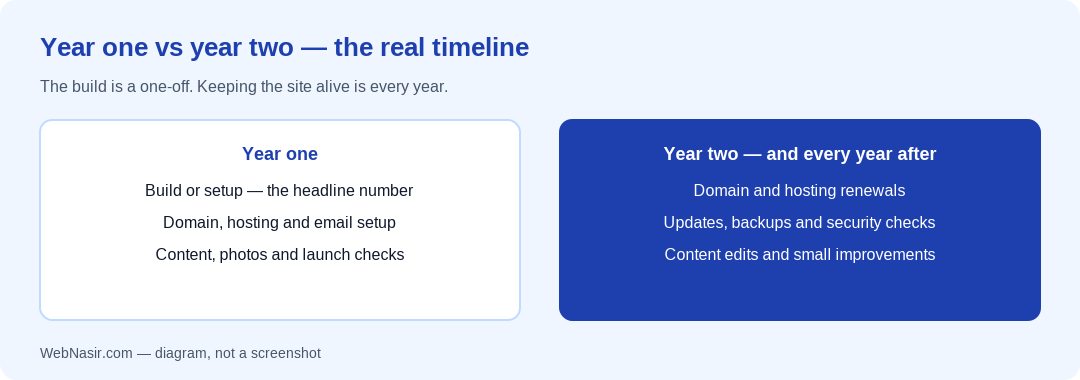
Nobody hides these costs on purpose. They are hidden because they are small, boring and spread across the year, so nobody puts them on the first page of a quote. Added together over two years, though, they are often larger than the build itself — which is exactly the year-two trap described earlier in this article. Walk through the list below with your quote in hand and tick each one off: included, extra, or your job. Anything unmarked is a surprise waiting for a renewal email.
- Domain renewal — usually small each year, but it is annual, and a .co.uk and a .com together cost twice a single domain. Set it to renew automatically on a card you still use, and keep the registrar login somewhere safe.
- Hosting renewal — first-year prices are often discounted, and the renewal can be noticeably higher. Ask for the renewal figure in writing before you sign, not when the invoice arrives.
- Business email — the per-user monthly figures quoted earlier in this article apply for every mailbox, so three staff addresses cost three times one. Shared inboxes and aliases can cut this down — ask what you actually need.
- Security certificate — the padlock in the browser. Many hosts include it free; some charge. If your quote does not mention it, ask — a site without it will warn visitors away.
- Plugin and theme updates — on WordPress and similar systems, the add-ons that give you forms, bookings or shops need updates, and updates sometimes break things. Somebody has to test them, and that time is either your evening or a care plan.
- Backups — your host may back up the site, or may not, or may charge to restore it. Ask where backups live, how often they run, and what restoring one costs. A backup you cannot restore is decoration.
- Privacy and cookie duties — a UK site that tracks visitors needs a proper privacy policy and genuine consent where non-essential cookies are used. The legal text is usually a small job once; keeping it accurate as you add tools is the ongoing part.
- Content edits — prices, menus, opening hours, staff pages. If you cannot edit the site yourself, every change is a small invoice or a favour owed. Budget either the training to do it yourself or a small monthly allowance for changes.
- Images and licences — stock photos and fonts sometimes carry annual licences. Check whether the images on your site are licensed to you permanently or only while a subscription lasts.
- Accessibility fixes — text that is too small, buttons too close together on a phone, images with no description for screen readers. These are cheap to do during the build and expensive to retrofit, so raise them before launch, not after a customer complains.
The honest way to handle this list is to turn it into a two-year budget before you choose a supplier. Add the build, then add year one of everything above, then add year two of everything above with renewals at their real renewal figures rather than their first-year discounts. The total will be higher than the headline quote, and that is the point: you are looking at the real cost, not the advertised one. If the two-year total scares you, the answer is rarely to pick the cheapest build — it is usually to cut scope. Drop the pages nobody needs, start with a simple booking form instead of a full booking system, and add features when the site has earned them. A small site that is fully paid for and properly maintained beats a large site that runs out of budget in year two.
One more cost hides inside the cheapest offers: your own time. The earlier sections priced DIY at fifteen to thirty hours of evenings, and that is only the build. Every update, every broken link, every email that does not arrive costs another hour. For a sole trader whose chargeable hour is worth real money, ten hours a month on website chores can cost more than a care plan. Do the maths honestly: your hourly value, times the hours, against the monthly figure a freelancer quoted. Sometimes DIY is still right. Often, once the hours are counted, it is the most expensive route of all — it just never sends an invoice.
DIY vs freelancer vs agency: the full trade-off

The routes and their price bands are set out near the top of this article. What follows is the part that decides between them: what each route costs you in time, attention and risk, and what you get back. Money is only one of the currencies. The other three are your evenings, your ability to fix things when they break, and your freedom to leave. Judge each route on all four, not just the first.
| DIY builder | Freelancer | Agency | |
|---|---|---|---|
| Cash cost | Lowest — monthly plan plus your time | Middle — the bands quoted above | Highest — team and overhead included |
| Your time | Most — build, content, fixes, updates | Content and decisions; build is theirs | Least — decisions and approvals only |
| Quality ceiling | Good, within the template's limits | Professional, if the freelancer is good | Highest, with brand and strategy included |
| Support when it breaks | You, plus the builder's help pages | One person, if they answer | A team, with agreed response times |
| Freedom to leave | Hard — content often cannot move | Usually good, if you own the accounts | Good, if ownership is written down |
| Best for | Testing an idea on a tight budget | Most UK small businesses | Sites that carry the whole business |
DIY has one advantage nobody else can offer: you learn how your own website works, and you can change a price or a photo at midnight without asking anyone. Its disadvantage is the mirror image: when something breaks at 9pm on a Friday, you are the support desk, and the builder's help pages are your only colleague. DIY also has a quiet ceiling. A builder template can look clean and professional, and for many businesses that is enough — but the moment you need something the template does not offer, you are stuck choosing between a workaround that looks wrong and rebuilding on another system. Before you commit months to a builder, check the exit: can you export your pages and take them elsewhere, or would leaving mean starting again? That answer matters more than any feature list.
A freelancer is the middle in every sense: middle cash cost, middle time demand, and the most personal service. You deal with the person doing the work, they learn your business, and a good one will tell you when an idea is a waste of money. The risk is concentration: one person can be ill, on holiday, or simply too busy when you need an urgent fix. Ask a freelancer what happens when they are away, and whether anyone else can step in. Also ask how many clients they look after and how quickly they usually respond. The answers are not a test — a busy freelancer is a good sign — but you should know the shape of the cover before you need it. And check their recent work on a phone, not on a laptop: open two or three of their live sites, tap through them, and see whether they feel fast and clear. That five-minute check tells you more than any portfolio page.
An agency gives you a team, a process and a project manager, and charges for all three. The work is usually excellent, and the process protects you: written scopes, staged approvals, testing before launch, and somebody to call who is not on holiday. The cost is not just money — it is also distance. You will deal with an account manager rather than the person building your site, and small changes can take days because they pass through a queue. For a business whose website takes bookings across locations or sells online, that process is worth it. For a straightforward local services site, it is mostly paying for account management you will never use, as the routes section said. The test is simple: if the website going down for a day would cost you real money, buy the team. If it would cost you a few missed calls, buy the freelancer.
A decision framework by business type

There is no single right budget for a small business website, because a website does different jobs for different businesses. The framework below starts from the job, then works back to the route and the spending priorities. Find your type, read what matters most, and spend there first. Everything else can wait until the site has earned it.
Trades: plumber, electrician, builder, roofer
Your website has one job: turn a search into a phone call. The customer is often standing in a leaking kitchen or a cold house, on a phone, wanting to know three things — do you cover my area, can you come soon, and can I trust you. Spend on a fast mobile site, a tap-to-call button that is visible without scrolling, your town and service area written out on every page, and genuine reviews with names and places. Spend nothing on clever animation, and little on extra pages: services, about, reviews and contact will carry almost every trade business. The freelancer route usually fits best, in the bands quoted earlier, because you need it to look professional and load fast, but you do not need a brand agency. And keep the content honest: real photos of finished jobs beat stock photos of smiling models holding wrenches, and a short line about how you charge — call-out, estimate, or fixed price where your trade allows — will win you more calls than any design feature.
Café, restaurant and takeaway
Your website has two jobs: show the menu and get the booking or the order. Photos do the selling here more than in any other trade, so spend on good pictures of real dishes, the room, and the people who run it. The menu must be easy to change — if the menu on the website is last season's, customers will assume the kitchen is too — so either learn to update it yourself or pay for a small monthly allowance of changes. Opening hours, allergy information and a booking or order button belong at the top of the home page, not buried three clicks deep. A simple DIY site with great photos can work for a small café, but a freelancer is usually worth it for the menu system and the booking or ordering setup, and for making sure the site still works perfectly on a phone held one-handed on a bus.
Shop and e-commerce
Your website is the till, and that changes everything. The build costs more because payments, delivery, stock and order emails all have to work together, and the ongoing costs are higher because stock must be right and orders must be answered. Spend on the checkout first: it must be fast, it must work on a phone, and it must tell the customer clearly what delivery costs and when the order arrives. Spend next on product photos and honest descriptions — every product needs a real photo, a clear price, and delivery information a customer can find without asking. Do not spend on a large catalogue before you can keep it stocked and photographed: twenty products with good photos and accurate stock beat two hundred with borrowed images and guesswork. This is the one business type where the agency route is often justified, or a specialist freelancer who has built shops before — ask to see a live shop they built, place a test order in your head, and check how the delivery and returns pages read.
Professional services: accountant, solicitor, consultant, therapist, tutor
Your website has one job: prove you are the safe choice. Customers for professional services are careful, they compare, and they read. Spend on words before anything else: clear explanations of what you do, who it is for, what it costs or how pricing works, and what happens first — a call, a consultation, an assessment. Spend on proof: qualifications stated plainly, reviews from real clients, and short case stories that show the outcome rather than the process. Design should be calm and uncluttered; anything flashy undermines the trust you are trying to build. A freelancer is usually the right route, with copywriting included or quoted separately, because the words are the product here. And keep the site current: an article or update every month or two, answering a question clients actually ask, does more for visibility than any technical trick.
Bookings and classes: salon, gym, driving school, clinic
Your website has one job: fill the diary. Spend on the booking flow first and the brochure second. A customer should be able to see availability, pick a time, and get a confirmation without ringing you — and you should get a reminder that actually reaches you. If the booking system takes deposits, the deposit rules must be written in plain words, including what happens on cancellation. Spend next on the details customers ask about before booking: prices, duration, what to bring, where to park, and whether a first visit needs anything special. A freelancer with booking experience is usually the right choice; a DIY builder can work if its booking tool genuinely fits your timetable, but test it as a customer before you commit — book a slot yourself, cancel it, and see what emails arrive. If that test feels clumsy, your customers will feel it too.
If your business is none of these — a maker, a market stall going online, a charity, a community group — the framework still applies. Write down the one job in one sentence, find the closest type above, and spend on that job first. The businesses that waste money on websites are not the ones with small budgets. They are the ones that bought features before naming the job.
What WebNasir charges: our own published starting rates
Everything above is about the UK market in pounds, and the ranges there are the typical quotes described in this article. This section is different: it states the rates published on this very site for the websites WebNasir builds, so you can see exactly what the author charges. These are the author's own starting rates, published on the We Build Websites page, and they are in Indian rupees — not pounds, and not UK market prices. They are included here for transparency, not as a guide to what a UK supplier should charge. A UK freelancer or agency works in a different cost base, and their quotes will reflect that.
| Site type | WordPress, starting from | Custom-built, starting from |
|---|---|---|
| Blog | ₹7,999 | ₹12,999 |
| Business | ₹8,999 | ₹14,999 |
| Restaurant / Cafe | ₹8,999 | ₹14,999 |
| Travel | ₹12,999 | ₹24,999 |
| News Portal | ₹19,999 | ₹29,999 |
| Shop (E-commerce) | ₹19,999 | ₹39,999 |
| Portfolio | Ask for a quote | Ask for a quote |
Read that table the same way this article teaches you to read any quote. The figures are starting points for a defined build, and the final figure depends on the same levers as everything else in this article: how many pages, what features, who supplies the words and photos, and what happens after launch. A shop costs more than a blog for the same reason a UK shop costs more than a UK blog — payments, stock and order handling are real work. A portfolio has no published starting rate, because portfolio sites vary so much that a fixed figure would be misleading; the honest answer there is a written quote against a brief. If you take one idea from this section, take this: a supplier who publishes starting rates and tells you what would move the figure is a supplier you can plan around. Ask every supplier you approach for the same clarity, in pounds, against your one-page scope.
Build your own two-year budget in twenty minutes
You do not need a spreadsheet to do this well. A sheet of paper and the quotes in front of you are enough. Work through the five steps below, write the figures down, and keep the paper with the quotes. It is the single most useful document in this whole process, because it turns a headline price into a decision you can defend.
- Step one — write the job. One sentence: what the site must do. Then the page list, one sentence per page, and the features as plain behaviour. This is your one-page scope, and every quote gets measured against it.
- Step two — collect three written quotes against that scope, as the comparison section describes. Refuse to compare a verbal figure with a written one; they are not the same thing.
- Step three — add year one. Build, domain, hosting, email, certificate if charged separately, and any content or photography. Use the renewal figures where a first year is discounted, and note which is which.
- Step four — add year two. Renewals at their real renewal figures, updates and backups, a small allowance for content changes, and any care plan you are considering. This is the number most people never calculate, and it is the one that matters.
- Step five — price your own time. Hours you will spend building, writing, photographing and fixing, times what an hour of your time is worth to the business. Add it to the DIY column honestly. If the DIY total is still the cheapest, choose it with confidence. If it is not, you have just saved yourself months of evenings.
When the worksheet is done, the choice is usually obvious, and it is rarely the choice you expected at the start. Often the freelancer route wins — not because it is the cheapest in cash, but because it is the cheapest once your time and the year-two costs are counted. Sometimes the DIY route wins, because the site is simple, the business is new, and the money genuinely is not there yet. Both are good decisions when they are made with the full numbers in front of you. The only bad decision is the one made from a headline figure alone.
More questions UK owners ask
Does the quote include VAT?
Ask, in writing, and keep the answer with the quote. Some suppliers are not VAT-registered and their figure has no VAT to add; others quote without VAT and it appears on the invoice. Neither is wrong, but a quote that does not say cannot be compared with one that does. If you are VAT-registered yourself, the treatment of VAT on a website build is a question for your accountant, not for this article — and not for the supplier's sales page. Get the figure, get it in writing, and file it.
How long should a build take?
Do not accept a single date. Ask for a written timeline with milestones: when the design is shown, when the content is due from you, when you test the site, and when it goes live. Then ask what happens if the content is late — because it usually is, and the answer tells you how the supplier handles the most common delay in the business. A supplier with a clear process for late content has done this before. A supplier who has no answer will blame you in week six. The timeline is also where your own time appears: the fastest builds are the ones where the owner supplies words and photos on the agreed dates.
What happens if I want to leave my supplier?
This should be answered before you sign, not when you are unhappy. Ask three questions: do I own the domain and the hosting account, can I export my content and take it elsewhere, and is there an exit fee or a notice period. Get the answers in writing. The domain point is the one that matters most — a domain registered in your name, with the registrar login in your hands, means you can move whenever you choose. A site built on a system you cannot leave is not a purchase; it is a subscription with a build fee. The earlier sections on ownership and on choosing a platform you can leave cover this in detail, and they are worth re-reading before any contract is signed.
Do I own the site if I stop paying a care plan?
That depends entirely on the contract, which is why the contract matters. In a fair arrangement, stopping a care plan means you stop getting updates, backups and support — it does not mean your site is switched off or held hostage. If a supplier's terms say otherwise, or if the terms are unclear, ask them to clarify in plain words before you pay a deposit. The test is simple: can you walk away, keep your domain and your content, and find someone else to look after the site. If the answer is yes, the care plan is a service you are choosing. If the answer is no, it is a lock-in dressed as a service, and you should think very carefully before signing.
Should I pay for ads to get visitors?
Not until the site converts the visitors you already have. The first ninety days after launch, covered earlier in this article, are for checking the basics: every link works, the form delivers, the phone number is right, and the pages make sense on a phone. If visitors arrive and nobody rings, ads will only buy you more visitors who do not ring. Fix the site first — clearer words, a visible phone number, a faster home page — and only then consider paying for traffic. When you do, start small, measure what each enquiry costs you, and stop anything that does not pay for itself. A website that earns its keep organically is a website worth advertising.
That is the full picture. A small business website in the UK in 2027 is not one price — it is a set of choices about scope, features, content, design and care, made against the job the site has to do. Get three written quotes against the same scope, own your domain, budget for year two, and choose the route that fits your business rather than the one that sounds most impressive. The cheapest quote is not always the worst, and the most expensive is not always the best. The right one is the one you understand, line by line, before you pay a deposit.
