Comparison · AI Builders
Best AI Website Builders for Small Business in 2027: 7 Compared (Prices, Free Plans, Verdict)
Every builder promises “a website in minutes”. The differences that matter appear in month two: Can you edit it easily? What does renewal cost? Can you leave if you outgrow it? We judged the seven best AI website builders for small business on speed, design quality, control, hosting, and total price — not on launch-day wow.
Comparison table — best AI website builder for small business 2027
| Builder | Free plan reality | Strength | Hidden cost / catch |
|---|---|---|---|
| Hostinger AI | AI builder bundled with hosting plans | Best value path into WordPress + hosting together | Hosting renewal price after intro term |
| Wix Aria | Free site on subdomain; paid for domain/features | Easiest editor, huge app ecosystem | Costs climb as you add apps/premium tiers; hard to migrate away |
| Squarespace AI | Trial-led, no permanent free site | Most polished templates for visual brands | Premium pricing from day one; less flexible |
| Durable | Very fast AI generation to a draft | Fastest launch for a simple service site | Draft needs heavy editing; depth is limited |
| Framer | Free tier on Framer subdomain | Best design control + modern animations | Learning curve; CMS/e-commerce depth is lighter |
| 10Web | AI generation onto WordPress | WordPress freedom with AI speed | You still own WordPress maintenance reality |
| GoDaddy Airo | AI site tied to GoDaddy ecosystem | Domain + site + tools in one account | Upsells across the ecosystem; design is generic |
Prices note: builder pricing changes with sales and regions (and ₹ billing/GST for India). Verify the renewal price and what the free plan actually removes (domain, ads, payments) on the pricing page before you commit — the pattern matters more than this week's number.
Best for…
- Budget: Hostinger AI — especially in a Black Friday window (Guide #1).
- Design: Framer for control, Squarespace AI for ready polish.
- WordPress: 10Web or Hostinger — you keep ownership and plugins.
- Fastest launch: Durable — live draft fastest, budget editing time after.
The hidden costs nobody puts in the ad
- Renewal prices — intro discounts end; your year-2 bill is the real price.
- Free-plan branding/subdomain — fine for testing, unprofessional for a business card.
- Lock-in — most builders do not export cleanly. WordPress-based options (10Web, Hostinger) leave you an exit.
- Payments/bookings tiers — the feature you need is often one tier above the one you bought.
Which one fits which business?
| Business | Pick | Why |
|---|---|---|
| Local service (salon, repair, tutor) | Durable → then Wix Aria | Speed first, editor depth when you grow |
| Shop / products | Hostinger + WordPress/WooCommerce path | Ownership + payment flexibility in India |
| Portfolio / creator | Framer | Design is the product |
| Restaurant / café | Squarespace AI or Wix Aria | Menus, reservations, polished food imagery |
Verdict
For most small businesses in India: start free with Guide #4's method to validate, then Hostinger/WordPress for the owned, long-term site — or skip the DIY loop entirely if the site is your shopfront. After choosing: connect domain, set up Google Business Profile, add WhatsApp contact, and publish one useful page a week — a builder alone does not bring customers; content does.
← How to make a website using AI free
Get it built for you →
How AI website builders actually work — and what ‘AI’ means here
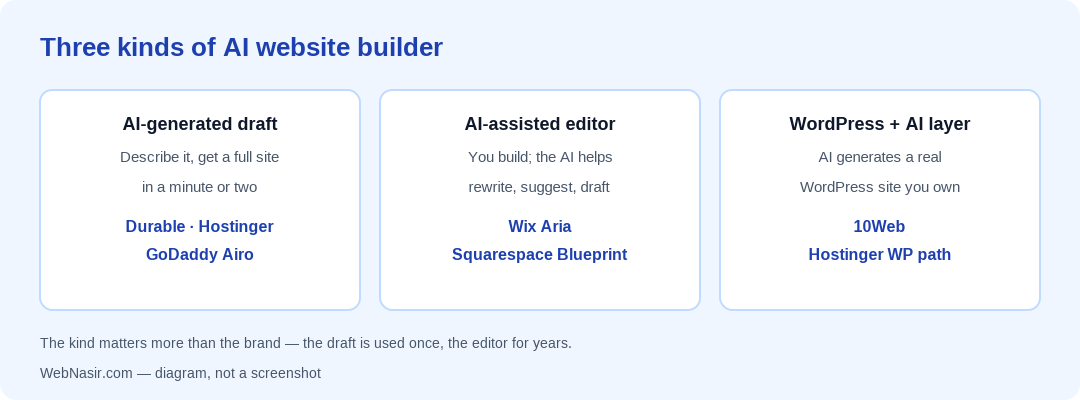
The word “AI” on a builder’s homepage hides three very different products, and knowing which one you are buying decides whether you will be happy in month two. The first kind is the AI-generated draft: you answer a few questions or type a sentence about your business, and the builder produces a whole site — pages, text, images, colours — in a minute or two. Durable and Hostinger’s AI builder work mostly this way, and so does GoDaddy’s Airo. The second kind is the AI-assisted editor: you start from a template or a blank page, and an assistant helps you as you build — rewriting a paragraph, suggesting an image, drafting a product description, fixing a headline. Wix’s Aria and Squarespace’s Blueprint tools sit largely here, even though both can also generate a first draft. The third kind is WordPress with an AI layer on top: 10Web generates a site that is, underneath, an ordinary WordPress site you fully own.
Why does the distinction matter? Because a generated draft is only a starting point, and the quality of that starting point varies wildly with what you feed it. Give the AI a vague prompt — “I run a salon” — and you will get a vague site: generic headlines, stock-style images, and copy that could belong to any salon in any city. Give it specifics — your services, your prices, your neighbourhood, the one thing customers compliment you for — and the draft comes back noticeably closer to a real business. The builders that look magical in a demo are usually being fed a good prompt by someone who already knows what a good website says. Your job is not to find the smartest AI. It is to arrive with a clear description of your business, because the AI can only rearrange what you give it.
The other thing the demos hide is the editing. Every AI builder shows the generation step and skips the refinement step, which is where the real hours go. After the draft appears, you will still need to replace the photos with your own, fix the service list, correct the phone number and opening hours, rewrite the generic copy in your own voice, and check every page on a phone. Budget an afternoon for that work, not ten minutes. A builder that generates a beautiful draft but makes editing painful is worse than a builder with a plainer draft and a friendly editor, because you will live in the editor for years and you will use the generator exactly once.
Before you compare: write the five-minute brief
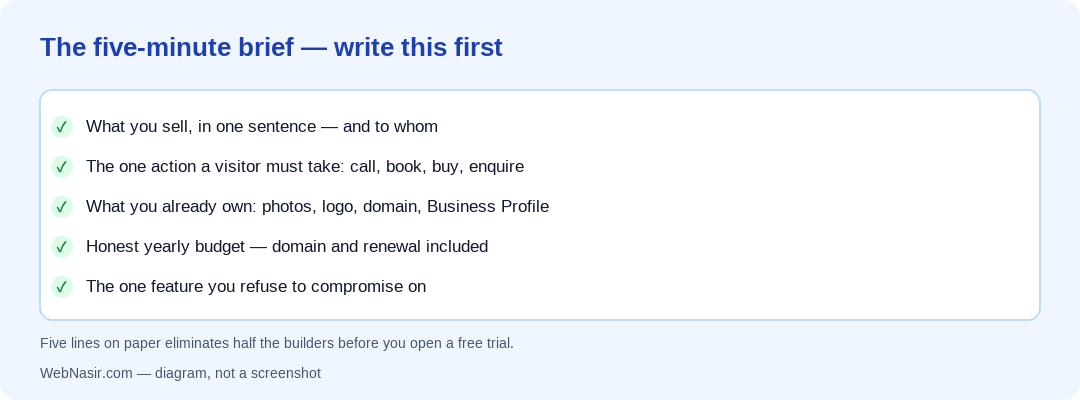
The fastest way to choose badly is to open seven free trials and click around. Every builder looks good for the first twenty minutes, because every builder is designed to look good for the first twenty minutes. The comparison that actually works starts before you open any of them, with five lines written on paper or in your phone’s notes app. What do you sell, in one sentence? Who is the site for — walk-in customers in your town, or buyers anywhere? What must a visitor be able to do: call you, book a slot, buy a product, read your work, or just find your address? What do you already have — photos, a logo, a domain, a Google Business Profile? And what can you spend, per year, without flinching? Answer those five and half the builders eliminate themselves.
A salon that needs online booking and a photo gallery has a different shortlist from a kirana wholesaler who needs a catalogue and a WhatsApp button, and both differ from a tutor who mainly needs parents to trust her and call. The brief also protects you from the most common trap in this market: buying the builder with the prettiest templates when your business actually needs bookings, or buying the cheapest plan when your business actually needs to take payments. Templates are the least important thing on the page, because every builder on this list ships decent-looking templates. The deciding factors are always the same four: can visitors do what you need them to do, can you edit the site without dreading it, what does year two cost, and can you leave if you outgrow it.
Write the brief down before you read the builder sections below. As you read each one, ask a single question: does this builder make my brief easier, or does it make me reshape my business to fit the builder? The right builder disappears into the background and lets your business show. The wrong one keeps asking you to upgrade, to install another app, or to accept a layout that does not fit what you sell. If you catch yourself thinking “it’s fine, customers won’t notice” — they will. Customers notice a booking button that does not work, a menu that is out of date, and a phone number that goes nowhere, far more than they ever notice which builder made the site.
- One sentence: what you sell, and to whom.
- The one action a visitor must be able to take (call, book, buy, enquire).
- What you already own: photos, logo, domain, Google Business Profile.
- Your honest yearly budget, including the domain and renewal — not just the first-year offer.
- The one feature you refuse to compromise on (payments, bookings, portfolio, blog).
Hostinger AI Website Builder — the budget all-rounder
Hostinger’s AI builder comes bundled with its hosting plans, which is the first thing to understand about it: you are not buying a standalone builder, you are buying hosting with a builder attached. You describe your business, pick a style, and the AI generates a draft site with text and images. Because the builder lives on a hosting account, your domain, your email, and your site all sit in one place, under one renewal date, which is genuinely convenient for a small business that does not want three separate bills and three separate logins. It is also the reason this builder tops the value ranking in the table above: the cheapest credible path to a real site with your own domain usually runs through a hosting bundle rather than a pure builder subscription.
The practical strengths are unglamorous and that is the point. The AI helpers cover the chores small businesses actually struggle with: drafting the homepage text, generating an image when you have no photo yet, and suggesting basic SEO wording for your pages. The templates are modern without being fussy, and the editor is simple enough that a non-technical owner can change prices, swap a photo, and add a page without watching a tutorial each time. The longer-term strength matters more: Hostinger is a WordPress host, so the day your business outgrows the AI builder you can move to WordPress on the same account, with the same host, instead of starting over somewhere else. For a shop that might one day want a proper online store, that path — AI builder now, WordPress and WooCommerce later — is the most realistic growth plan on this list.
The trade-offs are honest ones. The AI draft is a draft: the copy reads like every other AI-written homepage until you rewrite it with your own details, and the images it generates are placeholders, not photographs of your shop, your food, or your work. Replace them with real photos as soon as you can, because customers trust a real photo of your actual premises far more than a polished generated one. Design control is narrower than Framer or Squarespace — you can make a clean, professional site, but you will not make a strikingly original one. And the pricing that looks so good in year one is an introductory rate; the renewal is the real price, so check it before you commit, exactly as the prices note above says. None of this is a reason to avoid Hostinger. It is a reason to buy it for what it is — the sensible, low-cost, low-drama option — rather than expecting a design-studio result at a hosting price.
Who should pick it: a small business watching every rupee, a shop or service that wants its own domain and a professional site without a monthly subscription that keeps growing, and anyone in India who wants local-currency billing and a host that understands the Indian market. Who should skip it: a visual brand whose website is its portfolio — a photographer, an interior designer, a boutique — where the design ceiling will start to pinch within a year; and anyone who wants the deepest possible editor or the largest app ecosystem, which is Wix’s territory. If you are unsure, the test is simple: build the draft, replace the photos with your own, and show it to two customers on their phones. If they can find what you sell and how to reach you in under ten seconds, the builder has done its job.
Wix ADI and Wix Aria — the easiest editor, the biggest ecosystem
Wix is the oldest name on this list, and its AI comes in two parts that are easy to confuse. The first is the AI site generator — the descendant of Wix ADI — which asks you questions about your business and builds a draft site from your answers. The second is Aria, the AI assistant that lives inside the editor and helps after the draft exists: rewriting text, generating images, drafting product descriptions, and answering “how do I…?” questions while you work. Together they cover both moments that matter — getting started, and getting unstuck later — which is why Wix is the builder most first-time owners find easiest. If you have never built a website, this is the editor that will fight you least.
The real strength of Wix is not the AI, it is the ecosystem around it. The template library is the largest here, and the App Market adds the features small businesses actually ask for: bookings for a salon or tutor, table reservations and menus for a restaurant, an online store, events, memberships, and forms of every kind. That matters because the feature you need in six months is usually not the feature you need today. A tutor who starts with a simple site and later wants paid bookings does not need to rebuild — she adds the bookings app. The editor itself is a genuine drag-and-drop canvas, so moving a section, swapping a photo, or adding a testimonials block is a small job rather than a project. For a service business that will keep changing its offers, that ease of editing is worth more than any AI trick.
The costs of that convenience are the ones listed in the table above, and they deserve a second look. The bill grows as you add apps and move up tiers, so the price you start at is rarely the price you end at; add up the apps you will actually need before you compare headline prices. The template you choose is the template you keep — Wix does not let you switch to a different template once the site is built, so choose slowly and treat the decision as permanent. And migration is the hardest here: a Wix site does not export cleanly to another platform, so leaving later means rebuilding, not moving. That is not a reason to avoid Wix — most owners never leave — but it is a reason to go in with your eyes open, and to keep your own copies of your photos, your customer list, and your written content outside the builder.
Who should pick it: local service businesses that need bookings, restaurants that need menus and reservations, and any owner who wants one place where the site, the bookings, and the store all live together. Who should skip it: anyone whose priority is owning and exporting their site, anyone on a tight budget who will resent the bill creeping up with each app, and anyone who wants a highly distinctive design — Wix sites can look polished, but they rarely look unlike other Wix sites. The honest test is the same as for every builder: build the draft, add the one feature your business cannot live without, and check the total price including that feature. If the number still feels fair, Wix is probably your easiest year.
Squarespace Blueprint AI — polish first, flexibility second
Squarespace’s AI, called Blueprint, works the way Squarespace itself works: it asks about your business and your style, then generates a site that looks finished in a way other builders’ drafts do not. The templates are the product here. They are photography-led, typographically careful, and consistent — a Squarespace site looks like someone designed it, because someone did, and the AI is mostly arranging professionally designed pieces around your content. For a business where the look of the site is part of the sale — a café, a boutique, a photographer, a wellness studio — that starting polish is a genuine advantage, and it is the reason Squarespace keeps appearing in “best-looking” lists.
The second strength is coherence. Blogging, commerce, scheduling, and email campaigns are built into the same system instead of bolted on through apps, so the pieces behave consistently: the shop matches the blog, the booking page matches the homepage, and the whole site feels like one place rather than five plugins arguing with each other. The editor enforces that consistency by limiting what you can break — sections have rules, spacing is controlled, and it is genuinely hard to make an ugly page. For an owner who wants to write content and sell things without becoming a part-time web designer, that guardrail is a feature, not a limitation. It is also why Squarespace sites age well: a site built today still looks current in two years, because the design system does the heavy lifting.
The trade-off is flexibility, and it shows up in exactly the places a growing business notices. Unusual layouts are harder than on Wix or Framer; if your business needs a custom calculator, a complex booking flow, or a layout the templates did not imagine, you will feel the edges of the system. There is no permanent free plan — you get a trial, and then you pay — so the cost of experimenting is higher than on builders with a free tier. And the pricing is premium from day one, which is fair for what you get but worth saying plainly: this is not the budget pick. Transaction fees on commerce also vary by plan, so if you will sell online, check what the plan you are considering charges on each sale before you compare prices with other builders.
Who should pick it: visual brands, cafés and restaurants, photographers and designers, and any business where the website is effectively the shop window and must look expensive. Who should skip it: a business on a tight budget, a business that needs unusual functionality, or an owner who wants to tinker endlessly with layout — Squarespace rewards owners who accept the design system and get on with running their business. If you choose it, invest the saved design time in photography: Squarespace’s templates are built to show off good photos, and they are equally good at exposing bad ones.
Durable — the fastest draft on the market
Durable’s headline promise is the boldest on this list: a website in thirty seconds. You describe your business, and it generates a draft with copy, images, and a contact form almost immediately. There is no long questionnaire and no template browsing — the whole pitch is speed. And on that narrow promise, it delivers: from nothing to a live-looking draft faster than any other builder here. For a solo service provider who has been meaning to get a website for a year, that speed is not a gimmick. The gap between “no website” and “some website” is the biggest gap in this whole comparison, and Durable closes it in an afternoon.
The second thing worth knowing is that Durable is not only a website builder. It bundles the small-business tools that usually come later — a simple CRM to track enquiries, invoicing, and AI help with writing — so the pitch is really “your business, online and organised, in one account”. For a plumber, a tutor, a cleaner, or a salon owner who currently tracks customers in a notebook and a WhatsApp thread, that bundle can matter more than the website itself. The draft site becomes the front door; the CRM behind it becomes the memory of who enquired, who paid, and who needs a follow-up. Few builders on this list try to be the back office as well as the shopfront.
The speed comes with the clearest trade-off on this list. A draft generated in thirty seconds reads like it was written in thirty seconds: the copy is generic, the images are placeholders, and the structure is the same shape for every business. Budget real editing time after the generation — rewriting the homepage in your own words, replacing every image with a real photo, correcting services and prices, and adding the pages your business actually needs. Design depth is also limited; you can make a clean, credible site, but not a distinctive one, and the ecosystem of apps and integrations is far smaller than Wix’s. If your business needs e-commerce, complex bookings, or a content-heavy site, Durable will start to feel small quickly.
Who should pick it: a solo service business — salon, repair, tutoring, cleaning, coaching — that needs a credible site live this week and will actually do the editing pass afterwards. Who should skip it: a shop that sells products, a business whose website needs to carry a lot of content, or anyone who cares deeply about distinctive design. The honest way to use Durable is to treat the thirty-second draft as a skeleton, not a finished site: generate it on day one, spend day two making it yours, and launch on day three with real photos and real words. Used that way, it is the fastest honest route from no website to a real one.
Framer AI — design control for people who care how it looks
Framer started as a tool for designers to prototype websites, and that history is visible in everything it does. Its AI generates a site from a text prompt, but the real product is the editor you land in afterwards: precise control over layout, typography, spacing, and animation, with responsive design handled properly rather than as an afterthought. Of the seven builders here, Framer gives you the most control over how the finished site looks and moves. The free tier, which runs on a Framer subdomain, means you can learn the tool and publish a real page before spending anything — the most generous free starting point on this list for a design-led site.
The strengths are specific and real. Modern animation — subtle movement as you scroll, smooth transitions between sections — is built in rather than added through plugins, so a Framer site feels current in a way that is hard to fake. The built-in CMS handles blogs and portfolios cleanly, which makes it a strong choice for creators who publish regularly. And because the tool is used by professional designers, the templates and the community around it tend to be design-literate: the starting points are good, and the examples of what is possible are genuinely impressive. For a startup, a design studio, or a creator whose website is itself a demonstration of taste, Framer is the only builder on this list that can plausibly produce a site that looks like it cost ten times the subscription.
The price of that control is the steepest learning curve here. Framer assumes you are comfortable with design concepts — breakpoints, stacking, components — and an owner who wants the simplest possible editor will find it slower going than Wix or Durable. The freedom can also slow a beginner down in a different way: when everything is adjustable, finishing takes longer, and a perfectionist can spend a week on a homepage that a Durable user launched on Tuesday. E-commerce and CMS depth are lighter than on Wix or Squarespace, so a business whose site is mainly a shop will find the tooling thinner. Framer is a design tool that happens to publish websites, and it rewards owners who think like designers.
Who should pick it: designers, creators, portfolios, and startups where the site is the brand and looking exceptional is the job. Who should skip it: anyone who wants the simplest editor, anyone building mainly a shop, and any owner who knows they will tinker forever if given the chance. The test is honest and quick: open the free tier, build one page, and notice how you feel after an hour. If you are enjoying the control, you have found your builder. If you are frustrated and the page is still half-built, take the same content to Wix or Hostinger and compare the feeling — the builder you finish the site in is the right one.
10Web AI Builder — WordPress speed without WordPress setup
10Web takes a different approach from every other builder on this list: its AI generates a site that is, underneath, an ordinary WordPress site. You describe your business or paste the address of an existing site, and the builder produces WordPress pages, hosted for you, that you can then edit with WordPress tools or with 10Web’s own editor. That single fact changes the whole calculation. Every other builder here rents you a site on their platform; 10Web builds you a site on the world’s most widely used platform, with all the ownership that implies — plugins, themes, exports, and a migration path that does not require rebuilding from scratch.
The strengths follow from that ownership. If you outgrow the AI-generated starting point, you are not trapped: you can install any WordPress plugin, switch themes, add WooCommerce for a proper store, or move the whole site to another host, because it is a real WordPress site with a database you can take with you. The AI recreation feature is also genuinely useful for an existing business with an old, embarrassing website — point it at the old site and get a modern WordPress version as a starting point, instead of paying someone to rebuild it page by page. For businesses that already know they want WordPress eventually, 10Web removes the worst part of WordPress: the blank-screen beginning, where a new owner stares at an empty installation and does not know what to click first.
The honest weakness is that you still own the WordPress reality. Plugins need updating, themes occasionally conflict, and when something breaks, the fix sometimes requires more technical comfort than a pure builder ever asks of you. 10Web smooths much of this with managed hosting and support, but it cannot remove it entirely — WordPress is powerful precisely because it is open and flexible, and that flexibility has a maintenance cost. The AI output itself is also only as good as its input, like every generator here; a vague prompt produces a vague WordPress site, and the editing pass afterwards is real work. Owners who choose 10Web because they want to “never think about the website again” will be disappointed; owners who choose it because they want to own their site and are willing to learn a little will be pleased.
Who should pick it: a business that wants WordPress without building it by hand, an owner with an old site that needs rebuilding, and anyone whose priority is ownership and a clean exit path. Who should skip it: anyone who never wants to think about updates, plugins, or maintenance — Wix or Squarespace will suit that owner better — and anyone who wants the absolute simplest editor, because WordPress, even with an AI layer, is a bigger tool than a pure builder. If you are torn between Hostinger’s AI builder and 10Web, the deciding question is simple: do you want the easiest path with a WordPress upgrade later, or real WordPress from day one?
GoDaddy Airo — the domain-first shortcut
GoDaddy’s Airo is best understood backwards: it starts with the domain, not the website. You buy or already own a domain at GoDaddy, describe your business, and Airo generates a site, a logo, and even social media content from that starting point. Everything — domain, site, email, marketing tools — lives in one GoDaddy account, under one bill. For the large number of small businesses whose first step was buying a domain and whose second step never happened, Airo closes the gap: the domain you already pay for finally becomes a website, without learning a new platform or opening another account.
The strengths are all about convenience. If your domain is already at GoDaddy, the setup is the shortest on this list after Durable: no DNS settings to puzzle over, no separate hosting purchase, no connecting pieces from different companies. The generated logo and social posts are a real bonus for a business with no brand assets at all — a new venture gets a name, a mark, and something to post in the same afternoon. And GoDaddy’s support and billing are familiar to millions of small businesses, which counts for more than reviewers admit: when something goes wrong at 9pm, knowing exactly who to call is worth a lot.
The trade-offs are the ones the comparison table names, and they are worth taking seriously. The designs are generic: Airo sites look competent and similar, because the generator works from a narrow set of layouts and the customisation options are shallow. Design control is the weakest here alongside Durable, so a business that wants a distinctive look will outgrow it fast. The ecosystem also nudges you towards more GoDaddy products at every step — email, marketing, commerce — and those upsells add up, so the total cost of the convenient single account can quietly pass the cost of a cheaper builder plus a separate domain. None of this makes Airo a bad product. It makes it a product whose value is convenience, and convenience is worth paying for only when you actually need it.
Who should pick it: a business whose domain is already at GoDaddy, a side business or new venture that needs something live quickly with minimal decisions, and any owner who values one account and one support number over best-in-class design. Who should skip it: a visual brand, a business that wants a distinctive site, and anyone who wants platform independence — an Airo site is tied to the GoDaddy ecosystem in the way a WordPress site is not. The deciding test is the same as ever: generate the site, replace the images with your own, and ask whether the result looks like your business or like a template with your name on it. If it is the second, take the same brief to Squarespace or Framer.
The seven compared across the dimensions that actually matter
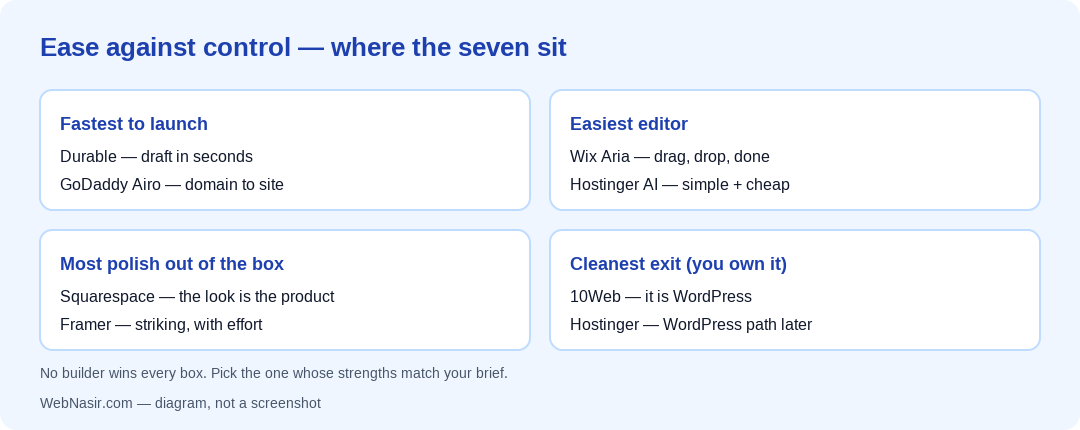
The first table in this guide compares free plans and headline strengths. This second table compares the things that decide whether you will still be happy in a year: how much control you get, how good the design ceiling is, how seriously the builder handles selling online, how much SEO control you actually have, how hard it is to leave, and how steep the learning curve feels to a non-technical owner. No builder wins all six. The right choice is the one whose strengths match your brief and whose weaknesses fall on things you do not care about. Read the table row by row, and notice which column makes you uncomfortable — that discomfort is the information.
| Builder | Editing freedom | Design ceiling | Selling online | SEO control | Leaving later | Learning curve |
|---|---|---|---|---|---|---|
| Hostinger AI | Good; simple editor | Clean, not striking | Via WordPress/WooCommerce path | Good basics | Easiest (WordPress path) | Easy |
| Wix Aria | Very good; drag-and-drop | Polished, familiar | Strong; apps for store + bookings | Good; apps add depth | Hard; rebuild to leave | Easiest |
| Squarespace AI | Moderate; guided sections | Highest out of the box | Strong built-in commerce | Good; consistent structure | Hard; rebuild to leave | Easy to moderate |
| Durable | Basic; quick edits | Clean but generic | Light; services, not shops | Basics only | Hard; rebuild to leave | Easiest |
| Framer | Highest; precise control | Highest with effort | Light; not shop-first | Good; clean output | Moderate; export is partial | Steepest |
| 10Web | Good; WordPress underneath | Depends on theme | Strong via WooCommerce | Strongest (plugins) | Easiest; it is WordPress | Moderate |
| GoDaddy Airo | Basic; guided | Generic | Light; upsells add it | Basics only | Hard; tied to ecosystem | Easiest |
Two rows in that table deserve a closer look, because they are where buyers most often fool themselves. The first is editing freedom versus design ceiling. Framer wins both columns, but only if you invest the time — its ceiling is high and its floor is also high, meaning a rushed Framer site can look worse than a rushed Squarespace site, where the guardrails protect you. The second is leaving later. Only the WordPress-based options give you a clean exit; every other builder means rebuilding if you leave. That is not a deal-breaker — most small businesses never leave, and a site rebuild every few years is normal — but it means the switching cost should be part of the price comparison. A builder that costs less per month but traps your content is not cheaper than a builder that costs more and lets you walk away with your site.
Use the table like this. Circle the two columns that matter most to your brief — for most small businesses those are editing freedom and leaving later, or selling online and SEO control. Cross out every builder that is weak in both of your circled columns. You will usually be left with two or three names, and that is your real shortlist. Then do the afternoon test described later in this guide on those two or three, and no more. Comparing seven builders in depth is a research project; comparing three with your actual content is a decision.
Free plans, honestly: what ‘free’ really gives you
Every builder on this list offers some way to start without paying, and every one of them means something different by “free”. The differences matter, because the free tier is where most small businesses actually make their decision — and where most of them get quietly disappointed. A free plan that puts your site on a subdomain with the builder’s branding is fine for testing and useless as a business address: nobody trusts a shop whose web address reads like a demo. The free tier’s job is to let you test the editor with your real content, not to be your permanent website. Judge it on that job alone.
In practice the free options fall into three shapes. Wix and Framer give you a genuinely usable free site on their subdomain, with real editing and publishing — the best way to learn whether you like the editor, and the honest way to test-drive before you pay for a domain. Squarespace gives you a trial instead of a permanent free site, which is a fairer preview of the finished product but puts a clock on your decision; use the trial with your real photos and real text, not with placeholder content, or you will learn nothing. Durable, Hostinger, 10Web, and GoDaddy’s Airo are closer to “generate first, pay to publish properly”: the AI draft is free to create, and the professional version — your own domain, no builder branding, the features a business needs — is paid. There is nothing dishonest about any of this. It is simply three different free shapes, and the shape should match how you decide: slowly and hands-on, or quickly with a deadline.
Three free-plan checks before you commit to any of them. First, what exactly disappears when you pay: the subdomain, the builder’s branding, the ads if there are any, and which features unlock — payments and bookings are usually the ones held back, and they are usually the ones a business needs. Second, whether your work survives the upgrade: on every builder here it does, but confirm it by upgrading the test site you actually built rather than starting over. Third, and most often skipped, whether the free site you publish is indexed by search engines or blocked from them: a free subdomain site that Google can find is not necessarily a good thing if it carries your business name with the builder’s branding and your half-finished draft. Test privately, publish publicly only when it is ready.
- Free subdomain + builder branding: fine for testing, not a business address.
- Trial-led (Squarespace): a real preview, but the clock is ticking — test with real content.
- Generate free, pay to publish properly: the draft is free, the professional version is paid.
- Check what paying actually removes — and whether payments and bookings are the locked features.
- Never let a half-finished free draft carry your business name in search results.
The real cost of a website: year one vs year two
The price on a builder’s homepage is never the price of the website. It is the price of the first year of the website, usually after a large introductory discount, and the difference between the two numbers is where small businesses get their most unpleasant surprise. A plan that costs very little for the first twelve months can cost two or three times as much at renewal, and the renewal is the price you will pay every year after that. Before you compare any two builders, find the renewal price on each pricing page — it is usually printed in smaller text underneath the headline price — and compare those numbers instead. The builder that looks cheapest in year one is often not the cheapest by year three.
The subscription is also only one line on the real bill. A working business website usually needs a domain name, which may be free for the first year and paid after that; a professional email address on your own domain, which some builders include and some charge separately for; and the features that turn a brochure into a business tool — online payments, bookings, or a store — which are often on a higher tier than the one advertised. Add the apps, too: a bookings app, a reviews widget, or a marketing tool can each add its own monthly charge, and Wix’s ecosystem in particular makes it easy to accumulate five small subscriptions that together cost more than the builder itself. None of these are hidden in a dishonest sense. They are simply not on the homepage, and the honest way to compare is to list everything your brief needs, price all of it, and then compare totals.
There is one more cost that never appears on a pricing page: the cost of leaving. If the builder does not let you export your site, leaving means paying someone — or spending your own weekends — to rebuild it. That rebuild cost should sit in the back of your mind when you choose, especially if you pick a builder mainly because the first year is cheap. The cheapest honest way to think about it is total cost over three years: subscription renewals, domain, email, the apps and tiers you actually need, and a rough allowance for either staying or rebuilding. Run that number for your two finalists. It takes twenty minutes, and it is the single most useful piece of arithmetic in this whole guide, because it replaces a feeling — “this one looks cheap” — with a number you can defend.

Can an AI-built site rank on Google?
Yes, with a qualification that matters: the builder does not rank your site, your content does. An AI builder can give you the technical basics — editable page titles and descriptions, clean page addresses, a sitemap, mobile-friendly pages, and fast loading — and every builder on this list covers those basics to a usable standard. What none of them can do is write the content that earns a ranking: a services page that answers the exact questions your customers ask, a location page that proves you serve their town, photos of your real work, and reviews from real customers. Google ranks pages that help the searcher, and an AI draft that says the same generic things as ten thousand other AI drafts helps no one.
Where the builders do differ is in how much control they give you over the details that support ranking. WordPress-based options give you the most: plugins for structured data, full control over addresses and redirects, and no ceiling on what you can add. Wix and Squarespace give you solid control over titles, descriptions, and page structure, which is enough for most local businesses. The lighter builders give you the basics and little more, which is fine for a simple service site but becomes a constraint the moment you want to publish regularly or compete for a busy search term. The practical rule is simple: if ranking matters to you, pick a builder that lets you edit every page title, every description, and every page address, and that generates a sitemap automatically. Then check those three things on your own site after you build it, because a setting the builder offers is not the same as a setting you actually used.
The other half of ranking has nothing to do with the builder at all, and it is the half most AI-builder buyers skip. Set up a Google Business Profile with your real address, hours, and photos, and keep it updated — for a local business, this matters more than any builder feature. Publish one useful page a month: a service explained properly, a question customers keep asking, a job you finished with photos. Ask happy customers for a review and reply to every review you get. None of this is technical, none of it needs AI, and all of it moves the ranking more than switching from one builder to another. The builder is the shopfront; the content and the reviews are the reputation. A beautiful shopfront with no reputation still gets no visitors.

Speed and mobile: the two tests to run before you pay
Most of your customers will meet your website on a phone, on a mobile connection, while doing something else. That is the test your site has to pass, and it is the test most owners never run, because they build and preview on a laptop. Before you pay for any builder, publish the draft and open it on your own phone, on mobile data rather than Wi-Fi, and try to do the one thing your brief says a visitor must do: find the price, book the slot, call the number. Time it. If it takes more than a few seconds to load, or if the button you need is below three screens of scrolling, you have learned more in two minutes than a week of comparing feature lists would have taught you.
The second test costs nothing and takes five minutes: run your draft through Google’s PageSpeed Insights tool and read the mobile score, not the desktop one. You do not need to understand every line of the report. Look for the two numbers that matter to a visitor: how long the largest thing on the page takes to appear, and whether the page jumps around while it loads. Big uncompressed photos are the usual cause of a slow AI-built site, because the generator fills the draft with large images and the owner never compresses them. Replace the largest images with smaller versions or use the builder’s image tools to do it, and re-run the test. A site that loads quickly on a cheap phone is not a technical luxury. It is the difference between a visitor who stays and a visitor who goes back to the search results and calls your competitor.
One more check while you are on your phone: read your own homepage out loud. AI-generated copy is easy to recognise when spoken — long sentences, vague claims, words like “seamless” and “cutting-edge” that no customer has ever said about a salon or a repair shop. If a sentence sounds like it could belong to any business, rewrite it with a specific fact: what you actually do, where you do it, and what it costs. Customers trust specifics. “Haircuts from ₹299, open till 9pm, walk-ins welcome” will bring you more business than a paragraph of polished adjectives, on any builder, at any price.
What happens when you outgrow your builder
Every small business that succeeds eventually outgrows its first website, and that is a good problem. The shape it takes depends on the builder you chose. On a WordPress-based option — Hostinger’s WordPress path or 10Web — outgrowing usually means adding things: a store, a membership area, a booking system, a new design, all on the same site, without moving. On Wix, Squarespace, Durable, Framer, and GoDaddy, outgrowing usually means one of two things: either the builder has grown with you, because you added the app or the tier you needed, or you have hit a wall the platform cannot cross, and the next step is a rebuild somewhere else. Both are normal. The mistake is not outgrowing your builder. The mistake is discovering, at that moment, that you cannot take your own content with you.
Protect yourself from that moment from day one, whatever you choose. Keep your own copies of everything that matters: your photos, your written content, your customer list, your product list with prices, and your domain registration. Your domain, in particular, must be registered in your name, on an account you control — never let anyone else own your domain, because the domain is your address, and losing it means losing every link, every listing, and every customer who bookmarked you. If the builder registered the domain for you, check today that the registrant details show your name and that you can log in to manage it. This takes ten minutes and it is the most valuable ten minutes in this guide.
When the rebuild day does come, treat it as a redesign, not a disaster. You will know more about your customers by then than you do today: which pages they visit, which service they ask about, which button they never press. A rebuild lets you throw away the pages nobody reads and build the site your business has actually become. The builders that make this easiest are the WordPress-based ones, because the content moves with you; the builders that make it hardest are the closed ones, where you rebuild from scratch. That difference is worth remembering at purchase time, not because you will leave tomorrow, but because a site you can leave is a site you can improve without asking permission.
Choosing in one afternoon: a practical workflow
Here is the whole decision, compressed into one afternoon, using your five-line brief and the shortlist this guide has given you. Start with the two or three builders that survived the dimensions table — not seven, not five, two or three. Open the first one and build the draft with your real business details, not the example content: your services, your prices, your town, your phone number. Replace the photos with two real photos from your phone. Then do the phone test: open it on mobile data, find the one action your brief demands, and time it. Write down three things: how long the build took, how the editor felt, and the total three-year cost including the domain and the tier you need.
Repeat the same exercise on the second builder, with the same content and the same photos. Do not compare the builders’ demo sites with each other — compare your business on each builder, because the demos are designed to flatter and your content is the truth. By the end of the second build you will usually know. One editor will have felt like work and the other will have felt like progress; one draft will look like your business and the other will look like a template wearing your name. If you genuinely cannot tell them apart, pick the cheaper three-year total, or the one with the cleaner exit path, and move on. The cost of another week of comparing is a week without a website, and a week without a website costs more than any difference between these builders.
Then stop researching and launch. Publish the site with your own domain, connect it to your Google Business Profile, add a WhatsApp button if your customers use WhatsApp, and tell your ten best customers it exists. Spend the next month improving one thing a week — real photos, a proper services page, customer reviews, a page that answers the question everyone asks — instead of wondering whether another builder would have been better. It would not have been, in any way that matters. The builder that ships is better than the builder that is still being compared, and the businesses that win with AI website builders are not the ones that picked perfectly. They are the ones that picked, published, and kept improving.
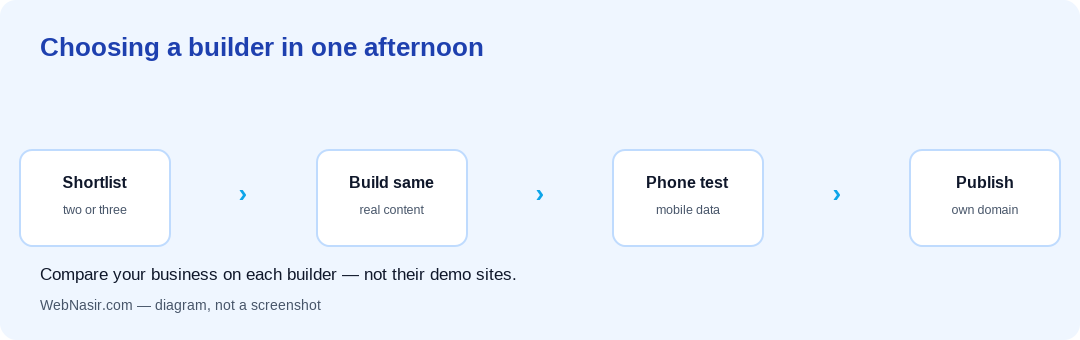
- Morning: write the five-line brief, shortlist two or three builders.
- Build the same real content on each — your services, prices, town, phone number.
- Phone test on mobile data: load time, and the one action a visitor must take.
- Price the three-year total for each, including domain, email, apps, and renewal.
- Pick, publish on your own domain, connect Google Business Profile and WhatsApp.
- Improve one thing a week for a month — photos, services page, reviews, FAQ.
Mistakes small businesses keep making with AI builders
The first mistake is publishing the draft. The AI wrote generic copy, chose placeholder images, and guessed your opening hours, and the site went live exactly like that, because the generation felt like the work and the editing felt optional. It is not optional. A published draft tells every visitor that the business does not check its own work, and no template can cover for that. The fix is unglamorous: read every page, correct every fact, replace every image, and only then publish. If you would not hand a customer a brochure with the wrong phone number on it, do not publish a website with one.
The second mistake is choosing on price alone and then paying more anyway. The cheapest first year is usually the most expensive third year, the cheapest plan usually lacks the one feature the business needs, and the money saved on the builder is often spent twice over on apps, upgrades, and eventually a rebuild. Price the three-year total before you choose, as described above, and you will never make this mistake. The third mistake is the opposite: buying the most powerful builder for a simple need, and then never using it. A salon does not need Framer’s animation controls or 10Web’s plugin library, and paying for power you never touch is the same waste as buying features you never use.
The fourth mistake is ignoring the phone. The site is built on a laptop, previewed on a laptop, and approved on a laptop, while the customers arrive on phones. Check the site on a real phone, on mobile data, before you pay and before you launch, and keep checking it every time you change something important. The fifth mistake is treating the website as finished. A website is not a brochure you print once; it is a shopfront you tend. The businesses that get customers from their sites are the ones that add a page a month, update their prices, post their finished work, and answer their reviews. The builder makes the first version easy. Only the owner can make the second version better.
- Publishing the AI draft without editing it — wrong facts, placeholder images, generic copy.
- Choosing on the first-year price, then paying more every year after.
- Buying the most powerful builder for a simple need — and never using the power.
- Building and approving on a laptop while customers arrive on phones.
- Treating launch as the finish line instead of the starting line.
- Letting someone else own the domain name.
Frequently asked questions
Which AI website builder is best for a small business?
There is no single best builder, because small businesses are not a single thing. For most small businesses, the sensible default is the one this guide’s verdict already names: start free to validate the idea, then use Hostinger’s AI builder with its WordPress path for the owned, long-term site. If your business needs bookings and an app ecosystem and you want the easiest editor, pick Wix. If the look of the site is the product — a café, a boutique, a photographer — pick Squarespace. If you need something live this week and you are a solo service provider, pick Durable and do the editing pass. If design control is the priority, pick Framer. If you want real WordPress from day one, pick 10Web. If your domain is already at GoDaddy and you want one account, pick Airo. The “best” builder is the one whose strengths match your brief and whose weaknesses fall on things you do not need.
Can I build a business website completely free?
You can build and publish a website without paying, on Wix or Framer’s free tiers, but a free site is not a business website. It runs on the builder’s subdomain, carries the builder’s branding, and lacks the features a business needs — payments, bookings, and a professional address. Use the free tier to test the editor with your real content and to learn whether you like the builder. When the site is ready to represent your business, pay for your own domain and the plan that removes the branding. The free tier is a fitting room, not the shop. Budget for the domain and at least the first year of the plan you actually need, and treat anything less as a rehearsal.
Will an AI-built website rank on Google?
An AI-built site can rank, because Google ranks pages, not builders. The builder supplies the technical basics — editable titles and descriptions, clean addresses, a sitemap, mobile-friendly pages — and the ranking itself comes from content that helps the searcher, a Google Business Profile that proves you are real and local, and reviews from real customers. What will not rank is an AI draft published untouched: generic copy that says the same things as every other AI-written site is invisible to Google and unconvincing to customers. Rewrite the copy with specific facts about your business, publish one useful page a month, and keep your Business Profile current. That work matters more than which builder you chose.
Can I move my website to another builder later?
On most builders, no — not cleanly. Wix, Squarespace, Durable, Framer, and GoDaddy sites do not export to another platform, so leaving means rebuilding, even though you can always take your domain name, your photos, and your written content with you. The exceptions are the WordPress-based options: a 10Web site is a real WordPress site, and a Hostinger site can graduate to WordPress on the same account, so the content and the structure move with you. That is why the “leaving later” column in the dimensions table matters at purchase time. If ownership and a clean exit matter to you, choose a WordPress-based option from the start rather than discovering the lock-in later.
Do I still need a domain name?
Yes. A business website on a builder’s subdomain — yourbusiness.wixsite.com, or yourbusiness.framer.website — tells every visitor that the site is a demo, and it tells Google the same thing. Your own domain costs little, makes the business look established, works on business cards and shop boards, and gives you a professional email address. Buy it in your own name, on an account you control, and connect it before you tell anyone the site exists. If you already own a domain, check that it is registered to you and that you can log in to manage it; if someone else bought it for you, get the login transferred now, while the relationship is good.
How long does it actually take to build a site with AI?
The generation takes minutes. The website takes days. The AI can produce a draft in under a minute, but the finished site — real photos, correct services and prices, your own words, a phone test, a domain connected, a Business Profile linked — takes an afternoon of focused work at minimum, and a week of evenings is a more honest estimate for a business that wants to do it well. Anyone who tells you a real business website takes ten minutes is selling you the generation step and hiding the editing step. Budget the afternoon, do the work, and launch a site you would be proud to show a customer. The draft is the beginning of the job, not the end of it.
Do I need to know coding to use an AI website builder?
No. Every builder on this list is designed for owners with no coding experience, and the AI exists precisely to remove the technical beginning. What you do need is the content: what you sell, what it costs, how customers reach you, and photos of your real work. The builders differ in how much technical comfort they reward later — Framer and the WordPress-based options assume more, Wix and Durable assume less — but none of them requires you to write code to launch a professional site. If a builder ever asks you to do something that feels technical, that is what its support chat is for, and it is also a signal: if the first week already feels technical, the builder may be the wrong fit for you.
Your launch checklist
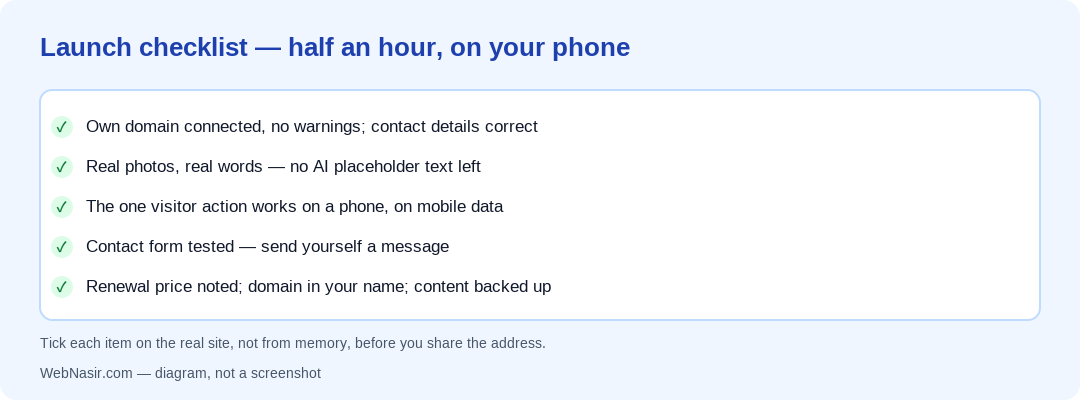
Before the site goes live, run through this list with the site open on your phone. It takes half an hour, and it catches the mistakes that cost customers: a wrong number, a dead button, a page that only looks right on a laptop. Tick each item off on the real site, not from memory, and fix what fails before you tell anyone the address. A launch is not the day the site appears. It is the day a stranger can find you, understand what you sell, and reach you without friction — and this list is how you check that is true.
- Your own domain connected, and the site loads on it without warnings.
- Phone number, WhatsApp button, address, and opening hours correct on every page.
- Services and prices listed, in your own words, with nothing left as AI placeholder text.
- Real photos of your business, your work, or your products — no generated stand-ins on the homepage.
- The one action a visitor must take works on a phone, on mobile data.
- Page titles and descriptions written for every page, not left as defaults.
- Google Business Profile created or linked, with matching name, address, and hours.
- Contact form tested — send yourself a message and confirm it arrives.
- Renewal price noted, with a calendar reminder before the renewal date.
- Your domain registered in your name, and your photos and content backed up outside the builder.
The seven builders in this guide are all capable of producing a good small-business website, and the differences between them are smaller than their marketing suggests. What makes the difference is not the AI. It is the brief you write before you start, the real photos and real words you put in, the phone test you run before you pay, and the habit of improving one thing a week after launch. Pick the builder that fits your brief, publish the site, and then get back to the work that actually brings customers in — serving them well enough that they leave a review. The website is the shopfront. You are the business.