Here is the short answer first. Yes, you can make a QR code for a link, a Wi-Fi network, a UPI payment or a business card without an account, without a watermark, and without paying. Seven tools do it, and this guide compares these free QR code generator no signup options on the only things that matter: whether the code still scans after you style it, whether your Wi-Fi password or UPI ID leaves your device, and whether the code keeps working after you print it.
One honest note before the list. I did not generate test codes or print and scan them for this guide. Every comparison below rests on the tools' own pages, checked live on 27 November 2026. The test section gives you a ten-minute protocol — one link, five checks — so you can confirm any of them yourself before you trust it with a code you are about to print a thousand times. One more honest note about the gap itself: page 1 for the exact phrase "free QR code generator no signup" is vendor tool pages only — GeoParrot, Leadpages, LanderLab, Livecounts, Elbuz and ContentStudio. Roundups do exist for broader phrases, and the closest thing to a comparison is QRBliss's own page, which pits its free plan against seven named tools with facts checked on 20 October 2026 — but no independent guide targets the exact phrase. That is the gap this guide fills.
What "really free" means here
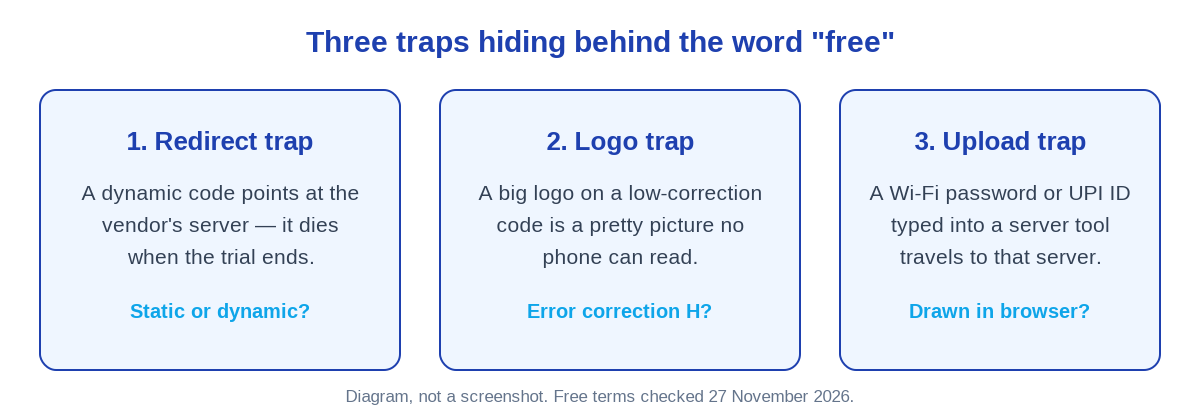
In this category, the word free hides three traps. A tool can clear two traps and still fail your job, so check every one of the three before you pick.
The first trap is the redirect trap, and it is the one that kills printed codes. A dynamic code does not hold your link at all. It holds a short link on the vendor's server, and the server forwards each scan to your real destination. That is useful — you can change the destination after printing, and you can count the scans — but the forwarding stops when the trial or the subscription ends. QRBliss gives you 15 dynamic codes free forever, with unlimited scans, and says it never turns them off for inactivity. StyleQRCode gives you 3. Most other "free" generators give you no dynamic codes at all, or a 14-day trial that deactivates them when it ends — QRBliss's own comparison page records exactly that for QR Code Generator PRO, with the pricing page checked on 20 October 2026. If the code goes on something you print once and never touch again — a menu, a business card, a shop counter — a static code is the safer pick. The data is baked into the pattern itself, it works forever, and no server sits in the middle.
The second trap is the logo trap. A logo in the middle covers part of the code, and the code only survives because of error correction — the extra data woven into the pattern that rebuilds the covered part. Level H, the strongest, restores about 30% of a damaged code; level L restores about 7%, M about 15% and Q about 25%. Those are DENSO WAVE's own figures, quoted on the GeoParrot, Livecounts and makeqr.fyi pages. A tool that does this properly raises the error correction to H automatically the moment you add a logo — StyleQRCode and makeqr.fyi both say so on their own pages, and the TopFood menu generator caps the centre image at 20% of the code, which it calls the measured limit where codes still scan. A tool that lets you paste a big logo onto a low-correction code will hand you a pretty picture that no phone can read.
The third trap is the upload trap, and it is the one with real consequences. A Wi-Fi QR code holds your network password in plain text inside the pattern. A UPI QR code holds your payment ID. If the generator draws the code on its server, that password and that ID travelled to a server you do not control. Five of the seven tools here draw a static code entirely inside your browser — GeoParrot, MSRX, LanderLab, Livecounts and makeqr.fyi all say so, in so many words, on their own pages: nothing you type is uploaded, stored, or even seen. The two studio tools — QRBliss and StyleQRCode — also draw static codes in the browser, but their dynamic codes are short links on their servers, which is the whole point of a dynamic code. If the code carries a password or a payment ID, pick a tool that never uploads it.
The 7 tools at a glance
| Tool | Signup? | Watermark? | Free limit | Static or dynamic? | Where your data goes |
|---|---|---|---|---|---|
| QRBliss | No | No | Unlimited static; 15 dynamic free | Both | Logo stays in browser; dynamic codes on its servers |
| MSRX QR Studio | No | No | No limit, no paid tier | Static | Stays on your device |
| StyleQRCode | No | No | Unlimited static; 3 dynamic free | Both | Static in browser; dynamic on its servers |
| GeoParrot | No | No | No limit stated | Static | Stays on your device |
| LanderLab | No | No | No limit stated | Static | Stays on your device |
| Livecounts | No | No | No limit; batch of 500 rows | Static | Stays on your device |
| makeqr.fyi | No | No | No limit stated | Static | Stays on your device |
Take the table as an orientation, not a decision. The details below are where the differences live: QRBliss is the only one here that gives you free dynamic codes in double figures, MSRX is the only one with no paid tier at all, and Livecounts is the only one that makes five hundred codes in one go.
Free QR code generator, no signup — the 7 tools, one by one
QRBliss — the branded pick, 15 dynamic codes free
QRBliss is the most generous free tier here, and the most honest about what it is for. You type a link, drop in your logo, and its AI Brand Sync pulls the palette out of the logo — the extraction runs in your browser with a library called Vibrant.js, so the logo file never touches a server unless you sign in to save the code — then it checks the contrast between your colours and the background against a 4.5:1 WCAG threshold and tells you whether the code will still scan, all in under two seconds. The result exports as PNG, JPG, SVG, or a print-ready PDF with a quiet zone, crop marks and 3 mm bleed, and no tier adds a watermark. The free plan gives you unlimited static codes plus 15 dynamic codes with unlimited scans and no expiry, across 14 code types: URL, text, email, phone, SMS, Wi-Fi, vCard, location, PDF, YouTube, WhatsApp, LinkedIn, menu and event. Pro is $9 a month or $84 a year, and Business is $290 a year. One thing to know before you plan around the dynamic codes: making one is free, but claiming it and managing the destination needs an account — that is the only point in the flow where sign-in becomes necessary, according to an independent review that tested the live generator in September 2026. Best for: a branded code on packaging, a menu or a business card, and the only free pick here if you need to change the destination after printing.
MSRX QR Studio — the UPI pick, free forever
MSRX QR Studio is the India pick, and the simplest business model in this list: there is no paid tier at all. The whole price list is one line — free is the business model, not an introductory offer — with no watermark, no download limit, and no limit on how many codes you make or how long you keep using them. It covers 22 kinds of code, each with its own form so you never have to know what a WIFI:S: string looks like: a website, your UPI ID, your Wi-Fi, a phone number, a menu, an event, your contact details, and fifteen more. The UPI form is the one that matters most here. You type your UPI ID and your name, optionally set a fixed amount and a note, and the code opens any UPI app — Google Pay, PhonePe, Paytm, BHIM and the rest — because it uses the standard UPI payment format. Downloads come as PNG, SVG, JPEG or WebP, there are 32 templates and 33 frames to start from, and a batch mode takes a list in and hands back a ZIP and a print-ready sheet — table numbers, product labels, UPI price tags. Everything is drawn on your device, with no account, no cookie banner and no analytics, and every code you download is kept in your browser so you can print it again later. Best for: a shop counter, a stall, or an invoice — any place in India where the code takes money.
One UPI detail worth getting right, from the Tool Studio UPI generator's own page: a UPI code needs a real UPI ID, the name@bank kind. A bare phone number is not a valid payee address in the UPI spec, so a code made from a phone number alone will not work. The standard transaction limit is ₹1,00,000, with higher limits for some categories such as tax payments, hospitals and education, and each bank or app can set its own lower limit. Check the payee name on the payment screen before you confirm — a UPI code that pays the wrong person cannot be undone by the generator.
StyleQRCode — the 60-types pick
StyleQRCode is the widest tool here. Sixty content types, from a website URL or an Instagram profile to Wi-Fi, vCard, email, SMS, PayPal, UPI and Pix, each with its own fields. You style the code — dot and corner shapes, solid colours or gradients, glow, texture, a confetti border — upload your logo or pick a brand icon, and the tool raises the error correction to H automatically so the centre image does not break the code. Switch the style to QR Art and you can describe a scene, a Japanese garden or a neon city, and get an artistic code built around your link. Downloads come as PNG, JPG, WEBP or SVG, and every code you make without signing in is static: the content is written into the pattern itself, so it keeps working forever and never passes through the vendor's servers. The free plan also includes 3 dynamic codes with full analytics and 5 starter AI credits. Pro is $6.58 a month billed yearly, or a $99 one-time lifetime licence. The site was launched in week 46 of 2026, so it is new — the free tier is generous, and the track record is short. Best for: a code that has to look like a brand, not a barcode — a café menu, an event poster, a product label where the code is part of the design.
GeoParrot — the on-device pick
GeoParrot is the plainest tool here, and that is its strength. Turn a link, a Wi-Fi network, a contact card, an email, a phone number, or any text into a code — free, instant, and entirely in your browser. Pick a content type, add an optional centre logo, choose an error-correction level and colours, and download the result as a high-resolution PNG or an infinitely scalable SVG. No signup, no watermark, and the page says plainly that there are no limits. The codes are static: they encode your text directly, so they never expire, there is no redirect through the vendor's servers, and nothing is tracked. The page explains the error-correction levels in plain words — L tolerates about 7% damage, M about 15%, Q about 25% and H about 30% — and recommends M as a good default, Q or H if the code will be printed small or might get scuffed. Everything happens locally in your browser: your text, your Wi-Fi password and your logo image are never uploaded. Best for: a quick code you need in thirty seconds, and the safest pick for a Wi-Fi code, because the password never leaves your device.
LanderLab — the simple pick
LanderLab does the least, and does it cleanly. Create a QR code in seconds: a link, text, email or Wi-Fi network becomes a high-quality, customisable code you download instantly as PNG or SVG. No signup, no watermark, and the page states there is no limit on how many codes you can create. Everything happens in your browser — the tool never uploads, stores or sees your data. Four steps, under a minute: enter your text or URL, customise it, test it with your phone camera, and save it. That is the whole tool. There is no logo upload here, no frames, no dynamic codes, and no batch mode. What you get instead is a page with nothing to learn and nothing to get wrong. Best for: a link on a flyer, a slide, or a chat message — the one-off code where styling would only slow you down.
Livecounts — the batch pick
Livecounts is the only tool here built for making many codes at once. Make a QR code for a link, text, Wi-Fi network, email, phone number, text message, contact card or calendar event and download it as PNG or SVG, with no sign-up, and the code never expires. The batch mode is the reason to pick it: up to 500 rows at a time from a CSV, a ZIP download, and the codes use the same error correction, colours, margin and logo as the single generator. Your rows and files stay in your browser. The single generator is just as thorough — optional UTM tags for Google Analytics, error correction L, M, Q or H, custom colours and margin, an optional centre logo with a scan test, and printable cards. The page lists its sources and the dates they were checked — Denso Wave for error correction, margin and versions, Keyence for capacity, the ZXing wiki for barcode contents, and the vCard, iCalendar and UPI specifications — checked on 20 and 21 November 2026. That is more sourcing than any other tool in this list puts on its own page. Best for: table numbers in a restaurant, product labels, event badges, or any job where one code is never enough.
makeqr.fyi — the print pick
makeqr.fyi is the print pick. Pick one of nine types — link, text, Wi-Fi, vCard, email, phone, SMS, location or event — and your QR code appears instantly, styled with a logo, colours and shapes, then downloaded as PNG or SVG. It is made in your browser with no redirect, so it never expires, and you can start a free group check-in QR room from the same page. Upload a logo and the tool switches the error correction to H, the 30% level, and clears the dots behind the logo so it sits on a clean area. Six templates — Classic, Violet, Dots, Forest, Sunset, Night — or your own code colour, eye colour and background, a gradient, and a short label such as SCAN ME above or below the code. Everything runs in your browser: the text you type, the logo you upload and the finished image are not sent to any server, and there is nothing to sign up for. Codes made here are free for commercial use — menus, packaging, ads, signs and anything else you sell — with no watermark. One small thing to know: when you print, the tool suggests adding a small makeqr.fyi line under the code, and you can untick that option to remove it. Best for: a printed code where the file has to stay sharp at any size — a poster, a shop window, a banner.

The test — a ten-minute protocol
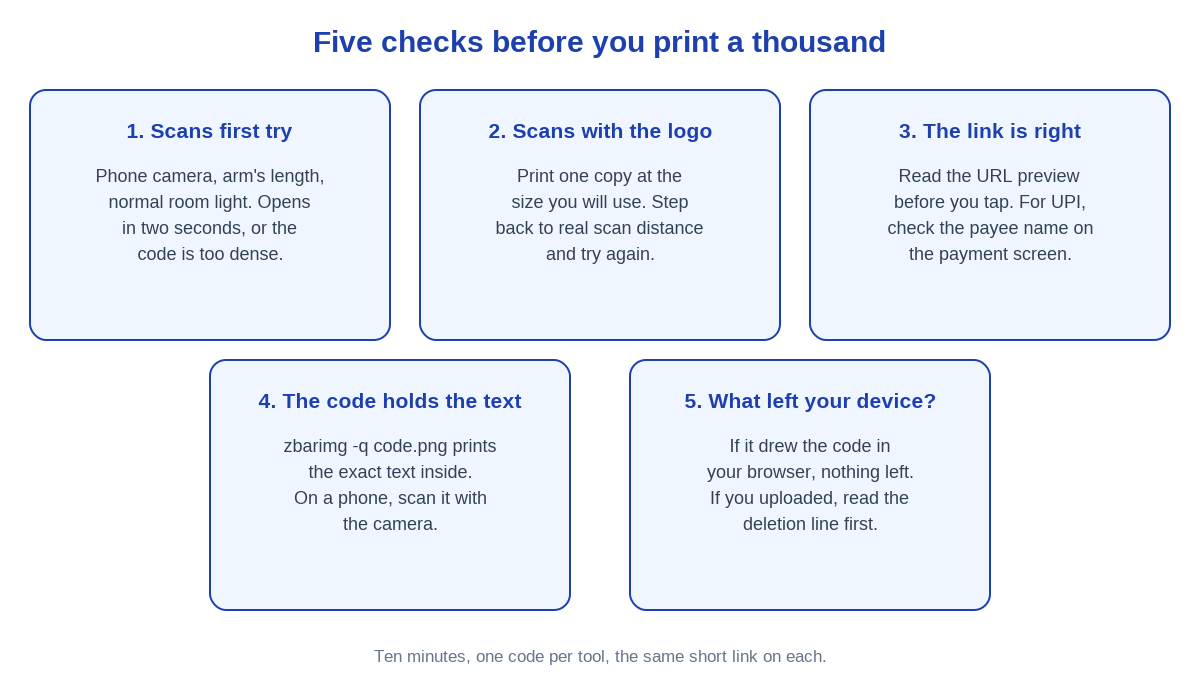
Do not trust any of these pages with a code you are about to print a thousand times until you have run the same link through the tool yourself. Here is a ten-minute protocol you can run yourself. Make one code for the same short link on each tool you are considering, and check five things.
First, does it scan on the first try? Point your phone camera at the code on screen, at arm's length, in normal room light. If it does not open in two seconds, the code is already too dense or too low-contrast — do not print it and hope. Second, does it still scan with the logo? Print one copy at the size you plan to use, step back to the distance people will actually scan from, and try again. If it fails, the logo is too big or the error correction is too low. Third, does the link open where you expect? Read the URL preview your phone shows before you tap it, and for a UPI code check the payee name on the payment screen. Fourth, what did you get to download? Check the file before you send it to print.
zbarimg -q code.pngThat prints the exact text the code holds, which is the only honest check that the code contains what you typed. It needs the zbar-tools package installed, and on a phone the same check is just scanning it with the camera. Fifth, what left your device? If the tool needed an upload, assume a copy of your link, password or payment ID sat on a server, and read the deletion line on its page before you make a Wi-Fi or UPI code there. If it drew the code in your browser, nothing left, and there is nothing to check.
Best pick by job
The job decides the tool — the homepage never does. For a shop counter or a stall in India, MSRX is the pick: the UPI form with a fixed amount, batch price tags, and a print-ready sheet, all free with no account. For a restaurant menu, StyleQRCode or QRBliss is the pick: a logo in the middle, frames, and a print-ready PDF — StyleQRCode if you want the widest choice of code types, QRBliss if you want the PDF with crop marks and bleed. For a business card, GeoParrot or LanderLab is the pick: a clean SVG, no styling to go wrong, and a code that is 2 cm wide and still scans. For packaging, QRBliss is the pick: the PDF export is set up for a print shop, with a quiet zone, crop marks and 3 mm bleed. For bulk labels, table numbers or event badges, Livecounts is the pick: five hundred rows in one ZIP. For a poster or a shop window, makeqr.fyi is the pick: SVG scales to any size without blurring, and the logo sits on a clean area at error correction H. For a one-off link on a flyer or a slide, LanderLab is the pick: thirty seconds, no decisions.

Print it right — size, quiet zone, contrast
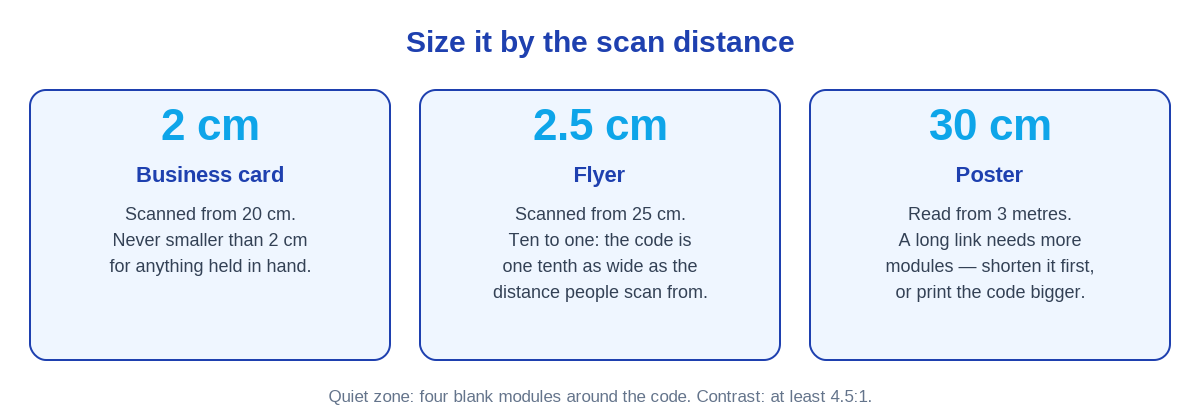
A code that scans on screen can still fail on paper, and the reason is almost always size. The rule most QR guides use is ten to one: make the code about one tenth as wide as the distance people will scan it from, and never smaller than 2 cm (0.8 in) wide for anything held in the hand. That is the Gearside print-size guide, updated on 22 November 2026, and it holds up well for typical phones and short links. The arithmetic is yours to check: a poster read from 3 metres needs a code about 30 cm wide, and a business card scanned from 20 cm needs a code 2 cm wide. The guide's chart, for a short link of about 40 characters, puts a business card at 2 cm for a 20 cm scan, a flyer at 2.5 cm for 25 cm, a table tent at 3.8 cm for 38 cm, a poster on a wall at 10 cm for a metre, and a window sign at 30 cm for 3 metres. Those widths are the code itself, not counting its white margin.
That white margin has a name — the quiet zone — and it is not decoration. DENSO WAVE, the company that invented the QR code, requires a blank margin four modules wide around the code, and a code with text or a frame touching its edge scans badly. Leave it alone. Contrast matters just as much: a dark code on a light background scans; a light code on a dark background, or two colours too close together, often does not. QRBliss enforces a 4.5:1 WCAG contrast ratio before it applies a palette, which is the right instinct — if your brand colours fail that check, the code is the wrong place to insist on them.
One more thing decides whether a printed code scans: how much data is inside it. A short link of about 40 characters is a version-2 code, 25 modules across. A long link with UTM tags needs more modules, so each module gets smaller at the same printed size, and a code that was fine on screen starts failing on paper. Shorten the link first — your own domain, or a short link you control — and if you cannot shorten it, print the code bigger. The size calculator at makeqrco.de does the same arithmetic from the other end: it takes the scan distance and the exact content, and returns a minimum, a recommended size and the quiet zone.
The honest limit — QR codes and scams
A QR code is a link you cannot read before you scan it, and that is exactly what scammers use. The US Federal Trade Commission's warning, quoted on the Elbuz generator page with the source checked on 18 November 2026, is blunt: scammers hide harmful links in QR codes to steal information. The defence is the preview. Every phone shows the link before it opens it — read it. If the link is a short link you do not recognise, or the page it opens asks for a password, a one-time code, or a payment you did not expect, stop. For a payment code, the payee name on the payment screen is the check: if it is not the shop, the restaurant, or the person you meant to pay, do not confirm. A code that pays the wrong person cannot be undone by the generator that made it.
The also-rans, one line each: Qrova, a new branded-code tool whose free terms I could not verify from its own pages today — a launch record captured on 14 November 2026 says free 1K, 2K, 4K and SVG downloads with no signup or watermark, while SourceForge describes it as a German business tool with a free plan and Pro from EUR 7 a month, so it stays here, not in the seven, until its own pages can be checked; Elbuz, a plain no-signup generator with PNG and SVG downloads and Wi-Fi codes for WPA, WPA2 and WPA3; ContentStudio, a free link-only generator with no usage cap, no account, and no branding on the code; the TopFood menu generator, a free menu QR with a logo capped at 20% of the code and PNG at 2048 pixels; Tool Studio's UPI generator, a free UPI code with a fixed amount, a logo, and a print-ready Scan & Pay poster in A4, A5 and 4×6-inch sizes; Scanmint, whose static codes are free with no account and no watermark, but whose free PNG exports stop at 300 pixels; QRCodeStack, with 37 code types including UPI, and unlimited static codes free without signup; QR TIGER, a professional tool whose plans start at $7 a month; and QRCode Monkey, whose free static codes are ad-supported and whose dynamic codes need a plan.
Questions people ask
Do free QR codes expire?
A static code never expires. The link, the Wi-Fi password or the contact is encoded directly into the pattern, so the code works for as long as what it points to exists, with no account and no service in between. Every tool in this list makes static codes, and GeoParrot, MSRX, LanderLab, Livecounts and makeqr.fyi say so plainly. A dynamic code is different: it points at the vendor's server, and it keeps working only while the vendor keeps forwarding it. QRBliss says its 15 free dynamic codes never turn off for inactivity; other vendors deactivate theirs when a trial ends. If the code goes on something permanent, make it static.
Can I put my logo in the middle and will it still scan?
Yes, if the tool raises the error correction when you add the logo. Level H restores about 30% of a damaged code, which is enough to cover the centre. StyleQRCode and makeqr.fyi do this automatically, and the TopFood generator caps the centre image at 20% of the code. Keep the logo small, keep the contrast high, and always print one copy and scan it from the real distance before you print the rest. A logo that covers the three square finder patterns in the corners will break the code no matter what the error correction is — those corners are how the phone finds the code at all.
Can I change the link after I print the code?
Only if the code is dynamic. A static code holds the link itself, so changing the link means printing a new code. A dynamic code holds a short link on the vendor's server, so you can change where it points without reprinting. QRBliss gives you 15 dynamic codes free, StyleQRCode gives you 3, and both need an account to manage them. Everything else in this list is static. If you think the link might change — a menu, a seasonal offer, a landing page — make it dynamic before you print. If the link is permanent, static is cheaper, safer, and forever.
Can I make a QR code for Wi-Fi or a UPI payment?
Yes, and both are ordinary code types. A Wi-Fi code holds the network name, the password and the encryption — WPA, WPA2 or WPA3 on most routers — and a phone that scans it joins the network without typing anything. A UPI code holds a upi://pay link with your UPI ID and name, and any UPI app opens it. Pick a tool that draws the code in your browser for these two, because the password and the payment ID are sensitive: GeoParrot, MSRX, LanderLab, Livecounts and makeqr.fyi all do. And remember the UPI rule from the Tool Studio page — the code needs a real UPI ID, the name@bank kind; a bare phone number is not a valid payee address.
Is it safe to scan a QR code I do not know?
Treat it like a link from a stranger, because that is what it is. Read the URL preview your phone shows before you tap it. If the link is a short link you do not recognise, or the page asks for a password, a one-time code, or a payment you did not expect, stop. The FTC's warning on this is the one quoted earlier in this guide: scammers hide harmful links in QR codes precisely because you cannot read the destination until you scan. A code on a restaurant table or a shop counter is one thing; a code stuck over a parking meter, or pasted on a poster, deserves a second look before you scan it.
That is the whole guide. Seven tools, free and account-free, each carrying a real limit you can test in ten minutes. Pick by the job — a shop counter, a menu, a business card, packaging, bulk labels, a poster, or a one-off link — and run the same link through your pick, print one copy, and scan it from the real distance before you print the rest.
What is actually inside a QR code
A QR code is not a picture of a link. It is a grid of black and white squares — modules — that a phone reads as data. The format was invented by DENSO WAVE to track car parts on a factory floor, and the design has barely changed since, because it was built for one job: to be read fast, at an angle, even when part of it is dirty or damaged. There are 40 versions. Version 1 is 21 modules across; every version adds four modules per side, so version 40 is 177 modules across. The more data you put in, the higher the version and the denser the grid — which is why a short link makes a code that scans easily and a long link makes one that struggles.
Capacity depends on what kind of characters you encode. At version 40 with the lowest error correction, the public specification allows 7,089 numeric digits, 4,296 alphanumeric characters, 2,953 bytes of binary data, or 1,817 kanji characters. Those are the maximums, not targets. In practice you will never get near them, because a code that dense has to be printed large to scan at all. A short link of about 40 characters is a version-2 code, 25 modules across — small, open, and readable from arm's length. That is the real reason every guide in this article keeps telling you to shorten the link first: fewer characters means fewer modules, bigger modules, and a code that scans on the first try.
The grid itself has four jobs, and each part of the pattern does one of them. The three big squares in the corners are the finder patterns — they tell the phone where the code is and which way up it is, which is why covering one of them breaks the scan no matter how good the rest of the code is. The dotted row and column between them are the timing pattern, marking where each module sits so the phone can read a code that is tilted or photographed at an angle. Larger versions add small alignment squares across the grid for the same reason. The remaining modules hold your data plus the error-correction codewords — the spare data that rebuilds the covered or damaged part, up to about 30% at level H. When a tool raises the error correction because you added a logo, it is spending some of that spare capacity to protect the centre of the code.

Static vs dynamic: the full decision
The single most important choice in this whole guide is not which tool you pick. It is whether the code is static or dynamic, because the two kinds fail in completely different ways. A static code holds your link, your Wi-Fi password or your contact inside the pattern itself. It works forever, it needs no server, no account and no subscription, and nobody can count your scans or switch it off. Its one weakness is that it cannot change: if the link changes, you print a new code. A dynamic code holds a short link on the vendor's server, and the server forwards each scan to your real destination. You can change the destination after printing and you can count the scans — but the code only works while the vendor keeps forwarding it. If the trial ends, the subscription lapses, or the vendor closes, every printed code goes dead at once.
So the decision is really about what the code is printed on. If it goes on something permanent — a business card, a shop sign, packaging, a book — make it static, because you may never touch that object again and a dead code on it is worse than no code at all. If it goes on something you control and expect to change — a menu that changes with the season, a poster for a campaign that ends, a landing page you are still testing — dynamic earns its keep, because reprinting a thousand menus costs far more than the free dynamic codes QRBliss and StyleQRCode offer. And if the code carries something sensitive, a Wi-Fi password or a payment ID, static on a tool that draws the code in your browser is the only sensible answer: a dynamic code means that password sat on a vendor's server, and a scan log means the vendor knows when and roughly where it was used.
| Static code | Dynamic code | |
|---|---|---|
| What it holds | Your link or text, inside the pattern | A short link on the vendor's server |
| Change after printing? | No — print a new code | Yes — change the destination online |
| Works if the vendor closes? | Yes, forever | No — the forwarding stops |
| Scan tracking | None | Counts, time, rough location, device |
| Needs an account? | No | Yes, to manage the destination |
| Free here | Unlimited, on all seven tools | 15 free on QRBliss, 3 free on StyleQRCode |
| Best for | Business cards, signs, packaging, Wi-Fi, UPI | Menus, posters, campaigns, links that move |
How to make each kind of code
Every tool in this list gives each code type its own form, so you never have to learn the raw format underneath. But knowing what goes into each kind helps you spot a wrong code before you print it — and helps you understand why some codes are fatter and harder to scan than others. The rule behind all of them is the same: the shorter the content, the smaller and more reliable the code.
A link code is the simplest kind, and the one most people make. Paste the URL, and the code holds it exactly as typed. Two things make it better. First, shorten the link before you paste it — your own domain, or a short link you control — because a 40-character link is a version-2 code and a 200-character link with tracking tags is a dense grid of small modules that needs a much bigger print size. Second, if you add UTM tags for analytics, add them to the short link, not to a long raw URL, and remember that a static code cannot change its tags later. If you need to change the campaign tags, that is a job for a dynamic code, not a static one.
A Wi-Fi code holds the network name, the password and the encryption type, so a phone that scans it joins without typing anything. The format is an open standard: the network name, the security type — WPA, WPA2 or WPA3 on most modern routers — and the password, all written into the code. That means the password is in plain text inside the pattern, and anyone who photographs the code can read it with a free decoder. So only ever make a Wi-Fi code on a tool that draws it in your browser, never one that uploads it, and think twice before putting your main home password on a poster. A guest network with its own password is the right answer for a café, a shop or a waiting room — guests get online, and your main network stays private.
A UPI code holds a payment link with your UPI ID and your name, and any UPI app — Google Pay, PhonePe, Paytm, BHIM — opens it when scanned. You can add a fixed amount and a note, which is what makes it work on a shop counter: the customer scans, sees the amount and your name, and confirms. The two things to get right are the ones this guide has already stressed. The code needs a real UPI ID, the name@bank kind — a bare phone number is not a valid payee address, so a code made from a phone number alone will not work. And the payee name on the payment screen is the final check: if it is not the shop or person you meant to pay, do not confirm, because a UPI payment that goes to the wrong person cannot be undone by the generator that made the code.
A contact code — a vCard — holds a name, a phone number, an email address and an organisation, and a phone that scans it offers to save the contact in one tap. It is the right code for a business card, but keep it lean: every extra field — a second phone number, a fax line, a long job title — adds characters, and a fat vCard makes a dense code that needs to be printed bigger to scan. Name, one phone number, one email, one website is enough for a card. The same lean thinking applies to the other everyday types. A WhatsApp code is just a wa.me link with your number and an optional prefilled message, so a customer scans and lands straight in a chat with you. An email code is a mailto link with an address and a subject already filled in. An SMS code opens a text message to your number. A calendar-event code holds the date, time and title so a phone offers to add it to the diary, and a location code holds coordinates or a maps link so a phone offers directions. None of these need an account, and none of them need the internet to be read — the scan itself works offline, and only the link types need a connection to open what they point to.
Styling a code without breaking it
A plain black-and-white code scans best, and every style choice trades a little of that safety for looks. The trade is usually worth it — a code that matches a brand gets scanned more than a barcode-looking square — but only if you respect the three rules that keep it readable. The first is contrast. A dark code on a light background scans; a light code on a dark background, or two colours too close together, often does not. QRBliss checks palettes against a 4.5:1 contrast ratio before applying them, and that is the right instinct to copy: if your brand colours fail that check, the code is the wrong place to insist on them. Gradients are fine as long as the contrast holds at every point of the code, not just on average — a gradient that fades to pale at one corner will fail at that corner. And test the code on the actual background it will sit on, not on a white screen: a code that scans on white can fail on a cream menu or a coloured poster.
The second rule is about shape. Rounded dots, soft corners and fancy eye shapes look good, but they shave a little off the scanner's tolerance, so use them on codes that will be printed big and scanned close, not on a 2 cm business-card code. The finder patterns — the three big squares — should stay square and dark, because they are how the phone finds the code at all. The third rule is the logo. Keep it in the centre, keep it small — the TopFood generator's 20% cap is a good ceiling — and let the tool raise the error correction to H when you add it, as StyleQRCode and makeqr.fyi do automatically. A logo that creeps over a finder pattern, or a logo so big the error correction cannot rebuild around it, will hand you a pretty picture that no phone can read. One more small thing that genuinely helps: a short label above or below the code, such as SCAN ME or SCAN FOR MENU. People scan more when they are told what they get, and a label costs nothing.
Then comes the file. For print, export at 300 DPI or better, and export the PNG at least 1,000 pixels wide for anything the size of a flyer — a 300-pixel PNG stretched to a poster turns blurry, and blurry modules do not scan. SVG is the better choice for anything large, because it is vector lines rather than pixels and scales from a business card to a shop window without losing sharpness. PDF is what a print shop wants: QRBliss exports a print-ready PDF with a quiet zone, crop marks and 3 mm bleed, and that is the file to send when someone else is doing the printing. WebP is the smallest file for a web page, but not every print shop accepts it, so keep it for screens. Whatever the format, print one copy first and scan it from the real distance before you print the rest.

Where QR codes actually get used
The tools in this guide are general-purpose, but the jobs people actually use them for are specific, and each job has its own detail that decides whether the code works. A restaurant puts a code on every table tent so diners scan for the menu — and the code works because the menu page is built for a phone, loads fast, and the code is big enough to scan from across the table. A shop counter uses a UPI code with a fixed amount, so the customer scans, checks the name, and pays without the shopkeeper touching a phone. A business card carries a vCard code, so the person you just met saves your number without typing it. Packaging carries a code to the manual, the warranty page or a reorder link — useful long after the box is opened, which is exactly why it should be static. An invoice carries a code to the payment page, so the customer pays from the paper in their hand. An event badge carries a code for check-in, and a poster carries one for tickets.
The pattern across all of them is the same, and it has nothing to do with the generator. A code works when three things are true: it promises something worth scanning, it is placed where a hand can reach it, and the destination works on a phone. The promise is the label — SCAN FOR MENU, SCAN TO PAY, SCAN FOR TICKETS — because a bare code on a wall gets ignored. The placement is the distance rule from the print section: a code on a poster three metres from the viewer has to be 30 cm wide, and a code on a table tent has to be big enough to scan from across the table, not just from directly above it. And the destination has to be a mobile page, not a desktop PDF or a homepage — a diner who scans for a menu and lands on a slow homepage will not scan your code a second time. The generator only makes the pattern. The job is everything around it.
Mistakes that make a code unscannable
Most dead codes fail for one of a short list of reasons, and every one of them is avoidable. The commonest is size: a code printed smaller than 2 cm, or smaller than a tenth of the scan distance, is asking a phone camera to resolve modules smaller than it can see. The fix is the ten-to-one rule — print it bigger, or shorten the link so the code has fewer modules. Next is contrast: a light code on a dark background, a brand colour too close to the background, or a gradient that fades out at one corner. The fix is dark on light, checked at 4.5:1, checked against the real background. Then the logo: too big, or sitting over a finder pattern. The fix is a small centre logo, error correction at H, and the finder patterns untouched.
The rest are physical. A code wrapped around a curved bottle, or printed on glossy laminated card, catches glare and reflections that hide modules from the camera — print it flat, on matte stock, or put it on the flat part of the label. A code with text or a frame touching its edge has lost its quiet zone, and the phone cannot tell where the code ends — leave four blank modules around it. A low-resolution PNG blown up to poster size turns blurry, and blurry modules do not scan — export an SVG, or a PNG at least 1,000 pixels wide. A code on a moving vehicle, or behind glass with reflections, is a code nobody can hold still long enough to scan. And a dynamic code whose trial ended or whose vendor closed is dead no matter how well it was printed — which is why anything permanent should be static. If a code fails and you cannot see why, scan it with a second phone, then read the exact content with the zbarimg check from the test section: if the content is wrong, the problem is the generator's output, and if the content is right, the problem is the print.
QR codes and privacy: what a scan can reveal
A static code holds exactly what you typed into it, and nothing else — but remember that anyone can read it. A QR decoder reads the content in plain text, so a code is never a safe place for a secret. Do not put your personal mobile number on a poster, do not put your home Wi-Fi password where strangers can photograph it, and do not put a private link on a public sign. For a home network, share the code with guests in person; for a business, use a guest network with its own password, so the code on the wall opens the guest network and nothing else. The same thinking applies to a vCard code: it is a business card, so only put on it what you would print on a business card.
Dynamic codes add a second privacy question, because every scan passes through the vendor's server. The vendor can count the scans, note the time, estimate the location, and see the device type — which is useful analytics for a poster campaign, and exposure for a personal code. Before you make a dynamic code with anything personal in it, read the vendor's page on what it keeps and how you delete it, and remember that the scan log exists whether or not you ever look at it. For the tools in this guide, the privacy picture is straightforward: five of them draw the code entirely in your browser, so a static code never leaves your device at all, and the two studio tools only involve their servers when you make a dynamic code — which is the whole point of a dynamic code. The rule to carry away is simple: if the code is personal, keep it static and on-device; if it is a campaign, accept the tracking as the price of the analytics, and say so to yourself before you print it.
More questions people ask
What is the smallest size a QR code can be printed?
Two centimetres wide is the floor for anything held in the hand — a business card, a label, a table tent — and the ten-to-one rule takes over from there: the code should be about a tenth as wide as the distance people scan it from, so a flyer scanned from 25 cm needs a 2.5 cm code and a poster read from 3 metres needs a 30 cm code. Those widths are the code itself, not counting the quiet zone. Two things let you go smaller safely: a short link, which means fewer modules and bigger ones, and error correction H, which lets the phone rebuild a code that is slightly damaged or slightly out of focus. Two things force you bigger: a long link, and a code that will be scanned in poor light or at an angle. When in doubt, print one copy at the size you plan and scan it from the real distance — that single test settles the question better than any chart.
Do QR codes work without the internet?
Yes, for the kinds that do not point at the internet. A Wi-Fi code, a contact card, a plain-text code and an SMS code all work with no connection at all, because everything the phone needs is inside the pattern — the scan itself never needs the internet. A link code is different: the scan works offline, but opening the page needs a connection, and the phone will simply show the link and wait. A dynamic code also needs the internet twice over: once for the vendor's server to forward the scan, and once to open the destination. So if the code has to work in a basement, a rural shop, or anywhere the signal is weak, make it static, and make it hold something useful offline — a Wi-Fi login, a phone number, a menu saved as text — rather than a link.
Can a QR code hold a PDF?
Not the file itself. A QR code holds text, and a PDF is far too large to fit — the maximum is under 3,000 bytes, and even a small PDF is many times that. What a PDF code actually holds is a link to the PDF, hosted somewhere on the internet. With a static code, the link points straight at the PDF file; with a dynamic code, it points at the vendor's short link, which forwards to the PDF. Either way, the code only works for as long as the PDF stays at that address, so host it somewhere stable — your own site, or a file host you control — and not on a link that expires. If the PDF might move, use a dynamic code so you can update the destination without reprinting, or use a short link you control and point the static code at that.
How many characters can a QR code hold?
The specification maximum, at version 40 with the lowest error correction, is 7,089 numeric digits, 4,296 alphanumeric characters, 2,953 bytes of binary data, or 1,817 kanji characters. But that maximum is a laboratory figure, not a practical one: a version-40 code is 177 modules across, and to scan it reliably you would have to print it very large. The practical limit is much lower. A short link of about 40 characters is a version-2 code, 25 modules across, and it scans easily at 2 cm. A few hundred characters of text is still fine on a flyer or a poster. Past that, the modules get small, the code gets fussy about light and distance, and you are better off putting the long text on a web page and pointing a short code at it. If your content is a paragraph, a code can hold it; if it is a document, link to it instead.
Why won't my QR code scan?
Work through the list in order. First, size: is it at least 2 cm wide, and at least a tenth of the scan distance? Second, contrast: dark on light, and at least 4.5:1 against its actual background? Third, the quiet zone: four blank modules around the code, with nothing touching its edge? Fourth, the logo: small, in the centre, with error correction at H, and nowhere near the three corner squares? Fifth, the surface: flat and matte, not curved or glossy, and not behind reflective glass? Sixth, the content: is the link short, and does it still exist — a dynamic code whose trial ended will not open anything? If all of that checks out, try a second phone, because some older cameras struggle with very dense codes. And if it still fails, read the exact content with the zbarimg check from the test section: if the content is not what you typed, the generator's output is wrong, and if it is, the problem is the print — so re-export as SVG or a bigger PNG and print it again.
Next: Free AI Voice Changer, No Signup: 7 Tools Compared →
Next: Free AI Thumbnail Maker, No Signup, No Watermark: 7 Tools Compared →