Small Business · Websites
How to Make a Website for Your Small Business in 2026 (Real Costs, 7 Steps, No Jargon)
By Nasir · WebNasir.com · Updated 26 Nov 2026
Almost every small business owner who messages me asks how to make a website for your small business: “I know I need a website. I just don't know what it should cost, or where to even start.” Fair enough. The internet answers that question with either a ₹499/month ad or a agency quote that makes your eyes water. The truth sits in the middle, and it depends on one thing: how much of the work you want to do yourself.
I've built websites for a dry-fruit store in Kashmir, a jobs portal that posts every day, and a names website with 140+ articles. This guide is the advice I give my own clients — including the parts where I tell them not to hire me.
First, what does it actually cost? All three routes, honestly

| Route | Real cost | You get | The catch |
|---|---|---|---|
| DIY free (AI builder or GitHub + Vercel) | ₹0, plus a domain later (~₹800–1,200/year) | A live site today | Your time. Evenings of it. And you're your own tech support. |
| DIY paid (hosting + WordPress, or a premium builder) | Roughly ₹3,000–10,000/year all-in | Your own domain, no ads, room to grow | Renewal prices jump after year one — budget for it (Guide #8 shows how). |
| Hire a developer | One-time project fee + hosting/domain yearly | Speed, design, SEO structure, someone to call when it breaks | Costs real money upfront. Worth it when the site has to earn, not just exist. |
Anyone quoting you a price without asking what the website has to do is guessing. A one-page site for a tailor and an online store with payments are not the same job.
The 5 pages every small business website needs (and the 5th is the one everyone forgets)
- Home — what you do, who it's for, and one clear action (call, WhatsApp, book, buy). If a visitor can't tell what you sell in five seconds, the page failed.
- Services / Products — one page or section per main offer, written around the customer's problem, not your ego.
- About — people buy from people. A real photo and two honest paragraphs beat a page of “we are a leading solutions provider”.
- Contact — phone number that taps to call, WhatsApp link, address or service area, hours. Test it yourself before launch. Seriously. Half the enquiry forms I audit are broken.
- Privacy Policy — the forgotten page. Google AdSense won't approve a site without one, browsers and customers trust you more with one, and it takes twenty minutes. Ours is linked in the footer of this site if you want a model.
The 7 steps, in order
- Decide the one job of the site. Calls? Orders? Bookings? Portfolio? Pick one primary job — it decides everything else.
- Get a domain name — short, easy to spell on a phone call, ideally your business name. Avoid hyphens and clever spellings you'll regret.
- Choose your route from the table above. Stuck between DIY and hiring? Start DIY free (Guide #4), validate that customers come, then invest.
- Write the content before touching design. Headline, services, prices or “ask for quote”, FAQs from real customer questions. Design around words, not the other way round.
- Build it — builder, WordPress, or developer. Mobile first: most of your visitors in India, the US, the UK and Canada will meet you on a phone.
- Connect the trust basics — Google Business Profile, your domain on Instagram/WhatsApp, SSL (the padlock) on, backups on.
- Launch, then publish one useful page a month. A website is a seed, not a billboard. The sites of mine that get found are the ones that keep adding genuinely helpful pages — that's the whole secret of this site too.
Mistakes I see every week (please don't)
- Building on a free subdomain forever — yourbusiness.wixsite.com on a visiting card looks like you don't take the business seriously.
- Copying a big brand's website — their structure serves their problems, not yours.
- No prices, no next step — if every page ends without telling the visitor what to do next, you've built a brochure for your competitors.
- Forgetting renewal day — the domain expires, the site vanishes, and the “cheap” first year becomes an expensive rescue.
FAQ — small business websites
How long does it take to make a small business website?
A DIY one-pager: a focused weekend. A proper 5–8 page site with a developer: usually 1–3 weeks, most of it waiting on your content and photos, not the code.
Do I need a website if I already have Instagram?
Yes — you don't own Instagram. Accounts get restricted, reach drops, and Google searches (“dry fruits shop near me”, “plumber in Austin”) don't end on your profile. Social brings people; your website is where they decide.
Can I take payments on a free website?
Not properly. Free tiers block or limit checkout. The moment you sell online, budget for the paid route — it's the one expense that pays for itself.
DIY route: Make a website using AI free →
Or get it built for you →
How to make a website for your small business: the full plan before you spend anything
Before you spend a rupee or an evening, write down three things on paper: what the website must do, who it is for, and what a visitor should do next. That sounds too simple to matter, and it is the step most owners skip. They open a builder, pick a pretty template, and three weeks later they have a site that looks fine and does nothing. A website is not a poster. It is a tool with one main job, and every choice after this — the pages, the words, the photos, the buttons — either serves that job or gets in its way. Decide the job first and the rest of the decisions get easier, cheaper, and faster.
Start with the job. A tailor needs phone calls and a map. A bakery needs orders and a menu people can read on a phone while standing in a queue. A plumber needs emergency calls and a service area, not a photo gallery. A coaching centre needs enquiries from parents, with batch timings and fees easy to find. Notice that none of these jobs is “look professional”. Looking professional is a side effect of a site that does its job well. When you can say the job in one sentence — “get people to book a table”, “get people to call for a quote”, “get people to order dry fruits online” — you have a brief. Without that sentence, every template looks equally good and equally useless.
Then name the visitor. Not “everyone”. A real person, with a real situation. A mother in Srinagar looking for a birthday cake for Saturday. A shop owner in Delhi who needs a printer repaired today. A tourist in Gulmarg looking for a homestay with parking. Write the site for that one person and the words come out concrete: prices, timings, delivery areas, what happens after they call. Write it for “everyone” and the words come out vague: “we provide best-in-class solutions”, which tells nobody anything and convinces nobody of anything. Your best customers are specific people with specific problems. Speak to them.
Finally, pick the one action every page pushes toward. Call, WhatsApp, book, order, visit, enquire — pick one primary action and make it the easiest thing on the page. A big button near the top, the phone number in the header, the same action repeated at the bottom. Everything else on the page exists to make that action feel safe and obvious: the photos prove the work is real, the reviews prove other people trusted you, the prices prove there is no trap waiting after the call. If a page ends without telling the visitor what to do next, you have built a dead end. Fix that before you fix the colours.
Start with the job, not the design
Most small business websites fail in the same quiet way: the owner falls in love with a design before deciding what the site must do. Design is the last decision, not the first. A beautiful homepage that hides the phone number is worse than a plain homepage with a big call button. Your customers do not visit your site to admire it. They visit with a question — how much, where are you, are you open, can you do this by Friday — and they leave the moment the answer feels hard to find. The designer's job is to make the answer easy to find. Your job is to know what the answer is.
Here is a practical way to find the job of your site. Look at the last twenty customer conversations you had — calls, WhatsApp chats, walk-ins — and count what people actually asked for. If twelve of them asked for a price, the site's job is to answer prices. If ten asked whether you deliver to their area, the job is a clear delivery map. If eight asked for photos of past work, the job is a gallery with real photos. Your customers have already told you what the website should do. You only have to listen to the questions they keep asking, and then answer those questions on the site before they have to ask.
This also settles the argument about how many pages you need. A business whose customers ask three questions needs a small site. A business whose customers compare ten products, read reviews, and check delivery options needs a bigger one. Neither is better. The right size is the size that answers the real questions without making visitors dig. Start small — the five pages in this guide — and add pages only when customers keep asking something the site does not answer. A site that grows from real questions stays useful. A site built from a template's demo pages stays decoration.
- Calls: the site must show a tap-to-call number on every screen, with hours so people know when to ring.
- Orders: the site must show the menu or catalogue, the price, and exactly how to pay and where delivery reaches.
- Bookings: the site must show available days, the price, and what happens after booking — confirmation, reminder, cancellation.
- Enquiries: the site must show what you do, for whom, at what starting price, and a form that actually replies.
- Portfolio: the site must show real finished work with dates and places, not stock photos of someone else's work.
Choosing a domain name you will not regret
Your domain name is the address people type, say on the phone, and print on a visiting card. It should pass the phone test: say it once to a stranger on a call, and they should be able to type it without asking you to spell it twice. That one test kills most bad names. Hyphens fail it. Clever spellings fail it. Numbers that could be words fail it — is it “4” or “four”? Your business name, spelled the way people already spell it, is almost always the right answer. If the exact name is taken, add your city or your trade — a short, honest addition beats a clever invented word every time.
A domain costs roughly ₹800–1,200 a year, and the first year is often cheaper than the renewal. That renewal jump is the trap this guide keeps warning about: a domain bought cheap in year one can renew at two or three times the price, and by then it is printed on your cards, your shop board, and your Google profile. Before you buy, check the renewal price, not only the first-year price. Write the renewal date in your calendar the day you buy it, with a reminder a month early. A domain that expires takes the website and the business email with it, and getting it back can cost far more than the renewal ever would.
Buy the domain in your own account, under your own name and email, and keep the login somewhere safe. This sounds like paperwork advice because it is — and it is the advice that saves businesses. I have seen owners lose their domain because the person who built their site registered it under his own account and then disappeared, changed his number, or wanted a fee to hand it over. Your domain is your address. You would not let someone else hold the keys to your shop. Do not let someone else hold the keys to your domain. If a developer buys it for you, make sure it is transferred into your account before you pay the final amount.
One more decision: the ending. For most small businesses, .com is still the ending customers expect and trust, because it is the one they type without thinking. If .com is taken, a country ending or your trade can work — but only if it still passes the phone test. Avoid endings that look odd on a card or that customers will misremember. And check the matching names on Instagram and WhatsApp Business while you are at it. A customer who finds your website but cannot find the same name on social media will wonder if they found the right business at all.

Hosting in plain English: what you are actually renting
Hosting is rented space on a computer that stays switched on so your website is available when someone visits. That is all it is. The domain is the address; hosting is the shop space at that address. Without hosting, a domain name points at nothing. With hosting, your pages, photos, and contact form live somewhere that answers every visitor, day and night. When someone says a site is “down”, it usually means the rented space stopped answering — the hosting failed, the payment lapsed, or the space ran out.
For a small business site, the honest choice is usually the simplest hosting that fits: shared hosting or a managed WordPress plan to start, where the company handles the server while you handle the website. You do not need a private server for a five-page site, and you do not need the most expensive plan on the page. What you do need is a host that includes the basics without charging extra for each one: the SSL certificate that puts the padlock in the browser, automatic backups, and support that answers when something breaks at 9 pm. A cheap plan that charges extra for the padlock and has no backups is not cheap. It is a bill waiting to happen.
Watch the renewal price here too, exactly as with the domain. Hosting is famous for a low first year and a much higher renewal — the DIY paid route in this guide costs roughly ₹3,000–10,000 a year all-in, and that range already assumes you checked what year two costs, not only year one. Before you pay, find the renewal price on the pricing page and write it down next to the first-year price. If the renewal is double, decide with open eyes. And keep the hosting login in your own account, under your own email, for the same reason as the domain: the person who built the site should never be the only person who can reach the server.
Builder, WordPress or custom code: which route fits which business
A website builder is the fastest way to a live site. You pick a template, drag blocks into place, type your words, and publish. For a business that needs a simple site this week — a few pages, a phone number, a map — a builder is a sensible choice. The trade is control and ownership. You are renting the platform as well as the space: if you stop paying, the site usually goes with the subscription, and moving it somewhere else is often close to rebuilding it. Builders also charge for the features that matter later, like taking payments properly or removing their branding. Fast and simple now, limited later — that is the honest deal.
WordPress is the middle route and the one most small business sites end up on. You rent hosting, install WordPress, pick a theme, and add what you need with plugins — a contact form, a gallery, a booking page, an online shop. You own the site and you can move it to another host. The price is maintenance: WordPress needs updates to its core, its theme, and its plugins, plus backups before those updates. Ignore updates for a year and the site gets slow, then broken, then hacked. That is not a flaw in WordPress. It is the cost of owning a flexible tool. If you are willing to update it monthly — or pay someone a small amount to do it — WordPress gives a small business the most room to grow for the money.
Custom code means a developer builds the site exactly for your business, page by page, without a builder or a theme in the middle. The result is usually faster, lighter, and exactly shaped to the job — no unused features slowing it down, no template look that a thousand other sites share. The price is the upfront project fee and the fact that changes go through a developer, at least at first. Custom code is the right call when the site has to earn its keep every day: an online shop with real orders, a booking system customers rely on, or a business whose website is its shopfront. It is the wrong call when you only need a simple presence and would rather spend the money on stock or advertising.
The practical rule is simple. If the site is an experiment and you have more time than money, start with a free builder route and learn what your customers actually do. If the site needs to grow — more pages, a blog, a shop — WordPress is the safe middle. If the site is the business and it must be fast, unique, and built to last, get it built properly once by a developer. And remember the route is not a life sentence: many businesses start free, prove that customers come, and then invest in a proper build with the money the free site helped them earn. That is a sensible path, not a wasted one.
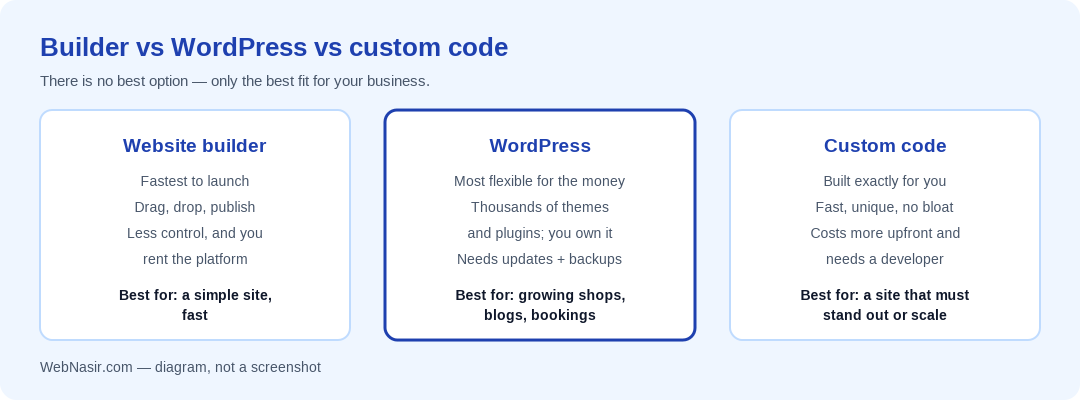
| Route | Best for | You own it? | The catch |
|---|---|---|---|
| Website builder | A simple site, fast | No — you rent the platform | Limited later; moving means rebuilding |
| WordPress | Growing shops, blogs, bookings | Yes — move it to any host | Needs monthly updates and backups |
| Custom code | A site that must earn daily | Yes — built for you | Higher upfront fee; changes need a developer |
What it costs, line by line: the honest 2026 breakdown
A website has three kinds of cost and owners usually budget for only one of them. There is the build cost — what you pay once to get the site made. There is the yearly cost — the domain at roughly ₹800–1,200 a year and the hosting that, together with the domain, puts the DIY paid route at roughly ₹3,000–10,000 a year all-in. And there is the running cost — the time you spend updating it, answering the enquiries it brings, and adding the pages that keep it useful. A site that costs nothing to build but nobody maintains is not a cheap site. It is a site that quietly stops working.
The free DIY route is genuinely free to start: ₹0, plus a domain later at roughly ₹800–1,200 a year when you are ready for your own address. It is the right route when you are testing an idea, learning how websites work, or building a site for a side project. Its cost is your evenings and your patience: you are your own tech support, your own designer, and your own fixer when something breaks. That is a fair trade while the site is an experiment. It stops being a fair trade the moment the site is the shop — the thing customers judge you by before they ever call.
The paid DIY route — hosting plus WordPress, or a premium builder — runs roughly ₹3,000–10,000 a year all-in. That buys your own domain, no ads, and room to grow into a shop or a booking system. Budget for the renewal jump after year one, as this guide has said twice now, because it is the surprise that catches the most owners. Write the year-two price down before you pay year one. If the numbers still work, the paid DIY route is the best value most small businesses will ever get from a website.
Hiring a developer is a one-time project fee plus the same yearly domain and hosting. The fee depends on what the site must do — a one-page site for a tailor and an online store with payments are not the same job, and anyone quoting a price without asking what the website has to do is guessing. To give you real numbers instead of a guess, here are WebNasir's own published starting prices, which are the rates I charge for the sites I build. Every price below is a starting price, and domain and hosting are extra, because those are yearly rentals in your own name, not part of the build.
| Website type | WordPress (starting from) | Custom code (starting from) |
|---|---|---|
| Blog | ₹7,999 | ₹12,999 |
| Business | ₹8,999 | ₹14,999 |
| Restaurant / Café | ₹8,999 | ₹14,999 |
| Travel | ₹12,999 | ₹24,999 |
| News | ₹19,999 | ₹29,999 |
| Shop (online store) | ₹19,999 | ₹39,999 |
| Portfolio | Ask for a quote | Ask for a quote |
Read that table with the job of your site in mind. A restaurant that needs a menu, photos, timings, and a booking button is a Business or Restaurant site, not a Shop. A shop that takes payments online is a Shop site, because payments, delivery areas, and order emails are real work that a simple business site does not include. A portfolio — a photographer, a designer, a craftsman showing finished work — is priced by asking for a quote, because no two portfolios need the same thing. If your site is the shop, get it built properly once. I have redone enough ₹999 template sites to know the cheap route often costs twice: once to build it cheap, and once to build it properly after the cheap version cost you customers.

Beyond the big five: the extra pages that earn their keep
The five pages in this guide — Home, Services or Products, About, Contact, and Privacy Policy — are the foundation. They are not the ceiling. The pages you add next should each answer a question customers keep asking, and each one should end with the same clear action as the rest of the site. A FAQ page is the most useful next page for almost every business, because it answers the questions your phone already answers ten times a week: delivery areas, timings, prices, cancellations, what to bring, how long it takes. Every question you answer on the site is a call you do not have to take, and a customer who got their answer without waiting.
A pricing page earns its keep even when your prices vary. You do not need a fixed price for every job. You need a starting price, a range, or a clear “ask for a quote” with the three things that change the price. Customers who cannot find any price assume the worst — either that it is expensive, or that the price will be invented after they have already committed. A starting price filters out the people who were never going to pay it, and it brings you the people who already know the range and are ready to talk. Hiding prices does not create more enquiries. It creates fewer, and warier, ones.
Reviews and past work belong on the site, not only on social media. A short reviews page with real names, real places, and real dates does more for trust than any claim you make about yourself. A gallery or a menu with real photos does the same: it proves the work exists, the food looks like that, the rooms look like that. Add one useful page a month — a guide, a price list, a seasonal offer, an answer to a question customers keep asking — and the site stays alive in search results and in customers' minds. The sites of mine that get found are the ones that keep adding genuinely helpful pages. That is the whole secret of this site too.
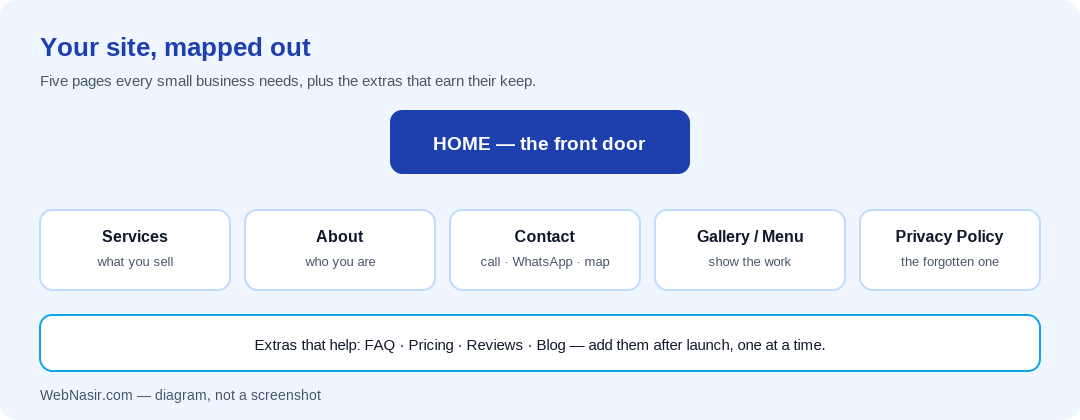
- FAQ — the questions your phone already answers ten times a week, written down once.
- Pricing — a starting price or a range, so customers are not left guessing.
- Reviews — real names, real places, real dates; no invented praise.
- Gallery or menu — real photos of your work, your food, your rooms.
- Blog or guides — one useful page a month, answering real customer questions.
Writing the words: homepage, services and about pages that actually sell
Write the content before touching design. That rule from the seven steps is worth repeating, because it is the rule most people break. Design around words, not the other way round. A template with perfect spacing and empty text boxes will seduce you into writing whatever fits the box, and whatever fits the box is usually vague. Write the words first — on paper, in a notes app, anywhere — and then find a design that holds them. The words are the website. The design is the frame.
The homepage has five seconds to answer three questions: what do you do, who is it for, and what should I do next. Put the answer in the first screen, in plain words, with one big button. “Fresh dry fruits, delivered across India. Order on WhatsApp.” That is a homepage. “Welcome to our website. We are a leading provider of premium quality solutions.” That is a homepage that says nothing to nobody. Read your headline out loud. If a stranger could not tell what you sell from it, rewrite it until they can. Then put the phone number or the order button where a thumb can reach it without scrolling.
Services and product pages should be written around the customer's problem, not your ego. Nobody buys “our services”. They buy a fixed leak, a cake for Saturday, a room with parking, a website that brings calls. Each service gets its own short page or section: what it is, who it is for, what it costs or starts at, how long it takes, and what happens after they enquire. Use the customer's words, not trade jargon. If your customers call it “AC gas refill”, do not call it “HVAC refrigerant replenishment services” on the page. Google and your customers both search for the words people actually use.
The About page is where people buy from people. A real photo of you, your team, or your shop, and two honest paragraphs: how you started, what you are good at, and who you serve. Skip the claims nobody can check — “leading”, “best”, “number one” — and say something true instead. A baker who learned from her mother and bakes to order will outsell a “premium artisanal patisserie solutions provider” every time, because the first one is a person and the second one is a brochure. Customers trust people. Let them see one.
Photos and design when the budget is small
Real photos beat perfect photos. Customers trust a slightly imperfect photo of your actual shop, your actual food, or your actual work far more than a polished stock photo of someone else's. Take photos in daylight, near a window or outside, with a clean background and no clutter behind the subject. Wipe the lens, hold the phone steady, and take five shots of the same thing from slightly different angles — one of them will be good. Then use those photos everywhere: the website, the Google profile, Instagram, WhatsApp. The same real photos in every place make the business feel like one real business, not three different ones.
Keep the design simple on purpose. One main colour, one accent colour, one clear font for headings and one readable font for everything else. White space is not wasted space — it is what makes the phone number and the order button easy to find. A page crowded with colours, boxes, animations, and pop-ups feels like a market stall shouting from every side. A calm page with one clear action feels like a shop that knows what it is doing. If you are choosing between two designs, pick the one where the call button is easier to find, not the one with more decoration.
Compress your photos before you upload them, or use a tool that does it for you. A photo straight from a phone can be several megabytes, and a page full of them will load slowly on a mobile connection — and a slow page loses visitors before they ever read a word. Resize photos to the size they will actually appear on the page, and keep each one as small as you can without it looking blurry. Name the photo file after what it shows, in plain words, so it can be found later. Small habits like these are the difference between a site that feels fast and a site that feels broken.
Mobile first: your customers meet you on a phone
Most of your visitors will meet you on a phone — in India, the US, the UK, and Canada alike — and many of them will be standing, walking, or in a hurry. Build the site for the phone first and the laptop second. That means the phone number must tap to call, the address must tap to open a map, the menu must be readable without pinching and zooming, and nothing on the page may force sideways scrolling. Test the site on your own phone before you test it anywhere else, and test it on a cheap phone with a slow connection, not only on the newest one. Your customers do not all own the newest phone.
The mobile test takes ten minutes and saves more customers than any design change. Open the homepage on your phone. Can you tell what the business sells in five seconds? Can your thumb reach the call button without stretching? Does the form work with a phone keyboard, with big enough fields and a keyboard that shows numbers where numbers belong? Does the page load before you lose patience? Now hand the phone to someone who has never seen the site and watch them try to order, book, or call. Wherever they hesitate is where the site is failing. Fix those places first.
Speed on mobile is mostly about restraint. Every photo, every animation, every pop-up, and every extra feature adds weight, and weight adds waiting. A small business site rarely needs a video that plays by itself, a chat box that pops up before the page has loaded, or three different fonts. Keep the homepage light: a few good photos, the words that matter, one clear action. The fastest website is the one that shows the answer before the visitor has time to leave, and the answer is what you sell, what it costs, and how to reach you.
Getting found nearby: Google Business Profile and local search
For a local business, the Google Business Profile is as important as the website itself — sometimes more. It is the free listing that shows your business on Google Maps and in local search results, with your hours, your phone number, your photos, and your reviews. When someone searches for a plumber, a bakery, or a homestay near them, that listing is often what they see first. Claim it, fill in every field honestly, add the same real photos you use on the website, and keep the hours correct, including holidays. A listing with wrong hours sends customers to a closed shop, and a closed shop does not get a second chance that day.
Your website and your Google listing must agree with each other. Same business name, same phone number, same address, same hours, same photos. When the details match everywhere — website, Google profile, Instagram, WhatsApp — both customers and Google trust the business more. When they disagree, customers get confused and search engines get cautious. After any change — a new number, new hours, a moved shop — update every place the same day. It takes ten minutes and it is the cheapest trust you will ever buy.
Reviews on your Google listing are worth asking for, politely, after a good job. A short message — “If you were happy, a review on Google would really help a small business like ours” — with a link, works better than any request made in person and forgotten by the time the customer gets home. Answer every review, good and bad, in your own words. A calm, honest reply to a bad review tells future customers more about you than ten good reviews do. Never invent reviews, and never pay for them: invented praise is easy to spot, and it poisons the trust that real reviews build.
Trust basics: the padlock, the privacy page and contact details that work
The padlock in the browser — the SSL certificate — is not optional any more. Browsers warn visitors away from sites without it, and customers have learned to look for it before they share a phone number or a card detail. Any hosting plan worth buying includes the certificate free and renews it automatically. If a host charges extra for the padlock, that is a reason to choose a different host. Check the padlock yourself after launch, on your phone and on a laptop, and check it again after any change. A site that shows a warning instead of a padlock is a site losing customers silently.
The Privacy Policy is the page everyone forgets, and it is the page that quietly decides whether your site is trusted. It says, in plain words, what information you collect through the contact form, what you do with it, and how people can ask you to delete it. Google AdSense will not approve a site without one, and customers trust a business more when it says what it does with their details. It takes about twenty minutes to write, and the footer of this site links to ours if you want a model. Put it in the footer of every page, where people expect to find it.
Test your own contact details the way a customer would. Ring the number on the site from a different phone. Send a message to the WhatsApp button and see if it opens a chat. Fill in the contact form yourself and check that the message arrives, and that someone replies. Half the enquiry forms I audit are broken — they look fine, and the messages go nowhere. A form that eats enquiries is worse than no form at all, because the customer thinks they have reached you and you never know they tried. Test it before launch, and test it again every month.
Launch day: the checklist I run before any site goes live
Launch day is not the day you finish building. It is the day you check everything as a stranger would. Open the site on your phone, on a laptop, and on a friend's phone if you can. Click every link and confirm it opens the right page. Ring the number. Send the form. Order something, if the site takes orders, and follow the order all the way through. Check that the photos load, that no image is broken, and that the text has been read by a second person — your own eyes stop seeing your own spelling mistakes after the third read. A launch is a checklist, not a feeling.
Then check the things visitors never see but search engines do. Is the padlock on? Does the site have a title that says what the business does, on every page? Is there a sitemap, and has the site been added to Google Search Console so you can see how it appears in search? Is there a backup, and do you know how to restore it? None of this is glamorous. All of it is the difference between a site that works quietly for years and a site that breaks the week you stop looking at it.
Finally, tell people the site exists. A website nobody knows about is a shop with no signboard. Put the address on your visiting cards, your shop board, your WhatsApp Business profile, your Instagram bio, and your Google Business Profile. Tell your regular customers in person and by message. Ask five of them to try it and tell you what confused them. Their confusion is the most valuable feedback you will get, because they are the people the site was built for. Fix what confused them before you spend anything on advertising.
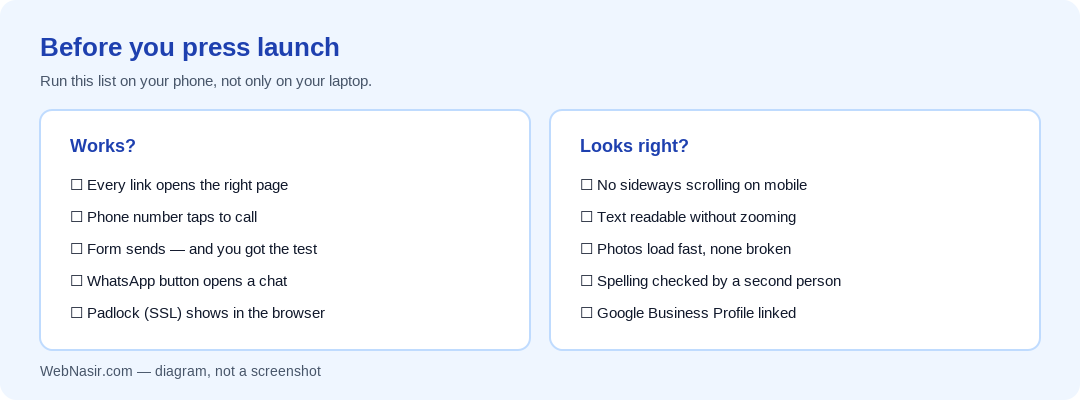
- Open every page on your phone and check for sideways scrolling.
- Tap the phone number and confirm it calls the right number.
- Send a test message through the contact form and confirm it arrives.
- Check the padlock (SSL) shows in the browser on phone and laptop.
- Read every page once more, or ask a second person to read it.
- Link the site from your Google Business Profile, Instagram, and WhatsApp.
The first 30 days after launch
The first week is for telling people. Link the site everywhere customers already find you: your WhatsApp Business profile, your Instagram bio, your Google Business Profile, your email signature, your visiting cards. Tell regular customers in person. A website's first visitors are almost always people who already know the business, and they are the kindest testers you will get — they will forgive a rough edge and they will tell you about it. Listen to them. If three people cannot find the prices, the prices are hidden, no matter how clear they look to you.
The second and third weeks are for fixing what visitors trip over. Watch which pages people visit and where they leave, if your site shows you that much — even a simple view count per page is enough to start. A services page nobody visits may be buried in the menu. A contact page everyone visits but nobody completes may have a form that is too long. Shorten the form to the fields you truly need: name, phone number, and what they want. Every extra field is a reason to abandon it. Fix one thing at a time, and check whether it helped before changing the next thing.
By the fourth week, add one useful page — a FAQ, a price list, a guide customers keep asking for — and ask five customers what confused them on the site. Fix the top two things they name. Then repeat monthly: one useful page a month beats ten rushed pages once. A website is a seed, not a billboard. The sites that get found are the ones that keep adding genuinely helpful pages, and the owners who keep listening to their customers are the ones whose sites keep getting better.

When hiring someone is the right call — and how to hire well
Hire when the website is the shop. If customers judge you by the site before they ever call, if the site takes orders or bookings every day, or if a broken site costs you money by the hour, then a proper build is not an expense. It is the shop itself. The DIY route is right when the site is an experiment, a side project, or a first test to see whether customers come. The moment the site has to earn, the quality of the build becomes the quality of the business in the customer's eyes. That is the point at which paying a developer stops being a luxury and starts being the sensible choice.
Hire well by asking the questions that reveal whether someone has done this before. Ask to see three live small business sites they built, and open them on your phone. Ask who owns the domain and the hosting account — the answer must be you. Ask what happens after launch: who fixes it when it breaks, who updates it, and what that costs. Ask how long it will take, and what they need from you to hit that date. A proper 5–8 page site with a developer usually takes 1–3 weeks, and most of that time is waiting on your content and photos, not the code. If a developer cannot show you live work, cannot explain who owns what, or cannot say what happens after launch, keep looking.
Before you pay anything, get the agreement in plain words: what pages are included, what the starting price covers, what costs extra, when it will be done, and who owns the domain, the hosting, and the site itself. Pay in stages — a part to start, a part at an agreed halfway point, and the final part when the site is live and the launch checklist in this guide has been run. Never pay the full amount before the site is live and in your own accounts. And keep the logins yourself from day one: the domain, the hosting, the website admin, and the Google profile. A good developer will insist on that, because a good developer wants a customer who can reach their own business.
More answers: making a website for a small business, FAQ
How much does a small business website cost in total?
It depends on the route, and this guide gives the real ranges instead of one number. Free DIY costs ₹0 plus a domain later at roughly ₹800–1,200 a year. Paid DIY — hosting plus WordPress, or a premium builder — costs roughly ₹3,000–10,000 a year all-in. Hiring a developer is a one-time project fee plus the same yearly domain and hosting, and WebNasir's published starting prices run from ₹7,999 for a WordPress blog to ₹39,999 for a custom-code shop, with business sites starting at ₹8,999 on WordPress and ₹14,999 on custom code. Whatever route you pick, budget for the renewal price after year one, not only the first-year price.
Can I make a website for my small business myself with no technical skills?
Yes, for a simple site. A website builder will take you from nothing to a live site in a focused weekend, and the free AI route in this guide's linked articles can get you a one-pager even faster. What you need is not technical skill but clear words: what you sell, what it costs, how to reach you, and one clear action on every page. The technical part — the domain, the hosting, the padlock — is the part builders and hosts now handle for you. Where most self-built sites fail is not technical. It is a homepage that does not say what the business sells, a phone number that does not tap to call, or a form that nobody tested.
How do I get customers from Google to my new website?
Start with the things that cost nothing and work first. Claim and complete your Google Business Profile, with the same name, phone, address, and hours as the website. Write the website's pages around the words your customers actually search for — the trade and the place, in plain language. Add one useful page a month that answers a real customer question. Ask happy customers for a review on Google. None of this works overnight: a new site takes time to be found, and the owners who keep adding helpful pages are the ones whose sites show up. There is no honest shortcut, and anyone selling you one is selling you a shortcut to a penalty.
Should I put my prices on the website?
Yes — at least a starting price or a range. Customers who cannot find any price assume the worst, and they leave to ask a competitor who does show prices. You do not need a fixed price for every job: a starting price, a range, or a clear “ask for a quote” with the three things that change the price is enough. A starting price also filters out the people who were never going to pay it, so the enquiries you do get are from people who already know the range and are ready to talk. Hiding prices does not create more enquiries. It creates fewer, warier ones.
What should I do if my website stops working?
First, check the simple things: is the domain renewed, is the hosting paid, does the site load on a different phone or connection. Most small business site outages are a lapsed renewal or a failed automatic update, not a hacker. If you have a backup, your host or developer can usually restore it quickly — which is why backups must be switched on before anything breaks, not after. If the site was built by a developer, that is the moment the after-launch agreement matters: you should already know who to call and what it costs. Write the renewal dates in your calendar today, with a reminder a month early, and half of all website emergencies never happen.