Here is the short answer first. Live Delivery is Alibaba's answer to the worst part of long AI agent runs: you hand an agent a big job, it works for hours, and you only see the result at the end — by which time a mistake from minute three has grown into a finished product built on the wrong idea. With Live Delivery, the agent ships you a usable first version early, then keeps shipping improved versions while the work runs. You look at each version, tell the agent what to fix or change, and it folds that into the next one. You stay in control the whole way instead of waiting at the end with your fingers crossed. The feature launched with Qwen4-Max on 16 November 2026, and Alibaba open-sourced the Qwen-Live-Delivery-Plugin (version 0.1.0) so anyone with Codex CLI on Linux or macOS can try the same workflow.
This guide is written for one person: a beginner to intermediate developer, or a freelancer who builds websites and small apps with AI agents, who has felt the pain of a long run going wrong and wants to know whether this new way of working is worth trying. It explains the problem first, then the feature, then the model behind it, then the exact steps to try the plugin, then when it helps and when it does not.
One note on how this guide was put together. Every launch date, spec and price in it comes from a page I read on 27 November 2026: Alibaba's own Qwen blog and Alibaba Cloud enterprise blog, the plugin's GitHub repository as described in its README, Google's Gemini 4 Carbon announcement and pricing page, and OpenAI's GPT-6.2 Astra pricing page. Where a number is the vendor's own claim — and several here are — I say so. Where I work out an example, I show the inputs so you can redo the math with your own numbers. Two things I did not do: I did not run the plugin install myself, because this machine has no Codex CLI on it, so the install steps below are the README's steps, not steps I executed — I say that plainly wherever it matters. And I did not reproduce Alibaba's 14-version website demo; that is their example, reported as theirs.
1. The problem: long agent runs are a black box

A normal agent run has a simple shape. You write a prompt, the agent plans, it calls tools, it writes files, and at some point it stops and says it is done. Everything between the prompt and the result is invisible. You see the plan if the agent prints one, and you see the tool calls scroll past if you watch the terminal, but you do not see a working version of the thing until the agent decides it is finished.
That shape works fine for short jobs. A five-minute fix, a single function, a short script — if the agent goes wrong, you lose five minutes and try again. It breaks down as jobs get longer, and the break is not gradual. A one-hour build that goes wrong in minute three does not cost you three minutes. It costs you the hour, because the agent spent fifty-seven minutes building on top of the wrong reading of your brief. A multi-hour job is worse again, because the wrong turn is buried under layers of later work, and fixing it means unpicking the layers or starting over.
Alibaba's own launch material gives the extreme case. Qwen4-Max ran a 48-hour agent job to design a new coolant molecule for data-centre chips: it surveyed approaches, built a candidate space of 2.7 million molecules, screened them, ran first-principles calculations, planned experiments, and directed an automated wet lab to synthesise and test the result — and after four rounds of that loop it had a real, physical sample. That is a genuine achievement, and it is also a perfect picture of the risk. If the agent had misunderstood the target in hour two, nobody would have known until hour forty-eight, when the lab produced the wrong molecule. In that job the stakes were a lab run. In your job the stakes are a website, an app, or a report — smaller, but the shape of the loss is the same.
Three things go wrong in a black-box run, and they go wrong in a particular order.
First, the agent misreads the brief. This is the most common failure, and it happens early. "Build a physics education website" can mean a page of text with a few diagrams, or an interactive site with 3D animations and experiments you can run in the browser. Both are honest readings. The agent picks one without asking, because asking would mean stopping, and the whole point of an agent is that it keeps going. If it picks the wrong one, every later decision follows from that pick.
Second, small errors compound. An agent that writes a component with the wrong data shape will write the next component to match the wrong shape, then the tests to match both, then the docs to describe all three. Each step is locally reasonable. The result is a coherent, tested, documented version of the wrong thing. Undoing it means undoing the chain, and the longer the chain, the more expensive the undo.
Third, you cannot steer what you cannot see. Mid-run course correction needs something concrete to react to. A plan is not concrete — it is a promise. A log of tool calls is not concrete either — it tells you what the agent did, not whether the result is any good. The only thing you can judge is a working version: open it, click it, read it, and say "this part is right, that part is wrong, do more of this." A black-box run gives you nothing to judge until the end, and by then the judging is just a yes-or-no on the whole job.
The usual fixes do not solve this. Splitting a big job into small prompts helps, but it puts the planning burden back on you — you become the project manager, and the agent becomes a typist. Checkpoints help too, but a checkpoint is a saved state of the agent's work, not a version you can use. You can roll back to a checkpoint, but you cannot open it in a browser, show it to a client, or decide from it whether the direction is right. What you actually want is much simpler: the thing itself, early, in a form you can use, and then again, better, as often as the agent can manage it. That is what Live Delivery is.
2. What Live Delivery is
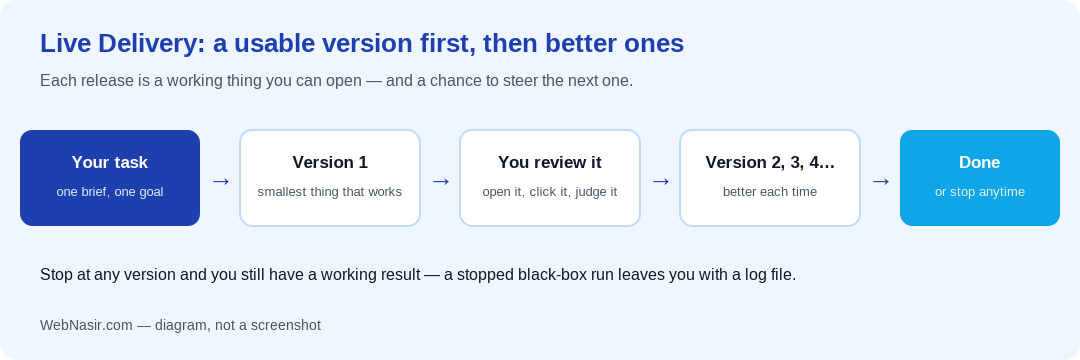
Live Delivery is a way of running a long agent task as a series of usable versions. The agent delivers the first version early — the smallest version that actually works — and then keeps delivering improved versions while the task runs. At each version you can look at the result, point out what is wrong, add a requirement you forgot, or change direction entirely. The agent takes that feedback into the next version. Alibaba's own words, from the Qwen blog: the agent "delivers a usable first version early, then expands and improves it through successive releases, updating its plans based on execution results and user requirements. Each release gives users a concrete basis for assessing progress and deciding what should happen next. They can step in at any point to correct mistakes or change direction, staying in control as the work progresses."
The key word in that paragraph is "usable". A first version is not a sketch or a plan. It is a thing that works, even if it is plain. If the job is a website, version one is a page that loads, with the right structure and the real content, even if it has no styling and no interactivity yet. If the job is a report, version one is a short document with the right sections and the key numbers, even if the analysis is thin. The point of version one is that it is real enough to judge. From there, every version has to be usable too — each one is a complete, working thing, just better than the last. That rule is what makes the whole approach work: you are never judging a half-built thing, and the agent is never allowed to drift for hours without showing you something.
Alibaba's demo of this is a physics education website. The agent shipped 14 consecutive usable releases of the same site. The early versions were plain pages. The later ones added structure, then styling, then interactivity, and the final version had 3D animations, interactive experiments, and full explanations. Fourteen versions sounds like a lot, and it is — but notice what it buys. At version three, a teacher looking at the site could already say "the explanations are too advanced for my students" or "this experiment needs a slider, not a button", and the agent would have eleven versions left to act on that. In a black-box run, the same feedback would arrive after the final version, when acting on it means rebuilding.
Each release is also a checkpoint you can go back to. The plugin keeps a complete snapshot of every version, with a preview entry point for each one, so you can open version six in a browser while the agent is working on version nine. If version nine goes in a direction you do not like, you are not stuck with it — the earlier versions are still there, and the work can continue from the one you liked. That is the difference between a version chain and a single undo stack: you do not lose the good versions when a later one goes wrong.
The other half of the idea is the workbench. Live Delivery is not just the agent shipping versions into a folder — it comes with a local browser page where you watch the plan, preview each version, download any version's files, type in new requirements, change the time budget, or stop the task. The workbench is where the "live" part happens: you do not have to wait for a version to land and then go and find it. You see it arrive, you open it, and you reply to it in the same place. The feedback goes back into the agent's context, so the next version reflects what you said. Section 4 walks through the workbench in detail.
It helps to be clear about what Live Delivery is not. It is not a different model — it is a way of running a model, and the open-source plugin brings the workflow to Codex CLI with whatever model you already use there. It is not a guarantee of quality: a bad brief still produces bad versions, just bad versions you can see sooner. And it is not free in the token sense. More versions means more work, and more work means more tokens. The bet is that the tokens spent on versions you can steer are worth more than the tokens spent on a single long run you cannot — because a steered run wastes less work on the wrong direction. Section 5 puts numbers on that bet.
3. Qwen4-Max in 60 seconds

Live Delivery launched with Qwen4-Max, so here is the model in one section: what it is, what it costs, and where you get it.
Qwen4-Max is Alibaba's flagship model and the first release in the Qwen4 series. It launched on 16 November 2026, after a limited preview that opened on 11 November. It is built on a new sparse mixture-of-experts architecture: 2.4 trillion total parameters, with 71 billion active for each token, plus another 328 billion parameters in an N-gram embedding layer. The "mixture of experts" part matters for the price: only a small slice of the model runs for any given token, so serving a 2.4-trillion-parameter model costs something closer to serving a 71-billion-parameter one. Alibaba says that is about 25% fewer active parameters than Qwen3.8-Max at the same scale. The context window is 1 million tokens, and the model takes text, images and video as input, with text as output.
| Spec | Qwen4-Max |
|---|---|
| Total parameters | 2.4 trillion (MoE) |
| Active per token | 71 billion |
| N-gram embedding parameters | 328 billion |
| Context window | 1,000,000 tokens |
| Input | Text, image, video |
| Output | Text |
| Max output | 131,072 tokens (non-thinking); 262,144 combined thinking + answer |
| Access | API only — no open weights |
| Launched | 16 November 2026 (preview from 11 November) |
Two architecture details are worth one sentence each, because they explain the long-context claim. Three Gated DeltaNet layers compress the conversation history into fixed-size states, and a Qwen Sparse Attention layer then picks out only the relevant parts at fine granularity — that is how a million-token window stays affordable to run. Four parallel Gated Residual branches with dynamic gates keep information flowing between layers. You do not need to understand either to use the model, but if a vendor tells you the million-token window is free, these are the parts doing the work.
The price, on Alibaba Cloud Model Studio's international list — the list most developers outside China will see — is $1.50 per million input tokens and $4.50 per million output tokens, with cached input at $0.075 per million. There is also a global-scope list at $1.413 in and $4.24 out, which is slightly cheaper; the $1.50 and $4.50 figures are the ones to budget with unless you know you are on the global scope.
| Price (per 1M tokens) | Qwen4-Max |
|---|---|
| Input | $1.50 |
| Output | $4.50 |
| Cached input | $0.075 |
Access is API-only. There are no weights to download and self-host for Max, and Model Studio lists fine-tuning and model deployment as unsupported for it. You use it through QwenCloud, on the Token Plan or the pay-as-you-go API, or inside Alibaba's own products: QwenWork, QwenStudio and Qoder. Smaller models in the Qwen4 family are coming to open source, according to Alibaba — but as of 27 November 2026 there is no release date, no model name, no size and no licence for them. Do not plan a self-hosted Qwen4 build around a promise with no date.
How good is it? The honest answer is that the strongest numbers are Alibaba's own, and you should read them as the vendor's case, not as an independent verdict. On Work360 — Alibaba's own benchmark for professional work, built on a taxonomy of 26 top-level domains, 182 subdomains and 721 specialised fields — Qwen4-Max scored 52.69 against 47.74 for Qwen3.8-Max. Token use fell by about 24% at Xhigh effort and 35% at High effort on Work360, and by about 48% and 49% on Terminal-Bench 4.0. The average cost per task on Work360 fell from $4.43 to $1.67, a 62% drop. Independent labs had not published their own scores for the model when this guide was written, so treat the benchmark story as "Alibaba's model is cheaper per task than Alibaba's last model, on Alibaba's test" — which is still useful, because the price is real and the token-use drop is the mechanism behind it.
The launch material also gives three concrete examples of the model doing real work, and they are worth knowing because they show what "long-horizon" means in practice. In automotive manufacturing, at partner plants SANF and Pacific Union, the model handled production-line planning, part design and machining verification, and the manual effort to program a single workpiece fell from about 475 minutes to 24 minutes — a reduction of about 95%, by Alibaba's account. In finance, it called 90 MCP tools to pull market data across shares, bonds, funds and derivatives, and delivered the results as Excel workbooks and PowerPoint decks where every number traces back to its source. And in the science example from section 1, a 48-hour agent run designed a new coolant molecule and drove an automated lab to make a physical sample of it. These are Alibaba's showcase cases, not everyday jobs — but they are the reason the model is built for long runs, and long runs are exactly where Live Delivery earns its keep.
4. How to try the plugin
This is the part of the guide where you actually do something, so it is also the part where honesty matters most. Everything in this section comes from the plugin's own README, as published on GitHub, and from Alibaba's launch posts. I did not run the install on this machine — it has no Codex CLI — so these are the README's steps, written out in order, not steps I executed and watched succeed. If a command fails on your machine, the README and the plugin's `--doctor` check are the first places to look, and the version number at the top of this section is the version these steps describe. The plugin is young — version 0.1.0, published on 14 November 2026 — so expect rough edges and read the README on the day you install it, in case a step has changed.
What the plugin is
The Qwen-Live-Delivery-Plugin is a small, open-source add-on (Apache-2.0 licence, written in TypeScript) that teaches an agent harness how to run a long task the Live Delivery way. At launch it works with one harness only: Codex CLI, OpenAI's terminal coding agent. It runs on Linux and macOS, needs Node.js 22 or newer, and was tested with Codex 0.166.0 and 0.167.1. There is no Windows support at launch, and support for other agent harnesses is on the project's planned list, not shipped. The repository was created on 14 November 2026, two days before the model launch, and had a few dozen stars within days — early, in other words, and worth treating as a 0.1 release.
The plugin has three parts, and each one does a different job.
| Part | What it does |
|---|---|
| Live Delivery Skill (`$ld:go`) | Tells the agent how to run the task: pick the smallest usable first version, plan each next version from the actual results, and include validation and delivery in every round. No fixed number of versions — it keeps going until the job is done or the budget runs out. |
| Live Delivery MCP | Four tools — `ld_begin`, `ld_publish`, `ld_status`, `ld_done` — that manage the delivery plan and its state: they keep a complete snapshot of every version with a preview entry point, report how much budget is left, and wrap the task up. |
| Lifecycle Hooks | Carry your feedback into the agent's context on the next turn or after a tool call, block the agent from finishing a turn early while the task is still active and budget remains, and handle the wrap-up when you stop the task or the budget runs out. |
Around those three parts sits the workbench: a local browser page that ties it all together. From the workbench you review the plan, preview any version, download a version's files, send the agent a new requirement, change the total time budget, or stop the task. It launches browser-created tasks and interrupts and resumes the same Codex thread for new messages, so your feedback lands in the conversation the agent is already having. External CLI tasks get feedback at the tool or turn events the hooks support.

One thing the plugin does not do, and it is worth knowing before you install it: it does not include a model or an API key. It uses your Codex model, your login, and your approval settings, and the model calls are billed by whoever provides your Codex model. There is nothing to buy from Alibaba to use it, and there is no Qwen key to paste in. That also means the plugin is not tied to Qwen4-Max — it brings the Live Delivery workflow to Codex, and the model doing the work is whichever one your Codex is set to use.
What you need before you start
The checklist is short. You need a Linux or macOS machine — Windows is not supported at launch. You need Node.js 22 or newer; check with `node --version` before you start, because an older Node is the most likely reason an install fails silently. You need Codex CLI installed and working, with a model and login already set up, because the plugin borrows all of that from Codex. And you need a project folder to work in — the plugin installs into a workspace, and the agent works inside that folder. If you have never used Codex CLI, get a plain Codex session working first (a small task, a file created, a result you can see) and only then add the plugin. Debugging two new tools at once is a bad way to spend an evening.
Install it
There are two ways to install, and the README describes both. The first is to let Codex do it: give Codex the repository directory and ask it to read the README and follow the installation skill to install and verify the plugin, using your project as the workspace.
Read /absolute/path/to/Qwen-Live-Delivery-Plugin/README.md and follow its installation skill to install and verify the plugin. Use /absolute/path/to/my-project as the workspace.Replace both paths with your real ones. The installing agent reads the skill, installs the plugin, configures the hooks, and verifies the result.
The second way is the install script, run from the repository itself:
./live-delivery/install.sh --workspace /path/to/projectThe script installs the plugin, configures the hooks, and opens Codex. The release archive needs no `npm install`. If Codex is already open, start a new session after installing. Two flags are useful to know: `--install-only` installs without opening Codex, and `--doctor` checks the installation. If anything feels wrong after installing, run the doctor check before anything else — it exists for exactly that moment.
Two safety notes from the README deserve to be repeated here, because they are the kind of thing people skip and regret. First, the installer never enables full access automatically. Browser tasks default to the `workspace-write` sandbox, which keeps the agent inside your project folder. There is an environment variable, `QWEN_LD_TASK_SANDBOX=danger-full-access`, that turns sandboxing off along with per-command approval — the README warns about it, the installer never sets it, and you should not set it either unless you understand exactly what you are giving up. Second, the workbench is a web page served from your machine. Use it on a trusted network, and set `QWEN_LD_BIND_HOST=127.0.0.1` so it only listens on your own machine, or reach it over SSH forwarding. Do not expose it to the open internet.
Start your first delivery
A Live Delivery run starts with a time budget, not with a task. The budget is an environment variable, and the README's example is twelve minutes:
QWEN_LD_TIME_BUDGET=12m codexThat starts Codex with a twelve-minute budget for the delivery. The budget is the guardrail that keeps a long task from running forever: when it runs out, the hooks wrap the task up, and the versions delivered so far stay available. Pick a short budget for your first run — twelve minutes is a good first number — because the point of the first run is to learn the workflow, not to finish a real project.
Inside Codex, in your project directory, start the delivery with the skill command and your task:
$ld:go Build a one-page portfolio website for a freelance photographer. Include a hero section, a gallery grid with six photos, an about section, and a contact form. Use plain HTML, CSS and JavaScript in a single folder.The agent reads the skill, picks the smallest usable first version, and gets to work. When the first version is ready, the CLI prints a workbench URL. Open it in your browser. That page is now your control room for the run: the plan on one side, the versions in the middle, and a box where you type new requirements. Enter sends a message; Shift+Enter adds a new line without sending. The header lets you change the budget or stop the task.
What you do in the workbench is the whole skill of Live Delivery, and it is simpler than it sounds. Open each version as it lands. Click through it. Ask three questions: does it work, does it match what I asked for, and what is the single most useful thing to fix next? Then type that one thing. Not five things — one. The agent folds it into the next version, and you judge again. If a version goes wrong, say so in plain words ("the gallery is showing broken image icons — use placeholder images that actually load") rather than in technical ones. The agent has the context; you have the eyes. That division of labour is the point.
What a version chain looks like
To make this concrete, here is what a website build looks like as a version chain, using Alibaba's physics-site demo as the shape and a portfolio site as the example. Your own chain will differ in the details, but the rhythm is the same: each version is usable, each one is better than the last, and you steer between them.
Version one is the smallest thing that works: a single page with the photographer's name, a short line about the work, six grey boxes where the photos will go, and a contact form that does nothing yet. It looks plain. It loads, the sections are in the right order, and you can already say whether the structure is right. If the brief said "portfolio first, about second" and version one has it backwards, you say so now — fixing it at version one costs nothing.
Versions two to four fill in the content: real headings, real copy, placeholder photos that actually load, and a form that shows a thank-you message. By version four the site is something you could show a friend, even though it still looks plain.
Versions five to eight are the design passes: colours, fonts, spacing, a hero image, hover states on the gallery. This is where most of the visible change happens, and it is also where your feedback matters most, because taste is the one thing the agent cannot check by itself. "The hero is too dark" or "the gallery needs bigger gaps" are the kind of notes that only a human eye produces.
Versions nine onwards are the finishing work: responsive layout for phones, loading speed, accessibility labels on the images, the form actually sending somewhere, and the small fixes you noticed while clicking through. In Alibaba's demo the chain ran to fourteen versions and ended with 3D animations, interactive experiments and full explanations — a much richer site than a portfolio, but the same idea: the last versions are polish on top of a structure that was settled early, when it was cheap to change.
Notice what did not happen in that chain. Nobody waited two hours for a finished site and then discovered the structure was wrong. Nobody re-did the design because the content arrived late. And at no point was there a version you could not open in a browser. If you had stopped the run at version six — budget out, or you ran out of evening — you would still have a working site. That is the practical payoff: a stopped Live Delivery run leaves you with something. A stopped black-box run leaves you with a log file.

Rollback: going back to a version you liked
Because the MCP server keeps a complete snapshot of every version, with a preview entry for each, you can open any earlier version from the workbench and keep working from there. In practice this means two things. If version nine introduces a change you hate — a redesign that loses the clean look of version seven — you do not have to argue with the agent about reverting it line by line. You open version seven, tell the agent to continue from there, and the bad version becomes a dead branch instead of a problem to undo. And if you are unsure whether a change helped, you can put two versions side by side in the browser and compare them directly, which is a much better test than reading a diff.
One honest limit: rollback returns you to a snapshot, not to the agent's state of mind at that snapshot. The agent will have the feedback you gave since then in its context, and the plan it built from later versions may still shape what it does next. So the cleanest way to use rollback is to say, in the workbench, both what to go back to and what to do differently this time — "go back to version seven and keep the gallery layout, but make the hero image smaller." That gives the agent a starting point and a direction in the same message.
What it costs
Live Delivery does not change the price of tokens. It changes how many tokens you use, because a versioned run does more work than a single-pass run — it builds the thing several times over, with feedback in between. Whether that is worth it depends on what the versions save you, and the only honest way to answer that is with numbers. Here is a worked example, with every input shown so you can redo it with your own figures.
Assume a small website build where each version uses about 25,000 input tokens (the brief, the project files, the feedback so far) and about 10,000 output tokens (the code the agent writes). Those are my assumptions, not measurements — a real build could use half as much or three times as much, and long files re-read every round push the input number up fast. On Qwen4-Max at $1.50 per million input and $4.50 per million output, one version costs (25,000 / 1,000,000 × $1.50) + (10,000 / 1,000,000 × $4.50) = $0.0375 + $0.045 = $0.0825, or just over eight cents. Fourteen versions — the length of Alibaba's demo chain — comes to about $1.16. The same fourteen versions on Gemini 4 Carbon at its from-1-December rates ($4 in, $20 out) would be $0.10 + $0.20 = $0.30 a version, or $4.20 for the chain. On GPT-6.2 Astra ($8 in, $40 out) it would be $0.20 + $0.40 = $0.60 a version, or $8.40 for the chain.
| 14-version chain (25k in + 10k out per version, my assumptions) | Cost per version | Cost for 14 versions |
|---|---|---|
| Qwen4-Max ($1.50 / $4.50) | $0.0825 | about $1.16 |
| Gemini 4 Carbon, from 1 Dec ($4 / $20) | $0.30 | about $4.20 |
| GPT-6.2 Astra ($8 / $40) | $0.60 | about $8.40 |
Two things to take from that table, and one warning. First, at these token counts the whole chain costs less than a cup of tea on any of the three models — the price difference between them is real but small in absolute terms for a job this size. Second, the input side is where long version chains get expensive, because every round re-reads the project. That is why Qwen4-Max's cached input at $0.075 per million matters: if most of the re-read context is served from cache, the input bill drops sharply. The warning is the one already stated: the 25,000 and 10,000 figures are assumptions. Measure your own first run — the workbench and your provider's usage page will tell you the real numbers — and then decide whether the chain is cheap or not. Do not budget a month of agent work on a worked example.
5. When to use it and when not to

Live Delivery helps most where the requirements are not fully formed at the start, or where the job is long enough that an early mistake is expensive. It helps least where the job is short, the spec is exact, or the result has to be right the first time.
| Good fit | Why it helps |
|---|---|
| Prototypes and demos | You need something to show quickly, and the requirements will change once people see it. Version one is the demo; later versions are the reactions to it. |
| Websites and landing pages | Structure settles early, design improves in passes, and you can judge every version in a browser. |
| Reports and research docs | Each version is readable, so you can correct the direction before the agent writes fifty pages on the wrong question. |
| Learning a new codebase | The versions show you what the agent understood, which tells you what it missed. |
| Long refactors | A working version at each step means you always have a version that runs, even if you stop halfway. |
| Bad fit | Why it hurts |
|---|---|
| One-shot, exact-spec jobs | If the spec is complete and the job is short, a single run is faster and cheaper than a version chain. |
| Jobs with a hard right answer | A calculation, a migration with a fixed target, a bug with one correct fix — steering adds rounds without adding value. |
| Tiny tasks | A five-minute job does not need versions. The overhead of reviewing each one costs more than the job. |
| Work you cannot judge mid-way | If you cannot tell whether a version is good — a legal analysis, a medical summary — early versions do not help you steer. Get an expert to judge, or do not use the workflow for that job. |
| Very tight token budgets | Every version costs tokens. If the budget only covers one pass, spend it on one careful pass. |
The comparison with the other two flagship models is short, because the price story is short. Qwen4-Max is the cheapest of the three per token by a wide margin: $1.50 in and $4.50 out per million, against Gemini 4 Carbon at $4 and $20 from 1 December 2026 (its $2 and $10 launch rates end on 30 November), and GPT-6.2 Astra at $8 and $40. Carbon launched on 10 November 2026 to paying developers and is not on Google's free tier; Astra launched on 17 November 2026 with a 1.05-million-token context window and up to 128,000 output tokens. But per-token price is not the whole bill. Artificial Analysis measurements, as reported by datastudios.org, put Carbon at $5.48 per completed task at high thinking against $3.24 for Astra at high effort — Carbon costs more per task despite cheaper tokens, because it spends far more tokens on the same work, and its runs took 33.8 minutes per task against 9.2 for Astra. The same logic applies to Live Delivery: a version chain that re-reads a large project every round can cost more in input tokens than a single careful pass, even on the cheapest model. So the honest comparison is not "Qwen4-Max is cheapest, use it" — it is "Qwen4-Max is cheapest per token, and Live Delivery is the only one of the three that ships as an open plugin for versioned, steerable long runs." I did not find an equivalent open-source version-and-rollback plugin from Google or OpenAI for this workflow when I checked on 27 November 2026. If your job is a long build where the requirements will emerge as you see versions, that combination — cheap tokens plus a workflow built for steering — is the reason to try it. If your job is a short, exact task, pick whichever model you already use and skip the workflow entirely.
Frequently asked questions
What is Qwen4-Max Live Delivery, in one sentence?
It is a way of running a long AI agent task so the agent ships you a usable first version early, then keeps shipping improved versions while you review each one and steer the work — instead of making you wait until the end to see anything.
Do I need Qwen4-Max to use Live Delivery?
No. The feature launched with Qwen4-Max, but the open-source plugin runs on Codex CLI with whatever model your Codex is set to use. The plugin uses your Codex model, login and approval settings, and no Qwen key is included. Using Qwen4-Max with it is a choice, not a requirement — and Qwen4-Max itself is API-only, through QwenCloud.
What do I need to install the plugin?
Codex CLI, on Linux or macOS, with Node.js 22 or newer. The plugin is version 0.1.0 at launch, tested with Codex 0.166.0 and 0.167.1. There is no Windows support at launch, and other agent harnesses are planned but not shipped. The install is either the script (`./live-delivery/install.sh --workspace /path/to/project`) or asking Codex to read the README and follow the installation skill.
How do I start a delivery?
Set a time budget first — the README's example is `QWEN_LD_TIME_BUDGET=12m codex` — then in Codex type `$ld:go` followed by your task. The CLI prints a workbench URL when the first version is ready. Open it, review the version, and type your feedback there. Each version after that is a chance to correct or redirect.
Can I go back to an earlier version?
Yes. The plugin keeps a complete snapshot of every version with a preview entry, so you can open any earlier version from the workbench and continue from there. Say both what to go back to and what to do differently, so the agent has a starting point and a direction in the same message.
Does Live Delivery cost more than a normal agent run?
Usually, yes, in tokens — a version chain builds the thing several times over. On Qwen4-Max's prices the cost is small for a small build: about $1.16 for a fourteen-version chain at my assumed 25,000 input and 10,000 output tokens per version. The saving is not in tokens, it is in wasted work: a steered run is less likely to spend an hour building the wrong thing. Measure your own first run before budgeting a month on it.
Is Qwen4-Max open source?
No. Qwen4-Max is API-only with closed weights, and Model Studio lists fine-tuning and deployment as unsupported. Smaller Qwen4 models are coming to open source according to Alibaba, but there is no date, name, size or licence for them as of 27 November 2026.
Sources
Qwen Team, "Qwen4-Max: Your New Teammate Has Arrived", qwen.ai/blog, read 27 November 2026 — launch 16 November 2026; 2.4T backbone, 71B activated per token, 328B N-gram embedding parameters; 1M-token context; native vision; Work360 52.69 vs 47.74, token use down ~24%/35% (Work360) and ~48%/49% (Terminal-Bench 4.0), cost per task $4.43 to $1.67 (62% down); GDN + Qwen Sparse Attention and Gated Residual architecture; automotive 475 to 24 minutes; 90 MCP tools in finance; 48-hour coolant-molecule agent run (2.7M candidates, four rounds, physical sample); Live Delivery definition and plugin announcement; availability on QwenCloud Token Plan and API, QwenWork, QwenStudio, Qoder; smaller open-weight models coming, no date. Alibaba Cloud, "Alibaba Cloud Brings Qwen4-Max to the Enterprise", alibabacloud.com/blog, 17 November 2026, read 27 November 2026 — enterprise announcement; Live Delivery described as a usable first version early with improved versions after; physics education website with 14 consecutive usable releases ending in 3D animations, interactive experiments and full explanations. Alibaba Cloud, "Qwen4-Max: One Flagship for Complex Work, at a Price That Scales", alibabacloud.com/blog, read 27 November 2026 — 62% lower cost per task; the 14-release physics site example repeated; plugin open-sourced. Qwen-Live-Delivery-Plugin repository, github.com/QwenLM/Qwen-Live-Delivery-Plugin, README as described 27 November 2026 — version 0.1.0, Apache-2.0, TypeScript; Codex CLI only at launch, Linux and macOS, Node.js 22+; tested with Codex 0.166.0/0.167.1; three modules (Live Delivery Skill $ld:go, Live Delivery MCP ld_begin/ld_publish/ld_status/ld_done, Lifecycle Hooks); local browser workbench; install via ./live-delivery/install.sh --workspace or via the installation skill; QWEN_LD_TIME_BUDGET example 12m; QWEN_LD_TASK_SANDBOX=danger-full-access warning; QWEN_LD_BIND_HOST=127.0.0.1; uses your own Codex model and auth, no key included; other harnesses planned. DataCamp, "Qwen4-Max: Features, Benchmarks, and Pricing", datacamp.com/blog, read 27 November 2026 — $1.50/$4.50 per 1M on QwenCloud; plugin v0.1.0, Codex CLI only, Linux/macOS, Node.js 22+. Model Studio pricing via dev.to, "Qwen4-Max Pricing, 1M Context and API Guide (2026)", read 27 November 2026 — international list $1.50/$4.50, cache $0.075; global scope $1.413/$4.24; max input 991,808 tokens non-thinking; max output 131,072 non-thinking, 262,144 combined; API-only, fine-tuning and deployment unsupported. Google, "Introducing Gemini 4 Carbon", blog.google, read 27 November 2026 — $2/$10 per 1M launch rates, cached input 95% off; rates rise to $4/$20 on 1 December 2026. OpenAI API pricing page, developers.openai.com/api/docs/pricing, read 27 November 2026 — GPT-6.2 Astra $8.00 in, $40.00 out, $0.40 cached per 1M; GPT-6.2 Sol $2/$10; rates rise above 272K input tokens. datastudios.org, "Gemini 4 Carbon vs GPT-6 Astra", read 27 November 2026 — Artificial Analysis per-task figures: Carbon $5.48 per task at high thinking, Astra $3.24 at high effort; 33.8 vs 9.2 minutes per task. Page-one check for the exact keyword, 27 November 2026 — no standalone Live Delivery article ranks; the concept appears only as a section inside Qwen4-Max overviews (Alibaba Cloud enterprise blog, qwen.ai blog, DataCamp, layer3labs.io, wyx.asia, mikhail-serov.com). Together AI listing via explainx.ai, read 27 November 2026 — Together added Qwen4-Max on 21 November 2026 at $1.50/$4.50 with a 30% sale through 22 November (ended).
Next: Gemini 4 Carbon vs GPT-6.2 Astra: Which AI Model Is Better in 2027? →