Here is the short answer first. If your admin work is mostly repeatable — sorting the inbox, pulling a weekly report, watching a price, turning a pile of emails into a short summary — Tasks in Gemini does it for ₹0, and a virtual assistant is money you do not need to spend. If your admin work needs someone to take a phone call, chase a client who stopped replying, decide what matters when two things clash, or own a mistake and fix it, no free agent does that yet. You need a person.
That split is the whole guide. Tasks in Gemini is a real agent now, not a chatbot with a new name. Since 17 November 2026 it is free in India, and it can plan, browse, read your Gmail and Drive, build files and run on a schedule while you do other work. It is also capped, supervised and deliberately limited in exactly the places where a human assistant earns their pay. The question is not which one is better in general. The question is which jobs belong to which one, and what that split costs you per month.
So this guide does three things. First, it explains what Tasks in Gemini actually is, with the limits Google publishes — not the launch-day hype. Second, it puts real virtual assistant rates next to it, from rate guides that checked actual prices in India in 2026, and works out the monthly math for a part-time VA, a full-time VA and a firm-managed VA. Third, it gives you a two-week test: five recurring jobs to hand to Tasks, the red flags that mean you should hire a person instead, and the hybrid setup most small businesses end up using.
One note on how this guide was put together. Every fact about Tasks comes from Google's own pages, read on 27 November 2026: the 17 November 2026 blog post by Josh Woodward and the Gemini Apps help page on managing tasks. Every VA rate comes from a rate guide that published its sources and checking dates. Where a number comes from a secondary guide quoting a Google help page, I say so. Where I work out an example, I show the inputs so you can redo the math with your own rates. Nothing in the cost section is a single "typical" number I made up, because there is no single typical VA rate — the range is the point.
What Tasks in Gemini actually is
Tasks in Gemini is a mode inside the Gemini app, not a separate product. You open Gemini on the web, on your phone or on a Mac, flip the toggle under the text box from Chat to Task, and describe a job instead of asking a question. Chat answers you. Task goes away and does the job: it plans the steps, opens websites, reads your connected apps, builds files and comes back with the result. You can watch it work in the task thread, add instructions while it runs, or stop it.
Google switched this on free of charge on 17 November 2026. The announcement, on Google's blog that day, says the update is rolling out free for hundreds of millions of people in six countries: the United States, Japan, South Korea, Canada, Australia and India. It runs on a new model called Gemini 4 Hydrogen. Before that, the same agent was tested in beta with paying subscribers since May 2026 under the name Spark. Google renamed it Task because, in its own words, people kept asking Gemini to just help them finish "tasks".
Who can use it is narrow, and the narrowness matters for a business. Google's help page sets three conditions: you must be 18 or older, you must sign in with a personal Google Account, and you must have History turned on. A work or school Google Account cannot use Tasks for now — Google says so plainly, and gives no date for Workspace accounts. That means if your business runs on a Google Workspace account, Tasks is not available to that account yet. It works on your personal account, in the Gemini mobile app, the Mac app and the web app at gemini.google.com.
What it can reach is the reason it is useful for a small business that already lives in Google's apps. The help page lists the sources Tasks can use: your skills and schedules, Gmail, Calendar, Docs, Drive, Sheets, Slides, Keep and Google Tasks, plus Contacts, Photos, Google Pay and Wallet, Search, Finance, Flights, Hotels and Maps, YouTube and several third-party apps. In practice that means it can search your inbox and summarise a thread, draft and reply to emails, label messages, check your calendar and book events, read and edit documents and spreadsheets, build a presentation, and pull research with cited sources into a PDF or a spreadsheet. Google's blog adds that it connects with more than 60 popular apps, and developers can apply to join the Connected Apps Platform.
The part that makes it an agent rather than a chatbot is the browser. When a task needs a website, Gemini works in a browser — your local Chrome on desktop, or a remote browser in the cloud. Google's blog says the remote work happens in a hardware-isolated virtual machine on Google Cloud, dedicated to your account and never shared with other users, with prompt-injection filters and Safe Browsing checks on the links it opens. On your local browser it has access to the same sites you are signed into, including sites where you saved logins in Password Manager — with your permission, it can use those to sign in.
Here is the part most launch coverage skipped: Tasks asks before it does anything that matters. Google's help page says Gemini is designed to always ask for your review and confirmation before it sends a communication, deletes your data, shares sensitive information, makes a purchase, completes a financial transaction, or fills out and submits a web form. It also pauses and asks you to take control of the browser for things like entering a password or payment details. Google's blog says the same in plainer words: Gemini is designed to ask for your confirmation or pre-approval before clicking "Buy", and to ask clarifying questions when an instruction is unclear. You can set routine actions you already trust to "Always allow" so it stops asking. And there is a warning in the help page worth reading twice: if a schedule runs when you are offline, you may not be able to stop Gemini from completing an unintended action. Some tasks need your confirmation before they complete, and the help page tells you to supervise important and sensitive tasks closely, because the safeguards do not guarantee protection against all risks.
The free tier has hard caps, and they shape what you can hand it. Google's help page says you can have up to 15 tasks running at a given time, and a schedule will not run if 15 are already going. Usage is compute-based: how much a task consumes depends on how many you assign each day and how complex each one is, and Gemini warns you when you are close to your limit. Google does not publish a daily task count. Its limits page, as quoted by a guide that read it on 18 November 2026, says usage refreshes every five hours until you reach a weekly cap. For schedules, the caps are published on Google's schedules help page: on the free plan and on Google AI Plus, you can have up to 10 active schedules, and each one runs at most once a day, in a general window — overnight, daytime or evening. You cannot pick an exact time, and you cannot run a schedule twice a day, without Google AI Pro. Pro costs $19.99 a month and raises the caps to 50 active schedules with hourly and exact-time runs, Gmail and topic monitors, and four times the usage. Ultra goes further, but for a small business comparing against a VA, Pro is the paid tier that matters.

Some of the flashiest features from the launch are not in India yet. Phone calls to businesses, Google Pay checkout, texting Gemini through RCS and forwarding emails to gemini@google.com are starting in the United States only. Google has not given a date for India. That matters for this comparison, because the demo most people saw — Gemini calling two car dealerships, sitting through hold music and booking a service appointment — is not something an Indian business owner can use today. What works in India is the core: planning, research, Workspace work, browsing, files and once-a-day schedules.
So the honest summary of Tasks in Gemini is this. It is free, it is genuinely capable at repeatable knowledge work inside Google's apps, it is supervised by design, and it is capped at 10 daily schedules and 15 tasks at a time on the free plan. It does not make phone calls in India, it does not send anything in your name without asking first, and it does not own the outcome of a job the way a person does. Keep that picture in mind, because the rest of this guide is about matching jobs to it — and about the jobs it should never get.
What a human VA actually does
A virtual assistant is a person who works for you remotely, usually from another city or another country, on the recurring operations of your business. The job title covers a wide range, from general admin — inbox, calendar, data entry, research, travel booking — to executive support and specialist work like bookkeeping, e-commerce operations and CRM management. What makes them different from an agent is not the task list. It is that they are responsible for outcomes.
A VA makes judgement calls inside the rules you set. When a client writes an angry email, a VA reads the history with that client, decides whether this needs you today or a holding reply now and a proper answer tomorrow, and sends the holding reply in your voice. When two meetings clash, a VA knows which one moves and which one cannot, and rings the person who needs to hear it first. When a supplier misses a delivery date, a VA chases them, and chases them again the next day, and tells you on the third day that the plan has to change. None of that is in a task description. It is the work between the tasks.
A VA also does the things an agent cannot do at all in India right now. They pick up the phone. They speak to a real person at a courier company, a bank, a government office or a client, and they negotiate, persuade and smooth things over. They remember that your biggest client hates long emails, that your supplier in Surat only answers on WhatsApp, that your accountant needs the invoice in a particular format. They learn your business the way a colleague does, and they carry that knowledge from one week to the next without being told again.
And a VA is accountable in a way software is not. If a VA books the wrong meeting, sends the wrong attachment or misses a deadline, there is a person to talk to, a person who notices the mistake, fixes it and changes how they work so it does not happen again. If Tasks in Gemini books the wrong meeting, nothing in the tool notices or cares — you notice, hours later, when you check the thread. Google is open about this: its help page calls the feature experimental, says Gemini can make mistakes and do unexpected things, and tells you your active supervision is the most important protection. A VA reduces your supervision. Tasks increases it, in exchange for costing nothing.
None of this means a VA is always the right hire. A VA costs real money every month, needs a week or two to learn how you work, can be sick or unavailable, and can leave. A bad hire costs more than no hire, because you spend your time managing the person who was supposed to save you time. The honest question is not "human or AI" in the abstract. It is which of your recurring jobs actually need judgement, a phone call and accountability — and how many hours of that work you really have each week.
The cost math, with real numbers
Tasks in Gemini costs ₹0 on the free plan in India. The paid step up is Google AI Pro at $19.99 a month, which buys four times the usage, 50 schedules and hourly runs. A virtual assistant costs what the market charges, and the market in India in 2027 has a wide range. Here are the rates from four rate guides that published their sources and the dates they checked, all read on 27 November 2026.
| Source | What it covers | Rate |
|---|---|---|
| Upcision, 2026 report, checked October 2026 | Full-time VA through a firm with Indian staff | $999 to $1,999 a month |
| Upcision, 2026 report, checked October 2026 | General admin, market rate | $3 to $6 an hour |
| Upcision, 2026 report, checked October 2026 | Executive assistant, market rate | $8 to $16 an hour |
| Growth Hacking India, compiled September 2026 | Full-time VA from India | $640 to $1,750 a month |
| Growth Hacking India, compiled September 2026 | General admin VA | $4 to $7 an hour |
| Growth Hacking India, compiled September 2026 | Executive VA | $7 to $12 an hour |
| Tejva, checked 6 November 2026 | Full-time VA hired directly in India | $400 to $900 a month |
| Tejva, checked 6 November 2026 | General admin VA hired directly | $2.50 to $5 an hour |
| Freelance Rate India, reviewed August 2026 | Mid-level freelance VA, Indian clients | ₹200 to ₹1,200 an hour |
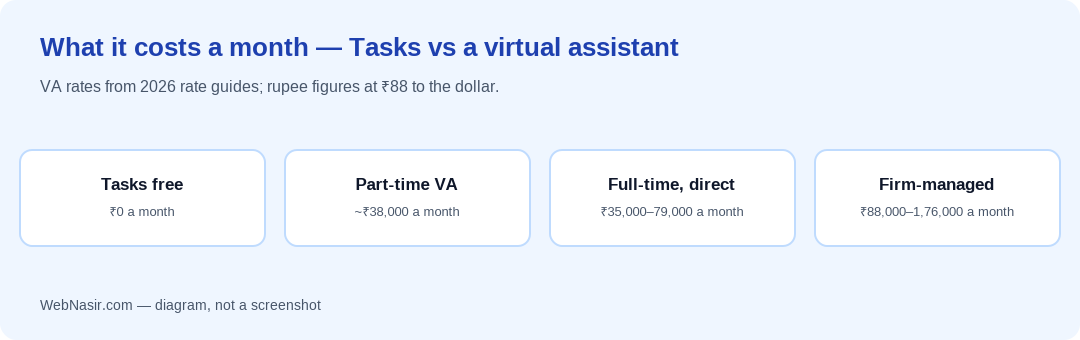
Read that table the way it is meant to be read: the same job has three different prices depending on how you hire. Hiring directly on a freelance marketplace is cheapest, at $3 to $6 an hour for general admin, but you carry the vetting, the no-show risk and the replacement time yourself. A managed firm charges $999 to $1,999 a month for a full-time VA, and that price is mostly the firm's costs and margin — Upcision's own report notes that Indian executive assistants earn about ₹23,424 to ₹45,833 a month in local pay, from Indeed, PayScale and Glassdoor data, which is far below what the firm charges you. A firm buys you reliability, a replacement if your VA leaves, and someone else doing the management. A direct hire buys you the lowest price and the most work on your side.
Here is the worked example, with the inputs shown so you can redo it with your own rates. I use ₹88 to the dollar, the rate the Growth Hacking India guide used for its September 2026 conversions.
A part-time VA, 20 hours a week, at $5 an hour: 20 hours times 4.33 weeks is about 87 hours a month, times $5 is about $433 a month, which is about ₹38,000 a month. Over a year that is about $5,200, or about ₹4.6 lakh.
A full-time VA hired directly, at the Tejva range of $400 to $900 a month: that is about ₹35,000 to ₹79,000 a month, or about ₹4.2 lakh to ₹9.5 lakh a year.
A full-time VA through a managed firm, at the Upcision range of $999 to $1,999 a month: that is about ₹88,000 to ₹1,76,000 a month, or about ₹10.5 lakh to ₹21 lakh a year.
Tasks in Gemini on the free plan: ₹0 a month, ₹0 a year. On Google AI Pro at $19.99 a month: about ₹1,760 a month, or about ₹21,000 a year.
Now put the two sides next to each other. The cheapest part-time VA in the example costs about ₹38,000 a month. Tasks on the free plan costs nothing, and Pro costs about ₹1,760 a month. The gap between Pro and the cheapest part-time VA is about ₹36,000 a month, or about ₹4.3 lakh a year. That is the money Tasks saves you — if, and only if, the jobs you hand it are jobs it can actually finish without you.
That "if" is where the saving is real and where it is false economy. The saving is real when the work is repeatable, written down and checkable in five minutes: a daily inbox summary, a weekly price watch, a research digest, a recurring report from a spreadsheet. The saving is false economy when the work needs judgement you have not written down, a phone call, a relationship, or a decision you would not trust a new hire to make unsupervised. A VA who chases a ₹50,000 overdue payment and gets it paid has earned a month of their fee in a day. Tasks cannot make that call in India, and even in the United States it would ask you before it spent your money. A VA who notices that a client has gone quiet for two weeks and flags it before the client leaves is worth more than a year of free summaries. Tasks does not notice what you did not ask it to watch.
There is also a cost that does not appear in either price: your time checking the work. A VA you trust needs a weekly check-in. Tasks needs you to open the thread, read what it did, and confirm anything sensitive — because it asks you to confirm before it sends, deletes, shares or pays. If you hand Tasks ten jobs and spend an hour a day checking them, you have not saved an hour. You have moved it. The two-week test later in this guide is designed to measure exactly that: how many minutes a day you spend checking Tasks, against how many minutes the jobs used to take you.
Task by task — who does what
The decision is not one choice for your whole business. It is a choice per job. Here is the split, job by job, for the recurring admin work a small business actually has.
| Recurring job | Give it to Tasks | Give it to a human VA | Why |
|---|---|---|---|
| Daily inbox summary | Yes | No | Summarising threads and flagging what needs you is exactly what Tasks is built for |
| Labelling and archiving newsletters | Yes | No | Repeatable, low risk, easy to check in a minute |
| Weekly research digest | Yes | No | Tasks pulls sources with citations and packages them into a file |
| Price tracking on flights, hotels, supplies | Yes | No | Google's own example: monitor and alert when a price drops within your budget |
| Recurring report from a spreadsheet | Yes | No | Same inputs, same format, every week — a schedule handles it |
| Drafting routine replies | Tasks drafts, you send | No | Tasks drafts fast; sending in your name is a confirmation step you keep |
| Chasing an overdue payment | No | Yes | Needs judgement, tone and a phone call; a missed payment is a relationship, not a reminder |
| Client phone calls | No | Yes | Tasks cannot call businesses in India yet, and a call is a conversation, not a script |
| Booking appointments that need negotiation | No | Yes | Two dates, three people, one person who will not move — that is a negotiation |
| Handling an angry or upset client | No | Yes | Reads history, picks the tone, knows when to escalate to you |
| Deciding what matters when everything is urgent | No | Yes | Prioritisation is judgement; Tasks does what you told it, in the order you told it |
| Following up with someone who went quiet | No | Yes | A follow-up needs to know how long is too long, and what to say the second time |
| Managing your calendar when plans change | Mixed | Mixed | Tasks can check and book; a VA handles the clashes, the apologies and the rescheduling chain |
| Onboarding a new supplier or client | No | Yes | First impressions, missing documents, questions nobody wrote down |
| Bookkeeping entries from invoices | Mixed | Mixed | Tasks can extract fields and build the sheet; a VA checks the numbers and owns the errors |
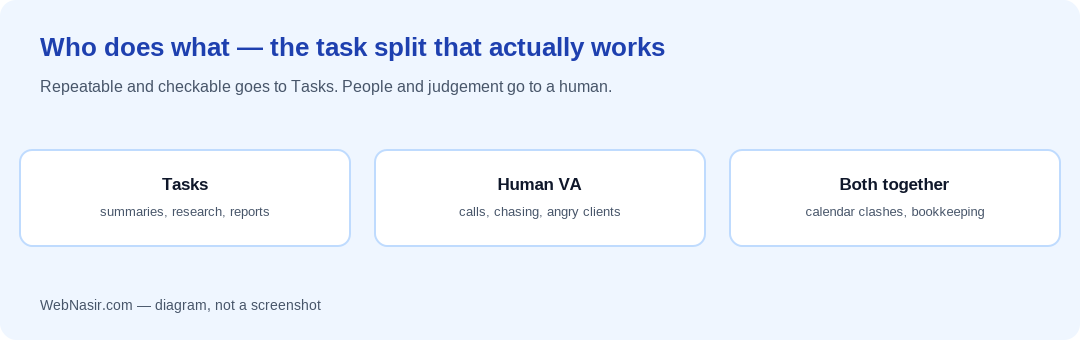
Two patterns show up in that table. Tasks wins every job where the inputs are written down, the output is checkable in a few minutes, and a mistake costs you minutes. A human wins every job where the input is a person, the output is a relationship, and a mistake costs you a client. The mixed rows are the interesting ones: Tasks does the mechanical half, and a person does the judgement half. That is the hybrid setup, and it is where most small businesses land — but only after they have tried the free half first and measured it honestly.
Five jobs to try in Tasks for two weeks

Do not hire a VA and do not buy Pro on the strength of this guide. Run a two-week test first, with five jobs that fit inside the free plan's caps: 10 active schedules, each running at most once a day, and 15 tasks at a time. Write each one down as a Task, let it run for two weeks, and keep a simple log: how many minutes the job used to take you, and how many minutes a day you spend checking what Tasks did. If the checking time is less than the doing time, the job stays with Tasks. If it is more, the job goes back to you — or to a VA.
Here are the five jobs, with the exact wording to paste. Adjust the names, times and details to your business, but keep the shape: a clear job, a clear time, and a clear output.
1. The morning inbox summary
Paste this as a Task: "Every morning, go through my Gmail from the last 24 hours and give me a short summary: emails that need a reply from me today, emails that are FYI only, and newsletters I can ignore. For each email that needs a reply, write one line saying what it is about and one line saying what I should say back. Do not send anything."
Why this job first: it is the highest-value, lowest-risk test. If Tasks can tell the difference between an email that needs you and one that does not, it has understood your business. If it cannot, you find out on day one, before anything important is at stake.
2. The weekly price watch
Paste this as a Task: "Once a week, check the price of [the one thing you buy regularly — packaging, a flight route, a software subscription, a raw material] and tell me if it has dropped below [your target price]. If it has, send me the link and the price. Do not buy anything."
Why this job: it is Google's own example use case, and it is pure research — no sending, no paying, no risk. It also teaches you how Tasks handles a schedule: it runs once a day at most, so a weekly check is well inside the free cap.
3. The Friday numbers report
Paste this as a Task: "Every Friday, read my [sales sheet / orders sheet / expenses sheet] in Google Drive and build me a one-page summary: total sales this week, total sales last week, the best-selling item, and any order that is still unpaid. Put it in a Google Doc and tell me when it is ready."
Why this job: it tests the Workspace half — reading a sheet, doing the arithmetic, writing a doc. Check the numbers against your own count for the first two weeks. If the arithmetic is right twice in a row, you can trust it. If it is wrong once, you have learned that this job needs a human check every time, and you can decide whether that check is still cheaper than doing it yourself.
4. The competitor and news digest
Paste this as a Task: "Every morning, search for news about [your industry, your main competitor, your main product] from the last 24 hours and give me a short digest: three to five items, each in two lines, with the source. Skip press releases and listicles."
Why this job: it tests research with sources, which is a different skill from reading your own inbox. It also tests whether Tasks can tell a real news item from filler. If the digest is full of press releases you asked it to skip, the job is not working yet.
5. The end-of-day tidy
Paste this as a Task: "Every evening, look at my Gmail and archive the newsletters I have not opened, label the emails from [your supplier / your accountant / your main client] with their label, and give me a list of anything you archived that looked like it might be important."
Why this job: it tests the one thing people are most nervous about — an agent touching their inbox. The safety net is the list at the end: you see what it archived, and you can un-archive anything in seconds. If after two weeks nothing important was ever wrongly archived, your trust is earned, not assumed.
Keep the log honest. Write down, each day, the minutes you spent checking Tasks. Most people find the first three days are slow — you read everything twice, because you do not trust it yet. By the second week the checking time usually drops to a few minutes a day. If it does not drop, that is a result, not a failure: it tells you the jobs you picked need more judgement than you thought, and that is useful information before you spend money on a VA.
Red flags that mean hire a human

The two-week test will surface problems, and most of them have the same shape. If you see any of these, stop handing that job to Tasks and hire a person for it — or keep doing it yourself until you can afford one.
The first red flag is a job that needs a phone call. If the work cannot be finished without speaking to a person — a supplier, a client, a courier, a bank — Tasks cannot finish it in India. Do not work around this by asking Tasks to draft an email instead. The email is a different job, and the client who needed a call will still be waiting.
The second red flag is a job where a mistake costs you a client or money. If Tasks drafts a reply with the wrong price, the wrong date or the wrong promise, and you only catch it after it is sent, the saving is gone. Remember that Tasks asks for confirmation before sending — so a sent mistake means you confirmed it without reading it properly, which means you were not actually supervising. If you cannot supervise a job properly, do not automate it.
The third red flag is a job where the answer depends on knowing a person. Your biggest client hates long emails. Your supplier only answers on WhatsApp. Your accountant needs the invoice in a particular format. A VA learns these things once and carries them. Tasks has Personal Intelligence and your chat history, but it does not know a relationship the way a person does, and it will not notice when a client has gone quiet for two weeks unless you told it to watch for that.
The fourth red flag is volume. The free plan caps you at 10 active schedules and 15 tasks at a time. If your business already has more than ten recurring jobs worth automating, you are past the free plan's shape. That is the point where you either pay $19.99 a month for Pro and its 50 schedules, or you hire a part-time VA — and the honest answer is usually the VA, because ten-plus recurring jobs means the business has grown past the point where one person plus a free agent is enough.
The fifth red flag is the one nobody plans for: you stop checking. If you find yourself approving Tasks' confirmations without reading them, or letting schedules run for weeks without opening the thread, you have handed over supervision — and supervision is the only safety net Google gives you. The help page says it directly: your active supervision is the most important way to protect against risk. A VA you stop checking is a risk too, but a VA notices when you stop checking and will usually tell you. Tasks will not.
The hybrid setup most small businesses should use

Almost nobody ends up with only Tasks or only a VA. The setup that works for most small businesses is a hybrid, and it has a clear shape.
Tasks handles the repeatable half: the morning inbox summary, the price watch, the Friday numbers report, the news digest, the end-of-day tidy. Those five jobs cost you ₹0 on the free plan, or about ₹1,760 a month on Pro if you want hourly runs and more schedules. They run while you sleep, they are checkable in a few minutes a day, and they free up the first hour of your morning.
A part-time VA handles the human half: the phone calls, the payment chasing, the client follow-ups, the calendar clashes, the exceptions. At 20 hours a week and $5 an hour, that is about ₹38,000 a month — and the VA's first job is the work Tasks cannot do, not the work Tasks already does. That is the mistake to avoid: hiring a VA and then handing them the inbox summary Tasks was already doing for free. You would be paying ₹38,000 a month for a job that cost ₹0.
The order matters too. Start with Tasks, run the two-week test, and keep the jobs it does well. Then hire a VA for the jobs that are left — the ones with red flags. When you brief the VA, hand them the list of what Tasks already covers, so they spend their hours on the human work and not on redoing the agent's work. And give the VA the same tools Tasks uses: if your business lives in Gmail and Drive, the VA works in Gmail and Drive too, and the two halves of your admin meet in the same place.
One more thing about the hybrid setup: it changes as the business grows. When you have one VA and the business doubles, the question is whether to hire a second VA or to give the first VA better tools — including Tasks. The best VA you can hire is one who already uses AI tools to work faster: they draft with AI, summarise with AI, and spend their judgement on the parts only a person can do. That person costs the same as any other VA, and does more per hour. When you are hiring, ask candidates how they use AI in their work. The answer tells you more about their value than their hourly rate does.
Frequently asked questions
Is Tasks in Gemini really free in India?
Yes. Google announced on 17 November 2026 that Tasks is rolling out free of charge in India, the United States, Japan, South Korea, Canada and Australia. You need to be 18 or older, signed in with a personal Google Account, with History on. A work or school account cannot use it for now. The free plan has caps: up to 10 active schedules, each running at most once a day, and up to 15 tasks at a time. Phone calls, Google Pay checkout, texting Gemini and forwarding emails to gemini@google.com are starting in the United States only.
Can Tasks in Gemini replace a virtual assistant completely?
No, not for a business that deals with people. Tasks can replace the repeatable half of a VA's work — summaries, research, reports, price tracking, inbox tidying — and it does that half for ₹0. It cannot make phone calls in India, chase a payment, negotiate a booking, handle an upset client, or take responsibility when something goes wrong. If your admin work is mostly repeatable, Tasks can replace most of a VA. If it is mostly people, it cannot replace any of one.
How much does a virtual assistant cost in India in 2027?
It depends on how you hire. Rate guides that checked prices in 2026 put a full-time VA hired directly at $400 to $900 a month, a full-time VA through a managed firm at $999 to $1,999 a month, and general admin by the hour at $3 to $7. A part-time VA at 20 hours a week and $5 an hour works out to about $433 a month, or about ₹38,000. Executive and specialist VAs cost more. The range is wide because the hiring route changes the price as much as the work does.
Does Tasks in Gemini send emails or spend money without asking me?
No. Google's help page says Gemini is designed to always ask for your review and confirmation before it sends a communication, deletes data, shares sensitive information, makes a purchase, completes a financial transaction or submits a form. It also pauses and asks you to take control for passwords and payment details. You can set routine actions you trust to "Always allow", but the sensitive actions always ask. The warning to remember: if a schedule runs while you are offline, you may not be able to stop it from completing an action you did not intend.
What is the difference between Tasks, schedules and skills?
Google explains it as the what, the when and the how. A task is the goal — the whole job you want Gemini to manage, like planning a trip or running your morning inbox. A schedule is when it runs — a trigger that tells Gemini to do the task automatically, such as every morning. A skill is how — a set of reusable instructions that teaches Gemini how to do a particular job, which you can attach to a task with the @ key. You define the task, set the schedule, and give it the skills, and Gemini does the work.
Do I need a Google AI Pro subscription to use Tasks?
No, not in India. Tasks is free without a subscription in India, the United States, Japan, South Korea, Canada and Australia. Pro, at $19.99 a month, buys four times the usage, 50 active schedules instead of 10, hourly and exact-time runs, and Gmail and topic monitors. If your ten free schedules are not enough, Pro is the next step — but if you have outgrown ten schedules, a part-time VA is usually the better spend, because the jobs that need more than ten schedules usually need a person too.
Can I use Tasks in Gemini with my business Google Workspace account?
Not for now. Google's help page says Tasks is not available if you sign in with a work or school Google Account. You need a personal Google Account, you must be 18 or older, and History must be on. Google has not published a date for Workspace availability. If your business runs on Workspace, Tasks is a tool for your personal account, not your business account, until Google changes that.
Sources
Google, "How to use Tasks in Gemini for personal assistance", blog.google, 17 November 2026, by Josh Woodward — the free rollout in six countries including India, Gemini 4 Hydrogen, the former name Spark, 60+ connected apps, the isolated virtual machine, confirmation before buying, and the US-only features. Google Gemini Apps Help, "Manage your tasks & workflows in Gemini Apps", support.google.com/gemini/answer/17094507, read 27 November 2026 — eligibility, countries, the 15-task cap, the confirmation and take-control rules, the Workspace actions, and the safety warnings. Google's schedules help page, as quoted by guides that read it between 18 and 24 November 2026 — the free plan's 10 active schedules, once-a-day runs, and the Pro tier's 50 schedules and hourly runs. Upcision, "Virtual Assistant Costs in India: 2026 Report", checked October 2026 — firm prices $999 to $1,999 a month, market rates $3 to $6 an hour for general admin and $8 to $16 for executive assistants, and Indian executive assistant pay of ₹23,424 to ₹45,833 a month. Growth Hacking India, "Virtual Assistant Cost in India: Monthly Rates Compared", compiled September 2026 — full-time $640 to $1,750 a month, general admin $4 to $7 an hour, executive $7 to $12 an hour. Tejva, "How Much Does a Virtual Assistant Cost? 2026 Rates by Country", checked 6 November 2026 — direct hire in India $400 to $900 a month, $2.50 to $5 an hour. Freelance Rate India, "Virtual Assistant Rates India 2026", reviewed August 2026 — mid-level freelance VA ₹200 to ₹1,200 an hour for Indian clients. Page-one check for the exact keyword, 27 November 2026 — the results were generic "AI vs human VA" guides (Vertu Agent, DigiWorks, Virtual Assistant Capital, GrizzlyTemplates), with no head-to-head on Tasks in Gemini versus hiring a VA.